



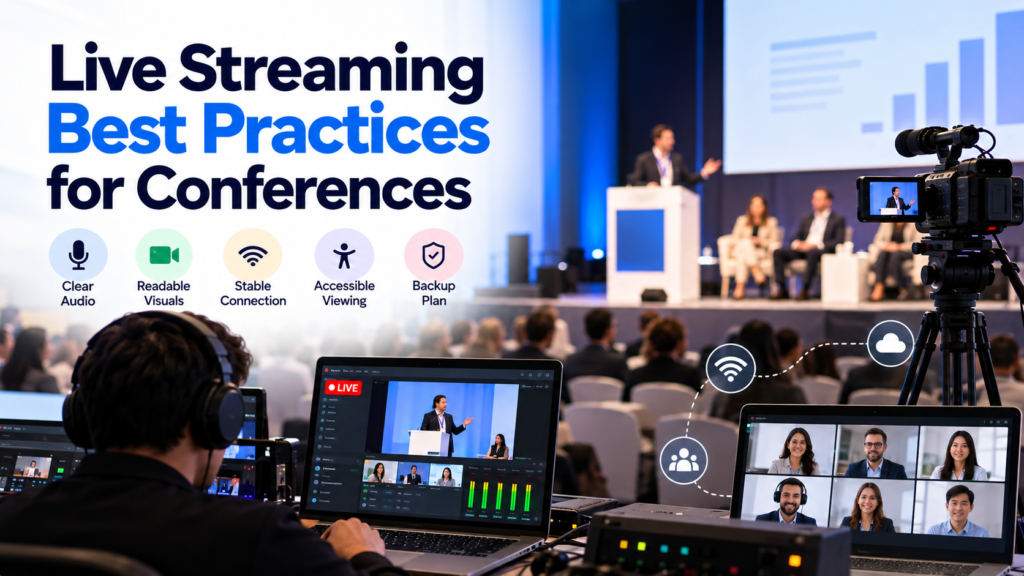
These are all best practices for conference live streaming, including
- Clear audio
- Readable graphics
- A solid internet connection
- Accessible watching alternatives
- And a proven backup plan
Teams also need clear roles, a full run-through, and a way to track what remote participants can really see and hear.
This blog covers how to organize, test, manage, and review a live stream of a conference before, during, and after the event.
6 Live Streaming Best Practices for Conferences
To organize a successful conference livestream, prepare ahead, have the right technology in place, and create a viewing experience that works seamlessly for remote attendees. Each stage should aim for simple communication, ease of access, and a rapid response to technology difficulties.
Here are the effective procedures for preparing and carrying out a conference broadcast-
1. Define Your Conference Streaming Requirements
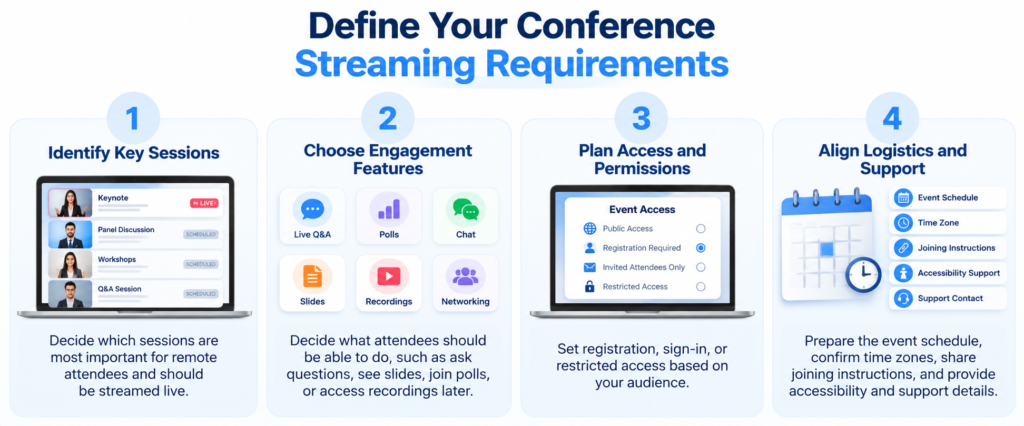
Before you pick the equipment or software, you should figure out what remote attendees can actually observe and do. For example, what can remote attendees see in real time, and what actions should they be allowed to take? Those requirements will, in turn, shape your whole production setup, your manpower needs, how you control access, and also how you run the testing method.
What sessions should you stream?
Begin by identifying which sessions are most important to distant attendees. It is easier to coordinate one keynote with moderated questions than to broadcast numerous rooms at once.
What kind of sessions, languages, presentation styles, and audience engagement will your team support? Can the audience rewind the stream, ask questions, see slides, or access recordings after the event? Check your streaming provider to make sure they provide these features before you advertize them.
Event schedule, time zone, joining instructions, accessibility information, and support contact details should all be kept together. It gives attendees a single source of truth for the information they want.
Who will be running the livestream?
Establish defined roles before the event starts. Depending on the production, you may need separate personnel for audio, video, platform operation, program timing, and remote attendee assistance.
A small team can mix jobs when the workload permits. But don’t put competing obligations on one individual at vital periods.
Develop a run-of-show with session times, speaker cues, source changes, breaks, escalation contacts, etc. Find out who can allow a delayed start or display a holding screen in case of a technical difficulty.
2. Build a Reliable Conference Streaming Setup
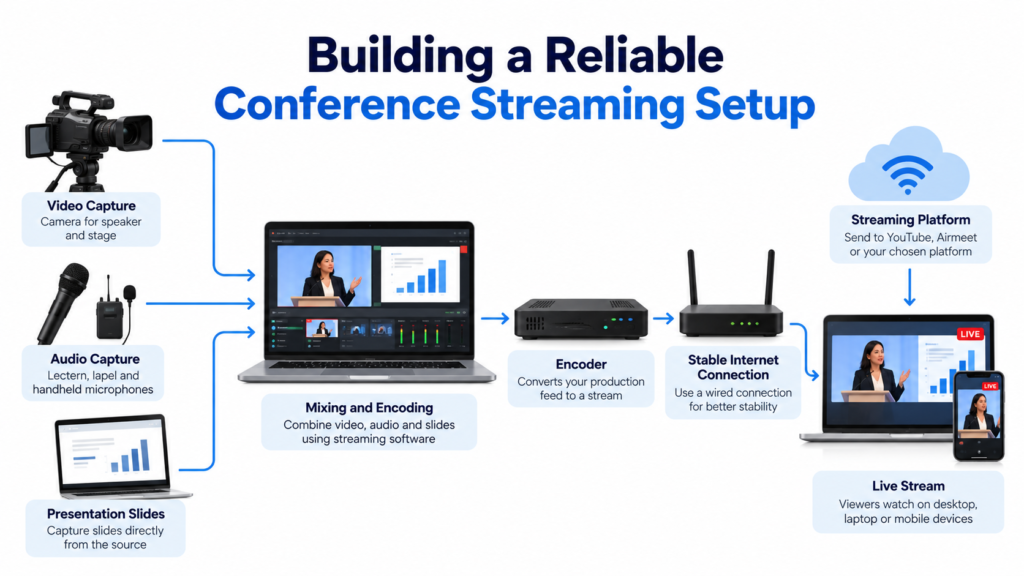
A conference livestream involves numerous interrelated steps, including audio/video capture, mixing, encoding, uploading, and playback. Test every step in live conditions so your staff can uncover problems before delegates do.
What upload bandwidth is required?
If possible, ask the venue to provide a production Internet connection that is separate from the regular audience traffic. Test the connection from the same network port that your encoder will use.
OBS suggests streaming with a wired connection. Unstable network delivery is listed as a possible cause of missing frames.
Calculate bandwidth requirements taking into account the real production setup, all outgoing feeds, and enough capacity for fluctuation. Two independent feeds may demand different capacity than a single feed supplied to a cloud distribution service.
For planning purposes, IBM’s live-streaming checklist recommends that the total stream bitrate be less than half of the available dedicated upload capacity. Consider this a suggestion, not a promise of dependability.
Perform long connection tests at normal times. Check with the venue IT department to ensure there is no authentication, firewall, or competing uploads that will impair the broadcast.
How can you improve the quality of audio and slides?
Clear audio is important so distant participants can follow the presentations. Instead of a microphone in the room, ask for a separate streaming audio mix from the venue’s sound desk.
Listen to every lectern, lapel, handheld, and audience inquiry microphone using headphones plugged into the broadcast audio line. Check remote speakers for echo and feedback before your sessions begin.
Make sure you can hear the audience queries online. Have the emcee repeat questions when guests talk without a microphone.
Capture presentation slides directly whenever possible. Make sure the charts and text are not hard to see, but that the speaker is visible. Try the slides on a phone. Can you still read the smallest critical labels? If necessary, use a camera that is focused only on the projection screen.
What parameters should you use for the encoder?
Ensure your encoder settings are suitable for the needs of the streaming platform. Check the following parameters before the event:
- Your encoder takes the production feed and encodes it in a manner that the streaming destination can accept. Check the target codec, bitrate, frame rate, keyframe interval and audio requirements in advance of the event.
- As per YouTube’s encoder settings guide, their recommended streaming workflow for supported streaming is constant bitrate encoding and a two-second keyframe interval. Such parameters are platform-dependent, so check the docs for your real destination.
- Save the approved encoder setup so that it can be restored by another operator, if required.
- For a conference where you will be giving a presentation, test if 1080p at 30 frames per second is good enough. This is a starting point, not a blanket need. If guests are having trouble reading slides, don’t assume a greater resolution would fix the problem. Instead, modify the slide design or screen arrangement.
3. Make the Conference Livestream Accessible
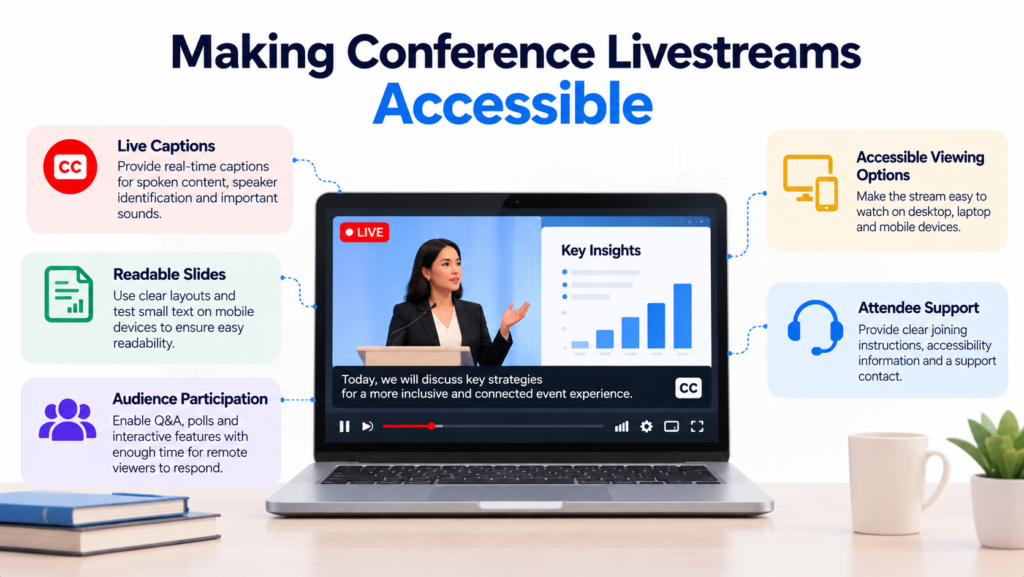
Remote attendees need more than just a video player that works. They have to be able to grasp what’s being presented, read the key information, move around the viewing page, and actually join the discussion.
Make sure captions are ready, slides are understandable, the viewing options are accessible and clear, and that participant support is in place well before the event, not at the last minute.
How do you best plan live captions?
W3C also gives guidelines on WCAG Success Criterion 1.2.4, it talks about live captions for audio in synchronized media at Level AA. In practice, captions mean you can catch the spoken dialog, you have the identification of speakers also, and then there are other important sounds.
Select a captioning workflow that is compatible with your streaming player. Give captioners names of speakers, technical jargon, and presentation materials in advance.
If you’re going to use automated captions, try them with representative accents and language. Test findings before they are used for live broadcast.
W3C’s recommendations on audio and video planning might allow you to explore accessible alternatives and prepare the media experience ahead of time.
How can distant participants be engaged effectively?
Remote viewers will get the broadcast after the same activity happens onstage, so plan for that little lag when you’re arranging audience questions, polls, and other interactive moments.
Let them know where to submit attendee questions and when the moderator will gather them. Give viewers time to hear the prompt and answer, then close submissions.
Test the platform’s latency settings and the captions and playback quality. YouTube’s live streaming documentation describes three latency settings, normal, low, and ultra-low, with various trade-offs.
Don’t assume that the lowest latency setting will work for all of the features you need for your event. Have an audience moderator handle queries and joining issues, while a technical team runs the show.
4. Rehearse the Conference Livestream and Test Backup Plans
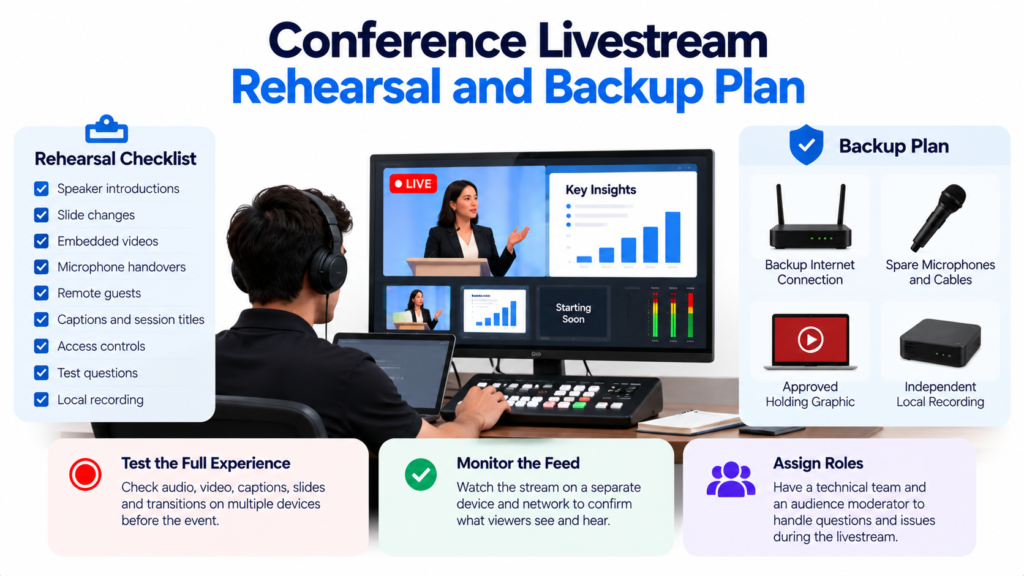
A good run-through tries the whole viewing experience, including the hand-offs between speakers and when technological troubles are most likely to surface.
Use the actual equipment, network routing, graphics and access settings scheduled for the event. Add routine session transitions and intentional failure testing.
What to look for in rehearsal?
Do a full dress rehearsal with speaker intros, slide changes, embedded movies, mic passes, remote guests, and the end of each session.
YouTube’s streaming guidelines include testing audio and motion that will be indicative of the intended program.
Ensure your permitted test destination is visible before you share the link. Have someone outside the venue network watch the stream on a phone and laptop with standard headphones.
During rehearsal, confirm that:
- The speech is clear, and the audio is in time with the speaker’s movements.
- Important slide content stays legible on small screens.
- Captions, speaker names, and session titles are displayed accurately.
- Access buttons function correctly.
- Test questions get to the host or moderator.
- The local recording has the program correct.
Problems should be fixed before the event, and tests should be repeated after any changes.
What contingency plans should you have?
The backup plan should outline how the team will deal with a breakdown of equipment or connectivity. Have a backup Internet connection, spare microphones and cables, an approved holding graphic, and a mechanism to restore the encoder settings.
Keep a local recording going independently where you can. Test to see if your backup internet connection will avoid the failure point of the primary connection.
For example, two cables plugging into the same upstream router don’t give you independent internet routes. If you’re at the venue, don’t assume cellular connectivity will work; try it.
Document the recovery sequence:
- Acknowledge the problem and determine the component impacted.
- Protect the rest of the software from additional damage.
- Switch to the approved backup, or replace the failed component.
- Check the stream on a different viewing device.
- Tell people what’s coming next.
Assign an operator for each phase and an approval contact. Only promise a specific recovery time if your tested system can actually deliver it.
5. Monitor the Conference Livestream in Real Time
You should be monitoring the production feed, the outgoing stream, and the actual viewer playback. Just because the encoder is working in preview doesn’t mean the attendees will hear the speaker or see the right slides.
Have someone look at the public feed on a different device and network connection. Agree on a simple manner for this person to communicate difficulties without stopping the presenters or the tech crew.
During big transitions, check the broadcast for:
- No audio in the presentation, or mics are muted.
- Frozen video/slides/screen shares
- Captioning issues.
- Wrong speaker names or session graphics.
- Playback problems or access issues.
To avoid feedback, keep audio away from open microphones.
Troubleshoot streaming problems
First off, figure out if the problem is affecting a single attendee or the entire broadcast. Before you tweak the settings for everybody, just take a quick look at what the streaming service says in its status info, and then compare what you see on separate viewing devices too.
Write down the time and symptoms of each episode. This helps your team match attendee reports, the recording, and technical logs later.
If the encoder reports dropped frames because of network issues, go through a network troubleshooting process. If the picture freezes before reaching the encoder, the problem is in the capture or rendering step.
Change one parameter at a time, if applicable, so the team can see what action corrects the problem. Keep the audience moderator in the loop so attendees have a good update while technical staff investigates.
6. Review the Recording and Improve Future Events
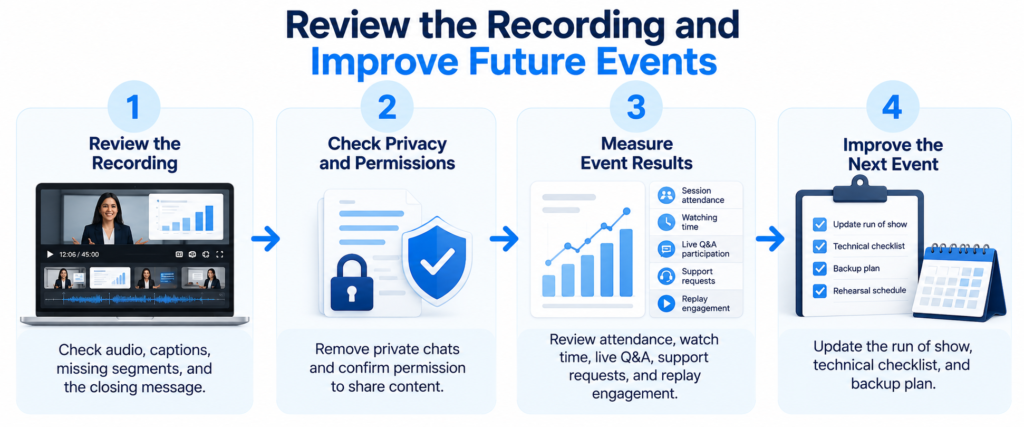
Production doesn’t stop when the broadcast is done. Grab the recording, look over the attendee experience and make note of things the team has to work on for the next event.
How do you prepare the recording?
Before releasing a tape, ensure there are no missing segments, no private chats, incorrect subtitles, or slides that you should not be sharing publicly. Obtain publication permission from the respective owners.
Keep a master recording protected and create a separate viewing copy with helpful session labels. It makes it easier for participants to find the sessions they wish to see.
How do you rate the event?
Compare the results to what you were expecting while you were planning. Useful measurements may include, depending on the platform and the data available:
- Session attendance
- Watching time
- Attending Q&A’s with a live audience
- Requests for technical support
- Views and engagement on replays
Define each metric and then compare the results. Distinguish between live and replay viewers, and don’t mix metrics measuring various actions.
What can you do to Better the Next Conference?
Give the production team a heads-up and log any issues that affected viewability. Assign ownership for each follow-up and specify a timeframe so you leave nothing to chance.
Use these results to alter the run of the show, technical checklist and backup processes. Then make plans for the next rehearsal, including the typical playback checks and a walk-through of each recovery stage.
Platforms like Airmeet provide audience engagement, session management, networking, and event analysis tools that enable teams to plan virtual and hybrid conferences. Its event platform allows for interactive seminars, audience questions, surveys and networking opportunities, allowing organizers to create a more engaging experience for guests.
Teams can also analyze performance from the event and leverage those findings to better future conferences.
Book a demo with Airmeet to see their event platform and choose the appropriate setting for your company.
Conclusion – Prepare for a Better Conference Live Stream
The planning phase is the first step toward a successful conference livestream. Keeping things consistent in implementation is the key. Teams can help prevent some typical production challenges at the event by noticing audience needs, dividing responsibilities, testing the connections, and putting together accessible materials that make sense.
Rehearsals, live monitoring, and post-event reviews help teams find gaps and improve the remote attendee experience. Use these best practices to develop a checklist, test your setup, and prepare your team for the unexpected before your next conference.
FAQs
Yes, a small team can livestream a conference when the production requirements match its capacity. A fixed-camera keynote usually requires less coordination than a panel with remote guests and live audience questions. Combine roles only after rehearsal confirms that the workload is manageable, and keep an escalation contact available.
No, all sessions should only be streamed if there is a clear need from the audience. Try to put first those sessions where the remote audience demand is there and where there is permission to broadcast. For workshops that involve delicate subjects or lots of room interaction, a different format can be necessary. Make sure coverage constraints are published ahead of time so participants understand exactly what their remote access includes and what it means for them.
No, a conference livestream doesn’t always have to be public. Pick public or restricted access, depending on who has to show up and how sensitive the content really is. Also, please test the access controls, try password recovery too, and double-check the whole “join process” before the event starts.