


Your strong ideas need a studio-quality show, an interactive audience moment, and a content stream that keeps earning attention. Airmeet, AirPulse, and AirStudio connect the very steps that most creator stacks leave fragmented.


The Problem
The Solution

Use Case
Teach a high-value topic, answer audience questions live, and convert the recording into an evergreen resource.
Bring remote guests into a polished studio, record a strong master episode, and distribute standout moments.

Use polls, chat, and Q&A to turn a lesson into a participatory experience and uncover future content ideas.
Reveal a product, course, community, or collaboration live, then sustain the campaign with replay and clips.
Use AirPulse to identify where your brand or topic is missing from AI search answers and high-intent conversations. Look for questions your audience is actively asking and prompts where a competitor or adjacent creator is cited instead of you. Use these gaps to brief the next episode.
Create your event in Airmeet and configure the session settings. Set the event format, session name, date, and duration. Enable 1080p recording and streaming quality from the Sessions tab under Session Settings. Apply stage backdrops, overlays, and branding from the Branding tab so every recording and live stream carries your visual identity.
Open AirStudio on your desktop and set up your studio layout with overlays, logos, and banners. Invite your guest using a browser link they can join without installing software. Start recording or go live directly from AirStudio. You can multistream to multiple destinations simultaneously depending on your plan.
Path: Event Dashboard > Sessions tab > Start Session > Go Live
If the episode includes a live audience, run the session inside Airmeet where attendees can participate through live chat, polls, Q&A, and reactions. Use Show Chat, Poll and Q&A on Stage to surface real-time audience responses during the session. Capture questions and poll responses as content signals for follow-up episodes.
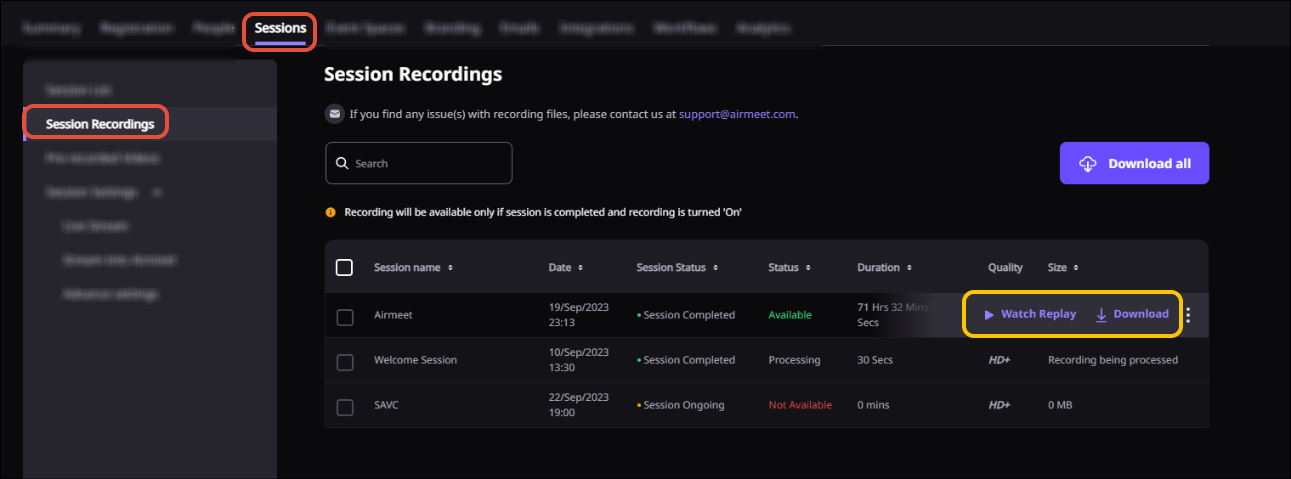
Path: Event Dashboard > Sessions tab > Session Recordings tab
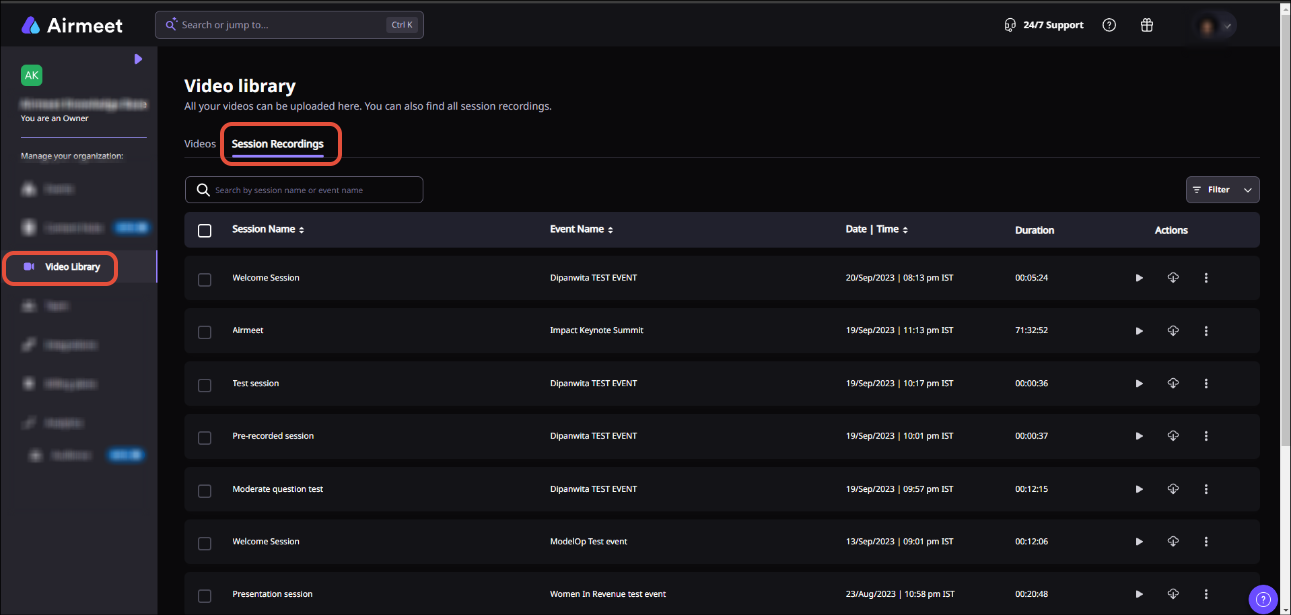
Once the session is marked as ended, go to the Session Recordings tab to access the recording. Download the transcript from the same section by hovering over the session and clicking Download Transcript. Use both for show notes, supporting pages, and clip source material.
Path: Event Dashboard > Registrations tab > Pre and Post Event Entry > Enable Event Replay
After the event ends, enable Event Replay so your audience can revisit sessions on-demand. Configure who can access the replay and monitor replay analytics to understand what content your audience returns to.
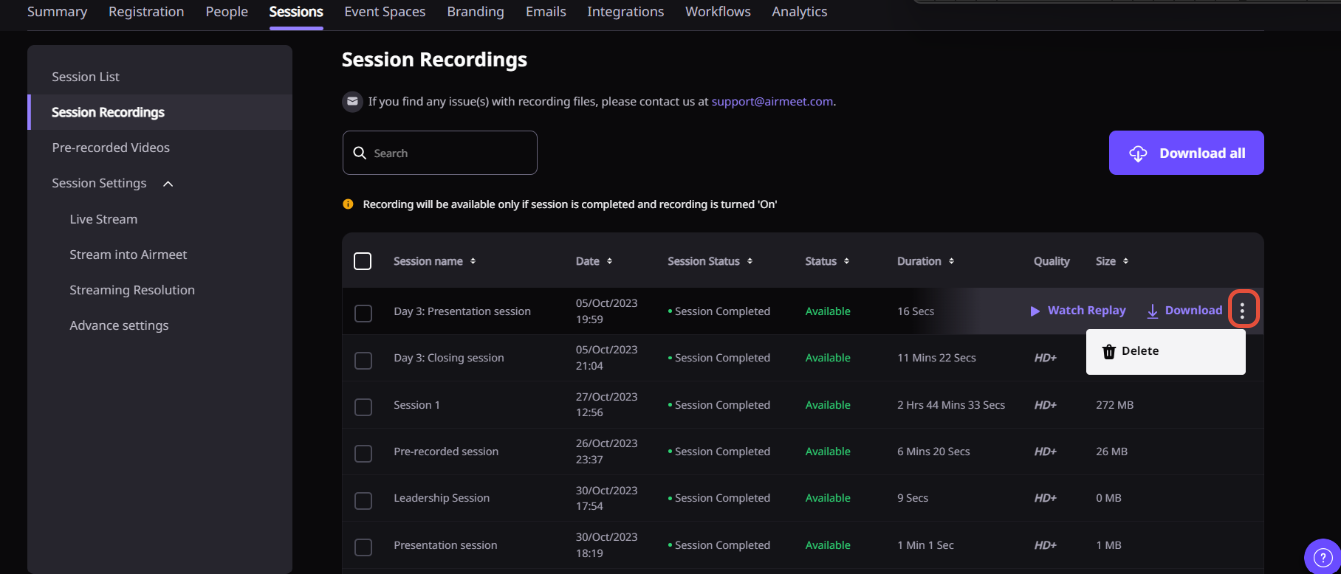
Path: Event Dashboard > Sessions tab > Recordings and Transcript > Scissors icon
Open the session recordings area and click the Scissors icon to access the video editor. Trim clips, adjust the layout ratio for different platforms, apply style settings, and save. Distribute clips across social channels for reach beyond the live moment.
Path: Event Dashboard > Analytics tab > Real-time Analytics or Reports
Review engagement data from the live session, including poll responses, questions asked, chat volume, and replay viewing behavior. Use this data combined with AirPulse visibility signals to brief the next episode around what your audience actually responded to.
A few things to keep in mind:
AirPulse, AirStudio, and Airmeet are separate products with distinct packaging and access. You can confirm your configuration with our Airmeet team.

Why Airmeet
It is a connected creator workflow spanning topic discovery, professional recording and streaming, interactive live experiences, replay, content repurposing, and performance feedback. Individual capabilities live in Airmeet, AirPulse, or AirStudio, depending on the workflow.
AirPulse monitors how AI answer engines describe a brand, identifies visibility and content gaps, and recommends actions. For creators and creator-led businesses, that helps prioritize subjects tied to high-intent questions rather than broad trend chasing.
AirStudio is a desktop streaming and recording studio for polished live streams, video podcasts, interviews, and recorded shows. It supports guests, overlays, logos, banners, screen shares, virtual backgrounds, and multistreaming.
Yes. Hosts can send a guest link, and guests can join from their browser without signing up. Airmeet also supports speakers and hosts in live event workflows.
Creators can use features including live chat, polls, Q&A, reactions, and stage participation to involve the audience. Availability and controls depend on the event format and plan.
Yes. Airmeet supports session recordings and event or webinar replay workflows, letting organizers extend access after the live moment based on configured permissions.
Yes. Airmeet has a built-in workflow to edit and create clips from recorded session videos using the Scissors icon in the Session Recordings section. The feature is currently in Beta and requires enablement through your customer success manager. AirShots is the broader AI-assisted short-form repurposing product in this creator ecosystem. Confirm current access and packaging with Airmeet.
Yes. AirStudio is suited to recording and streaming video podcasts with remote guests, branding, layouts, and screen content. Airmeet can add a live audience, registration, interaction, replay, and event analytics when the podcast runs as an audience experience.
Airmeet provides real-time and downloadable analytics for event activity. Questions, poll responses, chat, replay viewing, and clip performance add qualitative context. AirPulse contributes a separate view of AI search visibility and content opportunity.
Not automatically. Airmeet, AirPulse, and AirStudio have distinct product surfaces and may have separate access, packaging, or availability. Use the relevant product page or speak with us for current commercial details.


Incredible Companies Use Airmeet

Most loved Virtual Events Platform

Incredible Companies Use Airmeet
Most loved Virtual Events Platform
Incredible Companies Use Airmeet
Most loved Virtual Events Platform
Incredible Companies Use Airmeet

Most loved Virtual Events Platform
Incredible Companies Use Airmeet
Most loved Virtual Events Platform

