




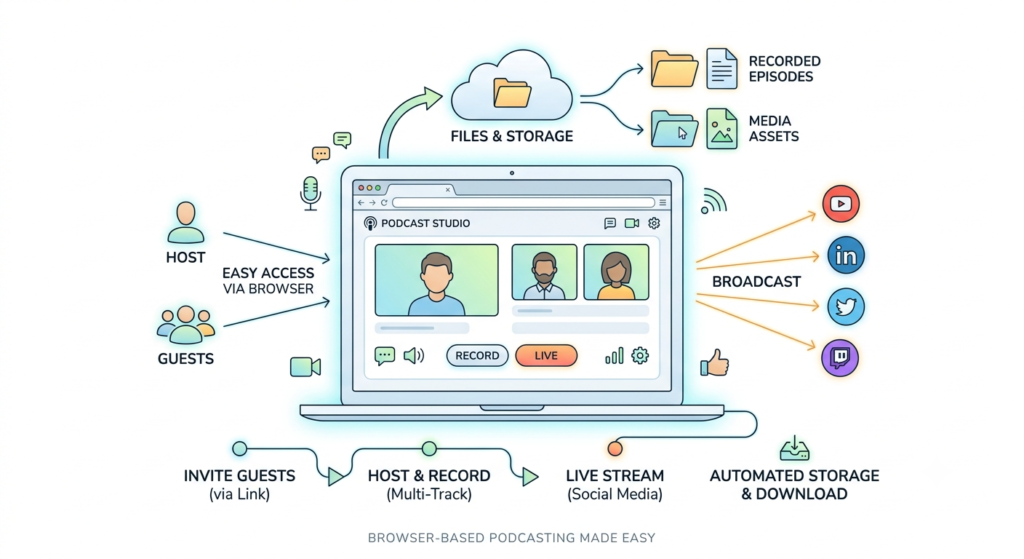
A browser-based recording and streaming studio is an online workspace where hosts and remote guests join through a link, usually without installing anything, to record conversations, broadcast them live, and store the files in one place.
All-in-one platforms combine these functions so the team spends less time coordinating tools and more time on the conversation. The category covers products of very different depth, so the practical question is which parts of an existing workflow a platform can replace.
This article covers what to check and how to test one before you cancel anything.
What an All-in-One Recording and Streaming Platform Includes
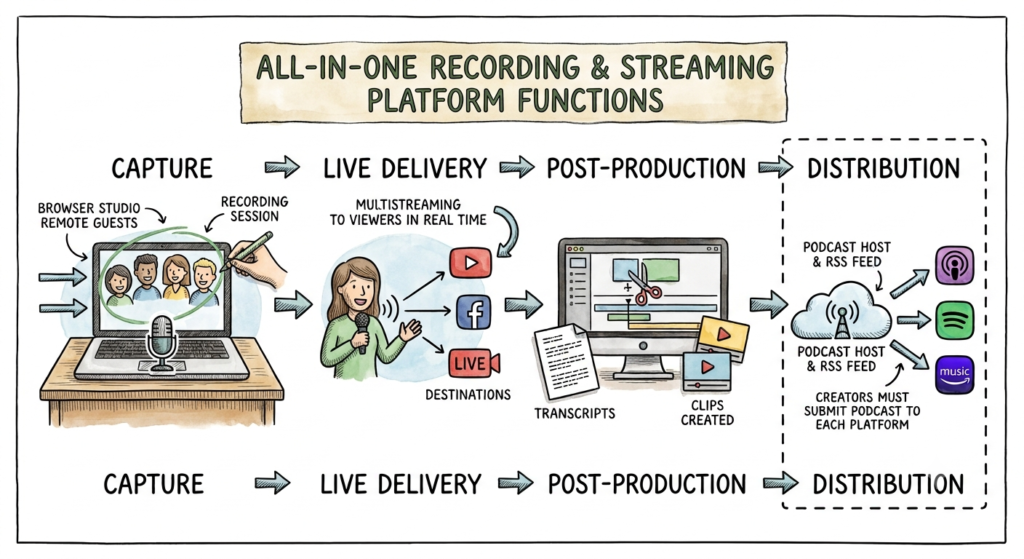
“All-in-one” is a broad label, and it is easier to compare products once you know which jobs they are meant to handle. Most platforms in this category cover four functions:
- Capture: bringing remote guests into a browser studio and recording the session.
- Live delivery: sending the conversation to viewers in real time, often to several destinations through multistreaming.
- Post-production: editing, transcripts, and clips created from the recording.
- Distribution: making the finished episode available to listeners.
Distribution is the function most often misunderstood. Podcasts reach listening apps through an RSS feed, which Spotify describes as a file containing a show’s titles, descriptions, audio file links, and artwork. Spotify’s guidance also notes that it does not distribute shows to other listening platforms on a creator’s behalf, so creators must submit their podcast to each platform themselves.
A platform that streams live to YouTube is therefore not automatically a podcast host. Before buying, match each output your team needs to a feature that has been demonstrated, and keep the current host if it still meets your requirements.
Why Business Podcast Production Is Moving Toward Combined Workflows
Business podcasts used to be an audio-only format with a simple workflow. That is changing on two fronts: audiences are moving toward video, and the production process behind each episode keeps getting more complicated. Together, these developments explain why more teams are looking at combined workflows.
Edison Research’s Infinite Dial 2026 found that 58 percent of Americans aged 12 and older, about 167 million people, had consumed a podcast in the previous month, an all-time high. The same research found that 57 percent have both listened to and watched a podcast. Edison’s Megan Lazovick described this as video expanding the audience rather than replacing audio.
YouTube’s figures point in the same direction. In February 2025 it announced more than one billion monthly active podcast viewers worldwide, although coverage at the time noted that it is unclear exactly how YouTube counts a podcast consumer. It later reported that viewers watched over 700 million hours of podcasts on living room devices in October 2025.
A business podcast usually involves several people and several handoffs. Each additional tool can add a login, an export step, and uncertainty about which file is the final version. A combined workspace can reduce some of this coordination, although it can also hide limitations, which is why the sections below focus on what to verify.
What Core Capabilities Should You Look for in a Browser-Based Recording and Streaming Studio
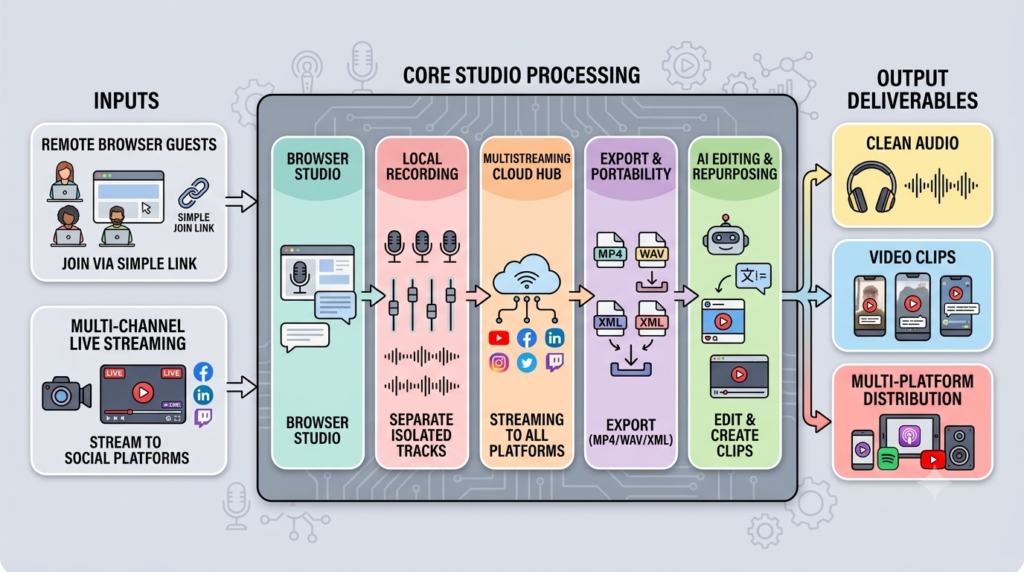
A recording and streaming studio needs to handle more than capturing video. The right platform should make it easy to bring in guests, record high-quality files, stream to multiple destinations, and prepare content for editing and reuse.
Remote Guests and a Browser-Based Studio
The guest experience affects whether an episode starts on time. The studio should work on the devices your guests actually use, so confirm the supported browsers and devices in advance.
Adobe Podcast, for example, states that remote recording in Studio works only in Chrome on desktop, which excludes guests who join from a phone. Airmeet’s guide to recording with remote guests recommends sending guests a short checklist before the session (the full list appears in the walkthrough below). The platform should keep guest requirements simple, and the producer should send the checklist regardless.
Local Recording and Isolated Tracks
Local recording captures each participant’s audio and video on their own device before internet compression affects the quality. Isolated tracks provide a separate file for each speaker, so an editor can correct one voice without changing the others.
For business podcast production, these two capabilities protect editorial flexibility more than most other items on a specification sheet. There are two ways to record a remote conversation. One records what participants hear during the call, after compression and degradation in transit. The other records each participant locally and uploads the files after the session. For remote interview shows, local recording gives cleaner files.
Local recording works differently from one product to the next, so the details are worth checking before you rely on it. StreamYard states that individual participant files are generated only if local recording is enabled before the session begins. It also explains that uploads pause for a participant with limited bandwidth while the broadcast is streaming. Its troubleshooting guidance advises participants to stay in the studio until the upload reaches 100 percent and notes that guests can return within 30 days to finish an interrupted upload.
Restream’s documentation describes a different kind of limitation. Its local recording feature is labeled beta, and participants who join from mobile devices are excluded from the local recording during that period.
Neither example is a flaw in the category. Both show that a feature name on a product page does not confirm that the feature will work for a specific production setup.
Multistreaming
Multistreaming sends one live program to several destinations at the same time. A key benefit is simplifying distribution from the producer’s setup. Rather than the producer’s computer transmitting a separate feed to each platform, the device sends a single feed to the cloud, which then manages distribution to every destination.
According to Airmeet’s podcast recording and streaming workflow guide, a remote episode can be recorded and streamed simultaneously to platforms such as Facebook, Instagram, and YouTube. This allows the host to respond to comments and questions in real time while continuing to capture material for clips. Whether a specific platform supports this functionality should be confirmed during a pilot.
If an audience spreads across several platforms, this approach reduces setup time. If the audience is concentrated on one platform, a single destination may be sufficient.
Recording Exports and Portability
Recording portability is the ability to move recordings to other tools without difficulty. Teams should confirm:
- Which formats can be downloaded
- How long files are retained
- Whether the editor can open the exports
Restream, for example, makes MP4 and WAV files available from local recordings and has also announced XML export for easier editing. A similar check should be made for each platform on a shortlist.
A reliable practice is to download and archive the master files of every published episode in storage controlled by the organization.
Editing, Repurposing, and AI Features
Many platforms now include transcripts, clip creation, and AI-assisted editing. These features can shorten the first editing pass, but they do not replace human review. Test them on the team’s own recordings, with particular attention to names, product terms, and any passage where an automated cut could change the meaning.
Who Benefits Most From a Combined Workflow
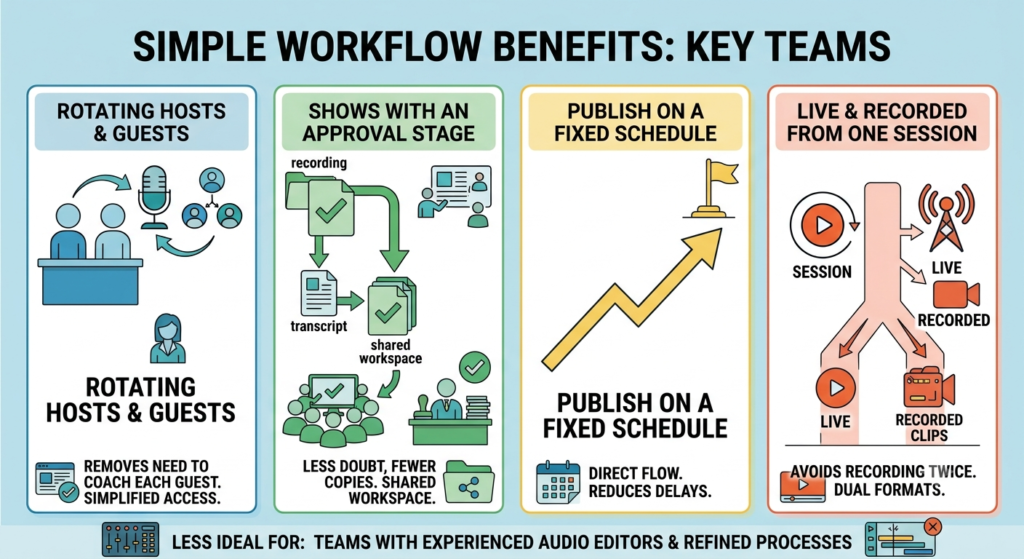
A combined platform is not equally useful to every team. It tends to deliver the most value where production is shared, recurring, and dependent on people outside the organization.
- Teams with rotating hosts and external guests. When different people host and the guests are experts from other companies, the studio stays the same for everyone, regardless of who is in the host’s chair.
- Shows with an approval stage. When recordings, transcripts, and clips live in one workspace, reviewers work from the same file instead of several copies, and there is less doubt about which version is final.
- Teams that publish on a fixed schedule. Fewer handoffs mean fewer points where a delay can start.
- Teams that want live and recorded content from one session. If a conversation is broadcast live and later cut into clips, a combined studio avoids recording the same session twice.
A combined platform is a weaker fit for teams that already have an experienced audio editor and a refined editing process. In that case, the better move may be to keep the dedicated editor and replace only the recording and streaming layers.
Where All-in-One Platforms Can Fall Short
Consolidation concentrates risk. When recording, streaming, and file storage depend on one account, a single outage or account lockout can interrupt all three functions. Address this before it happens:
- Keep a second recording method for important interviews. A failed upload or dropped connection can cost you the only copy, so it helps to have more than one way to record, such as asking a guest to keep a local backup of their audio, where appropriate.
- Set access rules. Decide who can delete files, how access is removed when a colleague leaves, and how long recordings are retained.
A second limitation is depth of functionality. A platform that performs several tasks may handle each one less thoroughly than a specialist tool.
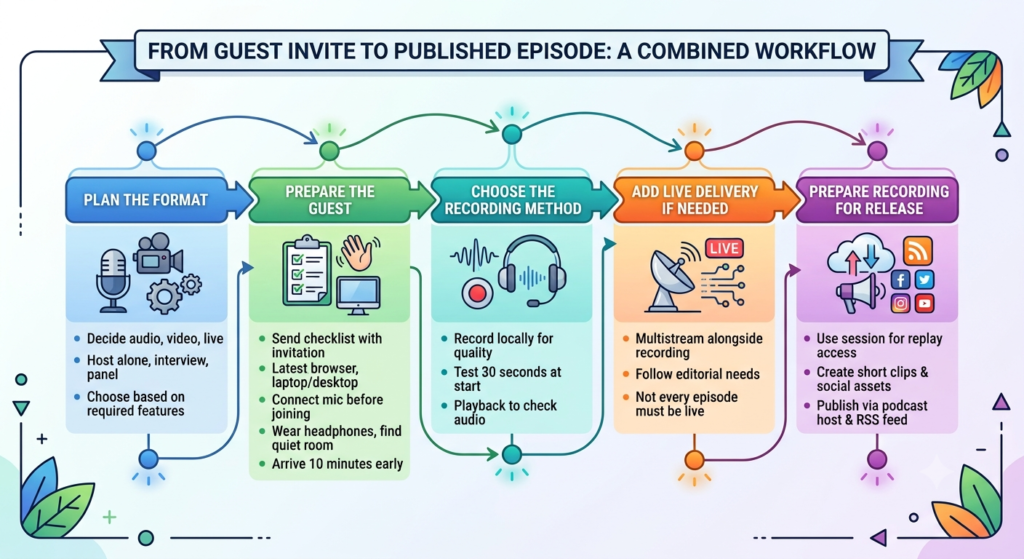
From Guest Invite to Published Episode: How a Combined Workflow Runs
A combined workflow is easier to judge when it is followed in order, from the first planning decision to the published episode.
- Plan the format. Decide whether the show will be audio, video, livestreamed, or a mix, and whether the host will present alone, interview remote guests, run panel discussions, or work with co-hosts. These choices determine which features you need, so settle them before comparing tools.
- Prepare the guest. Send a short checklist with the invitation. Ask the guest to use the latest version of their browser, join from a laptop or desktop where possible, connect their microphone before joining, wear headphones, find a quiet room, and arrive about ten minutes early.
- Choose the recording method. Record each participant locally rather than relying on the compressed call audio (see the local recording section above). Before the interview starts, record 30 seconds and play it back through headphones to catch echo, noise, or uneven levels, a check that Airmeet’s professional audio guide recommends before every session.
- Add live delivery if needed. Live streaming can run alongside the recording, as described in the multistreaming section. Not every episode needs to be live, so let the show’s editorial needs decide.
- Prepare the recording for release. Depending on the features in your setup, a recorded session can be reused for replay access, short clips, show notes, and social assets. Publication to listening apps still goes through the podcast host, as covered earlier.
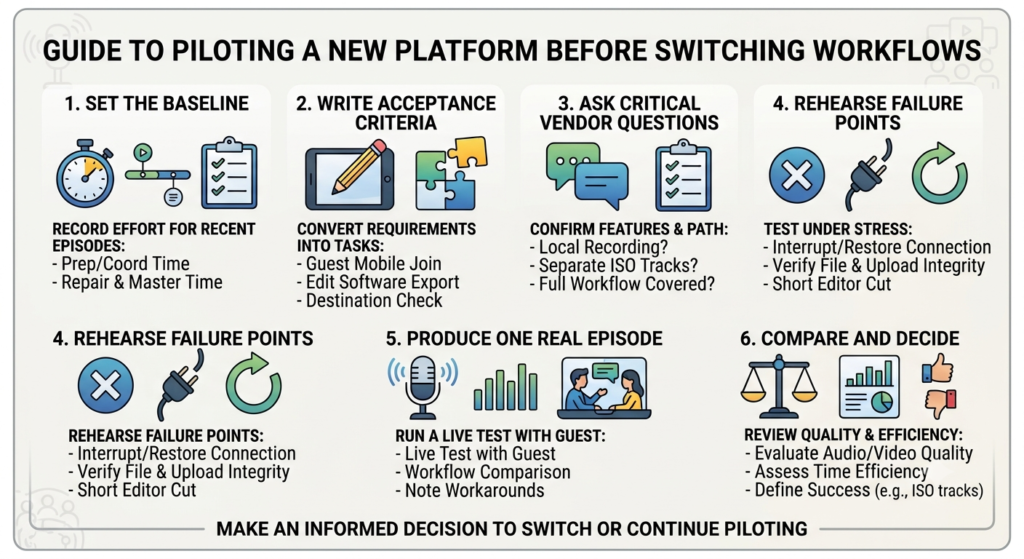
How to Pilot a Platform Before You Switch
A pilot lets a team compare the new workflow with the current one using observed results. It should use a real episode with real participants, and the current workflow should remain available during the test. Before committing to any platform for production use, confirm its current availability and podcast-specific features with the vendor directly.
- Set the baseline. For two or three recent episodes, record preparation time, coordination time, repair work, and the elapsed time from recording to approved master.
- Write acceptance criteria. Convert requirements into tasks, such as a guest joining from a phone, an export opening in the editing software, or a stream reaching a named destination with the correct account permissions. A roundup of podcast recording software suggests three questions to build into those tasks: whether each participant is recorded locally, whether the platform produces separate isolated tracks, and whether it covers the complete path the show needs, from invitation through recording, editing, export, and publication.
- Rehearse the failure points. Ask a participant to disconnect and rejoin, then check which files are kept and whether uploads complete. A useful test is a 30-minute conversation in which one connection is interrupted and restored, every upload is completed, and an editor builds a shortcut from the files. Before going live, also test the device upload connection, destination credentials, guest browser access, audio monitoring, disk space, recording consent, and a short playback check.
- Produce one real episode. Note every workaround and manual transfer that is still required, and ask the guest which steps were unclear.
- Compare and decide. Review audio and video quality alongside time saved. Cancel an existing tool only after its work is covered and its files have been exported.
The team should define its success threshold before the pilot begins. A reasonable example is reduced coordination time with no missing participant tracks across two pilot episodes. This is a test designed by the team and not an industry benchmark.
Conclusion
The strongest reason to choose an all-in-one platform is a repeatable production process that meets the team’s quality standard. Using fewer tools can be a useful benefit, but the decision should rest on episodes delivered on schedule and on recordings the team can open, edit, and archive without vendor support.
The most practical first step is to map one episode from guest invitation to approved master, measure how long it takes today, and test the replacement against that baseline. Keep the tools that perform well and replace the ones that do not.
FAQs
An all-in-one platform can’t fully fix a poor source recording. Microphone placement, room noise and recording levels all shape the sound before any software gets to it. If a platform does offer audio processing, test it by comparing the processed result with an untreated recording, using a quiet speaker, a louder speaker, and some background noise.
Live works well when audience interaction adds to the conversation and your team can handle the broadcast. If fact-checking, guest corrections, or detailed editing matter more, a recorded release is the safer choice. A good platform lets you do either, so you’re never tied to one format.
Production and hosting are two separate decisions, so check that the platform exports files your host accepts. Spotify’s guidance on the RSS feed makes the point that the feed lives with the hosting layer, which means you can test a new recording workflow without moving a feed you’ve already built up.
Test them on real editorial tasks, such as locating a passage, producing a transcript, or suggesting cuts. Check every proposed cut against the original recording. A named person should remain responsible for publication, and the source files should be kept so that any edit that changes the meaning can be reversed.
Recording saves the session as files for later use, while streaming sends the session to viewers as it happens. Many platforms offer both, but the quality, file type, and availability of each output can differ, so test each one separately.