



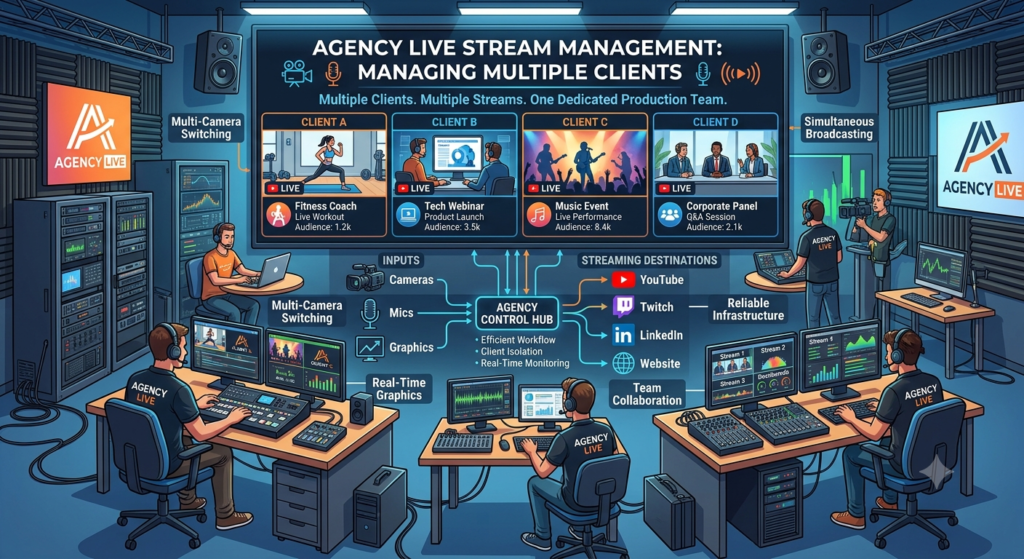
The work does not stop once the broadcast is online. Agencies need to keep client assets separate, protect streaming credentials, coordinate speakers, check destinations, monitor the live feed, and make sure the final recording and performance data are delivered to the correct client.
That’s why a multi-client live streaming workflow is so important for agencies. A repeatable process gives producers a consistent way to plan and run every broadcast while leaving room for the specific requirements of each client.
The workflow can also extend beyond the main event environment. For example, Airmeet’s guide to live-streaming webinars explains how webinars can be streamed to external platforms such as YouTube, LinkedIn, and Facebook.
The goal is to ensure that every client feels their broadcast has a dedicated production process, even when the agency is managing several productions at the same time.
Why Managing Live Streams for Multiple Clients Is Different
A live-streaming agency may have several broadcasts scheduled across the same week, with some taking place only hours apart. The technical work may look similar from one production to another, but the details are rarely the same.
One client may need a simple interview on YouTube. Another may have a panel discussion going to LinkedIn. A third may want one event distributed to several destinations through a custom RTMP setup.
The people involved can change too. Some events may have one host and one guest. Others may involve a moderator, several speakers, presentation slides, videos, sponsor graphics, audience questions, and a detailed run of the show. That creates a different kind of production challenge.
The agency has to keep each client’s brand, files, credentials, speakers, schedules, and approvals separate. At the same time, the internal team needs a consistent way to prepare every broadcast.
A missed approval or wrong graphic may be easy to correct during preparation. The same mistake becomes much harder to manage once the event is live.
That is why agencies need more than a list of streaming tools. They need a process that tells the team what needs to happen, who owns it, and when it needs to be completed.
How to Create a Production Record for Each Client
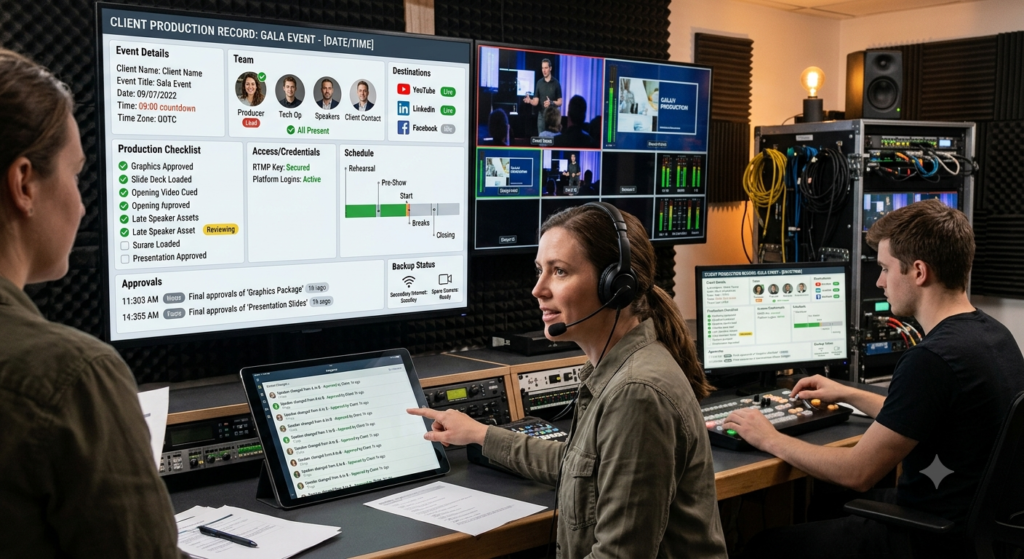
A simple way to improve a live streaming agency project management checklist is to create a dedicated production record for every event.
This record becomes the main reference point for the production team. The producer should be able to find important information in one place, rather than searching through messages, email threads, shared folders, and old event documents.
Production detail | What to record |
Event | Client name, event name, date, time, and time zone |
People | Producer, technical operator, speakers, moderator, client contact |
Destination | YouTube, LinkedIn, Facebook, custom RTMP, or other destination |
Production | Scenes, graphics, slides, videos, layouts, and recording requirements |
Access | Platform access and stream credential status |
Approvals | Final graphics, speaker details, presentation, and client sign-off |
Schedule | Rehearsal, pre-show, start time, breaks, and closing |
Backup | Secondary internet, equipment, operator, and escalation contact |
This record should be created as soon as the event enters production. It also gives agencies a useful way to handle changes. If the client replaces a speaker, changes a presentation, or adds a video, the production record can show what has changed and whether the new asset has been approved.
Keep Client Assets Separate
When an agency works with several brands, asset management becomes part of production quality.
A live event may use logos, speaker photos, lower thirds, background graphics, presentation decks, holding slides, videos, sponsor assets, and promotional material. If files from several clients sit in the same folder, it becomes easier to load the wrong asset into a production.
A separate folder structure for every client and event helps avoid that.
For example
Client → Event → Brand Assets → Speakers → Slides → Videos → Production Files → Recording → Final Report
File names should also identify the client and event.
Instead of
final-logo.png
Use something like
ClientName_EventName_Logo_Final.png
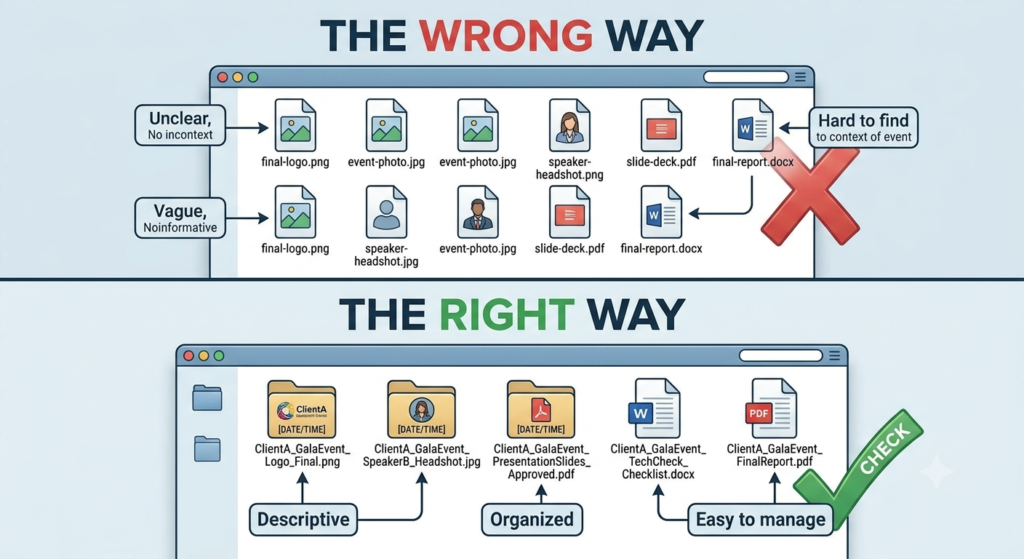
The same approach can be used for lower thirds, speaker cards, videos, and presentation files. This may seem like a small operational detail, but it becomes important when a producer is moving quickly between several productions.
Create a Clear Client Approval Workflow
A client approval workflow for live broadcasts should be completed before the production team treats an asset as final. The client should know what needs approval and when it is due. Depending on the production, the list could include the event title, speaker names, graphics, slides, videos, holding screen, lower thirds, and final run of the show.
A simple status system works well
Received → Under Review → Changes Required → Approved → Finalised
Once an asset is approved, the production team should use that version rather than continuing to work from multiple files in different locations. This also reduces last-minute questions. If a producer sees two versions of a presentation shortly before the event, there should be a clear answer about which one is approved.
How to Organize Client Stream Keys and Permissions
Stream keys are one of the details agencies need to handle carefully.
YouTube’s encoder documentation explains that the stream URL and stream key are entered into the encoder to connect the production to YouTube. YouTube also provides options for managing and resetting stream keys when needed.
For an agency, this means a stream key should be treated as a credential, not as ordinary event information. The team should know which client and event the credential belongs to, who is authorized to access it, which destination it connects to, and whether it has been tested.
Each platform handles streaming credentials differently. Agencies need to check the requirements for each client’s chosen destination. LinkedIn Live has updated how LinkedIn Live works on June 22, 2026. There will no longer be unscheduled live streams. Events now need to be scheduled before the broadcast. LinkedIn Help
Use One Workflow for Every Client Stream
A multi-client live streaming workflow for agencies should be consistent without becoming rigid.
A useful structure is
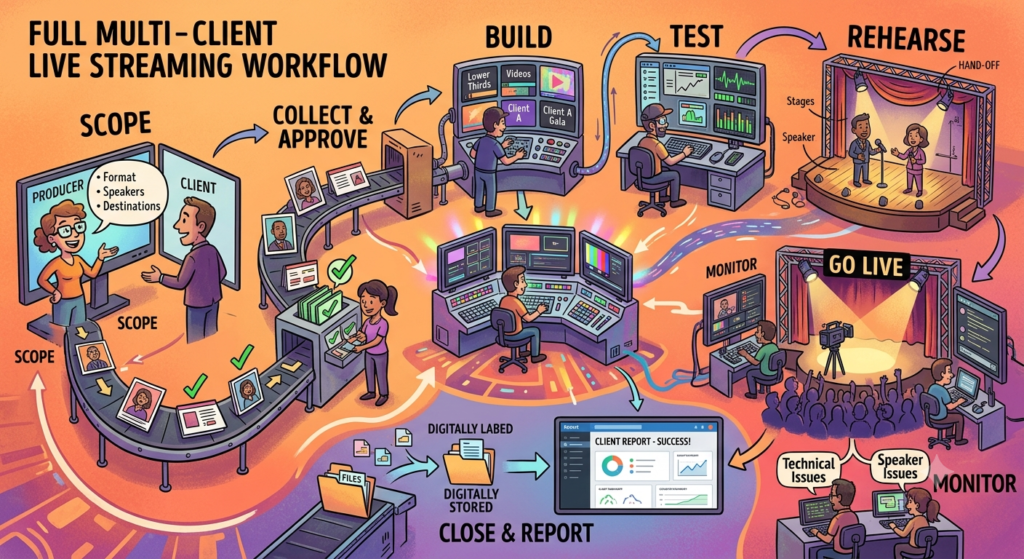
Scope → Collect → Approve → Build → Test → Rehearse → Go Live → Monitor → Close → Report
Scope the production.
Start by understanding what the client actually needs. Confirm the event format, speakers, moderator, streaming destinations, recording requirements, presentation material, sponsor requirements, audience interaction, and approval process.
This is also the point to identify whether the event is simple enough for one producer or needs separate production roles.
Collect and approve the assets.
Once the requirements are clear, collect the final files. Do not wait until the day of the event to request a speaker photo or discover that the presentation has changed. The production team should also know which files are approved and which are still being reviewed.
Build the production.
The next stage is creating the actual production environment.
This may include scenes, layouts, graphics, lower thirds, videos, presentation sources, audio inputs, output settings etc.
The setup should be associated with the correct client and event before testing begins.
Test the stream.
Testing should include more than checking whether the preview appears. YouTube’s encoder settings guidance recommends testing the stream before going live and monitoring stream health during the broadcast.
The test should cover the production elements that will actually be used during the event. Check the audio, video, presentation sharing, graphics, transitions, and destination connection rather than testing only one camera and microphone.
Rehearse the actual show.
A rehearsal should follow the run of the show as closely as possible. If the event includes a host introduction, speaker handoff, video playback, presentation sharing, audience Q&A, and closing graphic, the team should rehearse those transitions rather than simply asking everyone whether they can hear each other.
Go live and monitor.
Once the broadcast starts, the production team should focus on the live show.
The producer should know who is monitoring stream health, handling speaker issues, communicating with the client, and stepping in if something fails.
Close and report.
After the stream ends, confirm the recording, save the production files, note technical issues, collect available analytics, and prepare the client report. This final stage is often rushed when another event is coming up, but it is part of the production workflow.
Assign Clear Roles for Every Broadcast
The agency’s live streaming roles and responsibilities should be clear, but that does not mean every production needs a large crew. For a small event, one person may handle several responsibilities. But a full broadcast will need separate individuals for different parts of the production.
The producer oversees the overall flow and timing. The technical operator handles the production environment, audio, video, scenes, screen sharing, and streaming connection. A moderator may handle audience questions and speaker interaction, while a client contact provides approvals and decisions. For larger broadcasts, a show caller can keep the production team aligned with the run of the show.
Plan for Overlapping Client Broadcasts
An agency’s capacity depends less on the number of streams and more on what each production demands. A two-person interview and a multi-speaker event with videos, graphics, audience interaction, and several destinations can require entirely different levels of support.
This is why agencies should look at production complexity when planning their schedules. If two demanding broadcasts are happening at the same time, assigning one producer to both can leave neither production with enough attention.
Before accepting overlapping broadcasts, identify what each show requires, including speakers, destinations, production roles, rehearsals,technical support etc. This makes it easier to decide whether the same team can handle both productions or whether another producer or technical operator is needed.
An agency could use an internal classification such as-
Production level | Typical requirements |
Low | One or two speakers, simple graphics, one destination |
Medium | Multiple speakers, slides, moderator, several scenes |
High | Multiple speakers, videos, sponsor graphics, audience interaction, multiple destinations |
These categories are planning guidelines rather than fixed definitions; the actual staffing requirement depends on the specific production.
If two high-complexity broadcasts overlap, the agency should decide early whether it has enough producers, technical operators, equipment, and backup capacity to handle both.
Use Profiles and Scene Collections to Reduce Rework
Agencies that use OBS Studio can create reusable production setups for different types of events. OBS profiles save settings mainly related to output. Scene Collections store scenes and sources. An agency might have separate setups for a podcast, panel discussion, product launch, or recording-only workflow.
Even with a saved setup, the producer should check everything before the broadcast. Check the active profile, scenes, client branding, audio sources, destination, output settings etc. A saved setup can save time, but it does not mean everything is ready for the next event.
Manage Multi-Platform Streaming Without Overloading the Setup
A multi-platform streaming workflow for marketing agencies also needs to consider bandwidth. If an agency sends separate streams directly from its production setup, the upload requirement can increase with every destination.
YouTube’s current simulstreaming guidance recommends adding the target bitrates for each stream and having roughly 1.5 – 2 times that combined bitrate available as upload capacity for stability. For agencies, this means testing the actual production environment rather than assuming that an internet connection that works for normal office activity will automatically support multiple live feeds. A cloud-based distribution workflow can approach the problem differently.
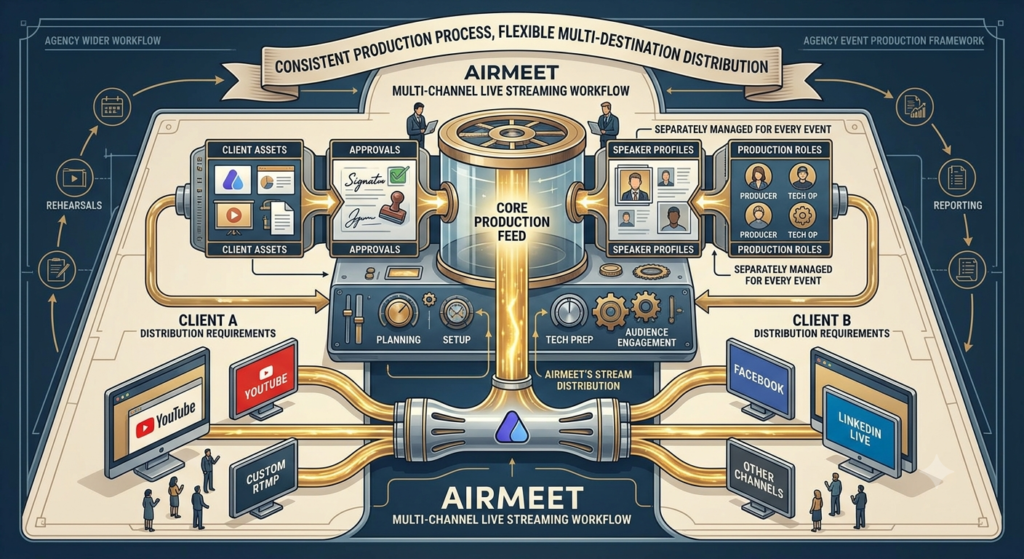
Airmeet’s current Multi-Channel Live Streaming offering supports using one production feed and distributing it to multiple destinations. For agencies, the advantage of this type of workflow is that producers can keep the production side more centralized instead of creating several separate device-side workflows.
How to Build a Run of Show for Client Broadcasts
A live stream run of show templates for agencies should tell the production team exactly what happens and when. It should cover both the content and the technical action behind it.
Time | Segment | Production action | Owner |
2:45 PM | Pre-show | Check stream health and audio. | Technical operator |
2:55 PM | Holding screen | Display holding graphic. | Producer |
3:00 PM | Opening | Bring the host on camera. | Producer |
3:05 PM | Introduction | Add a lower third. | Technical operator |
3:10 PM | Main discussion | Switch to speaker layout. | Producer |
3:35 PM | Q&A | Change layout and monitor questions. | Moderator |
3:50 PM | Closing | Play the closing graphic. | Producer |
3:55 PM | End | Confirm recording and stop the stream. | Technical operator |
This process gives the production team a shared reference during the event.
It also makes the rehearsal more useful because everyone can work through the same sequence before the audience arrives.
Have a Backup Plan for Client Broadcasts
A live stream backup plan for client broadcasts should be part of the production process from the start. For important productions, agencies should consider a secondary internet connection, backup equipment, local recording, a backup operator, and a clear escalation process.
The level of backup needed will depend on the event. An interview may not require duplicate cameras and computers, but a larger corporate broadcast will need additional equipment and technical support.
Before the event, the team should figure out where things are most likely to break. YouTube’s troubleshooting guidance also provides steps for dealing with common live-stream and encoder problems, which can help the team prepare for technical issues.
Before going live, ask
- What happens if the main internet connection fails?
- What happens if the production computer stops working?
- What happens if a speaker loses connection?
- What happens if the streaming destination rejects the feed?
- Who contacts the client if there is a major problem?
The team should have an answer to each question before going live.
How Live Streaming Fits Into an Agency Workflow
For agencies managing webinars and virtual events for several clients, the streaming platform is another part of the production workflow. It needs to support the way the team already plans, builds, tests, and runs each broadcast.
Airmeet supports live streaming to external destinations such as YouTube, Facebook, LinkedIn Live, and Custom RTMP. This gives agencies options when a client wants to reach audiences on more than one channel without creating an entirely different production process for each destination.
Its Multi-Channel Live Streaming workflow uses one production feed and distributes it across multiple destinations. For an agency, this approach can simplify the production setup because the team can manage the main event from one place while extending the broadcast to the channels the client has selected.
This can be particularly useful when different clients have different distribution requirements. One client may want a webinar on YouTube, while another may need the same type of event shared across several social platforms. Instead of rebuilding the entire production workflow around each destination, the agency can keep the core production process consistent and adjust the distribution based on the client’s requirements.
The platform can also fit into the preparation work that happens before the broadcast. Airmeet’s step-by-step live-streaming webinar guide covers areas such as planning, platform setup, technical preparation, and audience engagement. These steps can complement an agency’s existing production checklist and rehearsal process.
For agencies, the main consideration is not simply how many destinations a platform supports. It is how well the platform fits into the team’s wider workflow. Client assets, approvals, speakers, production roles, stream settings, rehearsals, and reporting still need to be managed separately for every event.
A platform can make the distribution side easier, but the agency still needs a consistent process around it. When that process is in place, producers can spend less time rebuilding the same setup for every client and more time managing the details that make each broadcast different.
Keep Reporting Separate for Every Client
Knowing how to report live stream performance to clients is part of closing the production properly. The client should not have to work out what the numbers mean or which event they relate to.
Start with the basic event details: the client, event name, date, streaming destination, and reporting period. Then include the metrics that are actually available for that broadcast. These may include views, peak concurrent viewers, watch time, engagement, stream duration, audience questions, and other platform-specific data. YouTube’s live-stream analytics documentation provides examples of metrics available for live content.
When an event is streamed to several destinations, keep the numbers easy to follow. A client should be able to see which platform generated which results rather than receiving one large collection of figures with no context.
It also helps to separate what happened during the broadcast from how the audience responded to it. A short technical issue, for example, belongs in the production notes. Viewer numbers and watch time belong in the performance section. This keeps the client report useful without turning it into a record of every issue the production team handled behind the scenes.
The report can also give the agency useful information for the next event. If speakers regularly join late, assets often arrive close to the deadline, or audio problems keep appearing, those patterns can point to changes that are needed in the production process.
A good report therefore does more than show numbers. It gives the client a clear record of the event and provides the agency information it can use to improve the next production.
Turn the Recording Into More Client Content
A live stream may last an hour, but the content can still be useful long after the event ends. Once the recording is available, the agency can look for sections that have value beyond the original event. A strong speaker’s answer can become a short social clip. A detailed discussion can provide material for a blog post. A frequently asked question can become an FAQ, while useful quotes can be turned into social posts or email content.
Airmeet’s article on using webinar recordings and live streaming for content creation covers ways recordings and live sessions can provide material for additional content.
This is where the production workflow can connect with the client’s wider content plan. Instead of handing over one recording and treating the project as finished, the agency can identify useful sections while the event is still fresh.
For example, the team could mark:
- Strong discussion points for blog or article ideas
- Short, useful answers for social clips
- Audience questions for FAQs
- Expert comments for quote posts
- Full sessions for on-demand viewing
The final output will depend on what the client needs, but the basic workflow remains the same:
Plan the event → Produce the broadcast → Record it → Identify useful moments → Repurpose the content → Deliver it to the client
For agencies handling several clients, this approach also makes the recording easier to manage. The team knows what each client expects from the event before production starts, rather than having to decide afterward what to do with a large video file.
A Simple Multi-Client Launch Checklist
Before each broadcast, the production team should confirm that the event has passed the following checks:
Area | Final check |
Client | Correct client, event, date, and time |
Assets | Final approved graphics, slides, videos, and speaker information |
People | Producer, technical operator, speakers, moderator, and client contact |
Destination | Correct platform, event, URL, and stream configuration |
Production | Correct scenes, audio, video, layouts, and output settings |
Rehearsal | Full production walkthrough completed |
Backup | Internet, equipment, recording, and escalation plan ready |
Reporting | Metrics and post-event requirements confirmed |
The team should complete this process for every event, even when two productions use almost identical setups.
That final check is what keeps familiarity from becoming an assumption.
Final Thoughts
Managing live streams for multiple clients is not simply a matter of adding more broadcasts to the calendar.
Every additional client introduces another brand, another approval process, another set of assets, another destination, and another production schedule. When events overlap, those differences become even more important.
The agencies that handle this workload efficiently are not necessarily the ones with the most complicated setups. They are the ones with a clear process for separating client information, assigning responsibilities, checking technical details, rehearsing the production, and responding when things do not go as expected.
A strong multi-client live streaming workflow for agencies gives producers that structure without making every production identical. The client may see one polished broadcast on screen. Behind it, the agency needs a system that keeps everything else organized.
FAQs
Yes. The practical limit depends on the complexity of the productions, the number of trained team members, available equipment, internet capacity, streaming destinations, and the amount of audience interaction involved.
A simple interview and a multi-speaker conference should not be treated as equal workloads simply because both are one-hour live streams.
Stream keys should be treated as credentials, and access should be limited to the people who need them. Each key should be clearly associated with the correct client, event, and destination. Agencies should also have a process for replacing or resetting credentials if they are exposed.
It should include an event timeline, speakers, segments, production actions, graphics, videos, scene changes, audience interaction, and ownership of each action. It should also include pre-show technical checks and post-show steps.
The timing depends on the complexity of the production. A simple broadcast may need only a short technical check, while an event with multiple speakers, videos, audience interaction, or several destinations may require a full rehearsal. The key is to finish with enough time to resolve technical or content issues before the broadcast begins.
A standardized production framework can save time, but the client-specific details still need to be checked. Branding, scenes, credentials, destinations, speaker information and output settings should all be verified before each broadcast.
The report can include available audience metrics, engagement, stream duration, destination performance, recording status, technical observations, and notable moments. Each report should remain separate so that one client’s data is not mixed with another’s.