AirGenie helps webinar teams turn an entire Airmeet event or a specific session into a concise AI-generated summary. For B2B marketers, that means faster post-event recaps, cleaner handoffs to sales, stronger attendee follow-up, and a clearer narrative for proving webinar impact.
Manual recaps slow the motion Teams spend hours turning a live session into a usable summary.
Sales follow-up loses context Reps need the strongest topics, questions, and takeaways while accounts are still warm.
Marketing reports lack narrative Attendance and engagement metrics are useful, but stakeholders also need the story behind the numbers.
Content reuse starts too late Summaries are the raw material for emails, blogs, social posts, and sales enablement.
Turn event context into reusable content with AI Summary
With AirGenie’s AI Summary, organizers can generate a summary from an entire event or an individual session, then guide the output with controls such as format, tone, word limit, and keywords. The summary should be reviewed before publishing, then copied into the channels that move prospects and customers forward.
Event or session source Create broad event recaps or focused session summaries depending on the campaign need.
Summary controls Use format, tone, word limit, and keywords to shape the output for each audience.
Generation attempts AirGenie provides three AI-generation attempts by default for each event and each session.
Human review workflow AI-generated output may need editing, so the final content stays under marketer control.
Benefits across revenue-focused virtual event use cases
AI Summary gives every webinar team a faster way to translate event content into a useful next step for prospects, customers, executives, and sales teams.
Demand Generation Webinars
Send faster recaps that reinforce key pain points, solutions, and conversion paths.
Customer Education
Package best practices and implementation guidance into clear post-session takeaways.
Product Launch Events
Capture demo highlights, audience questions, and launch proof points for multi-channel follow-up.
Sales follow-up
Equip reps with concise account-relevant context immediately after high-intent attendance.
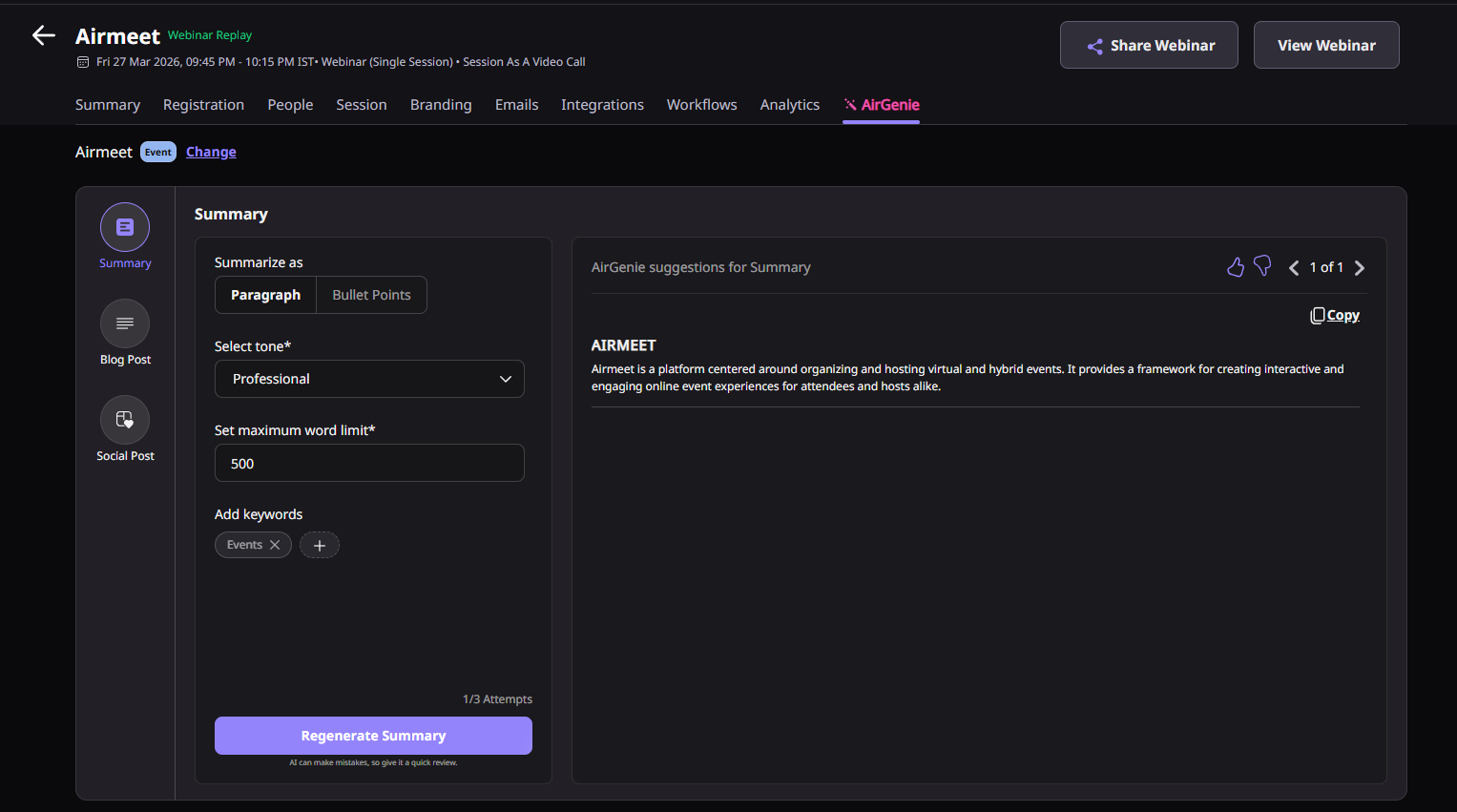
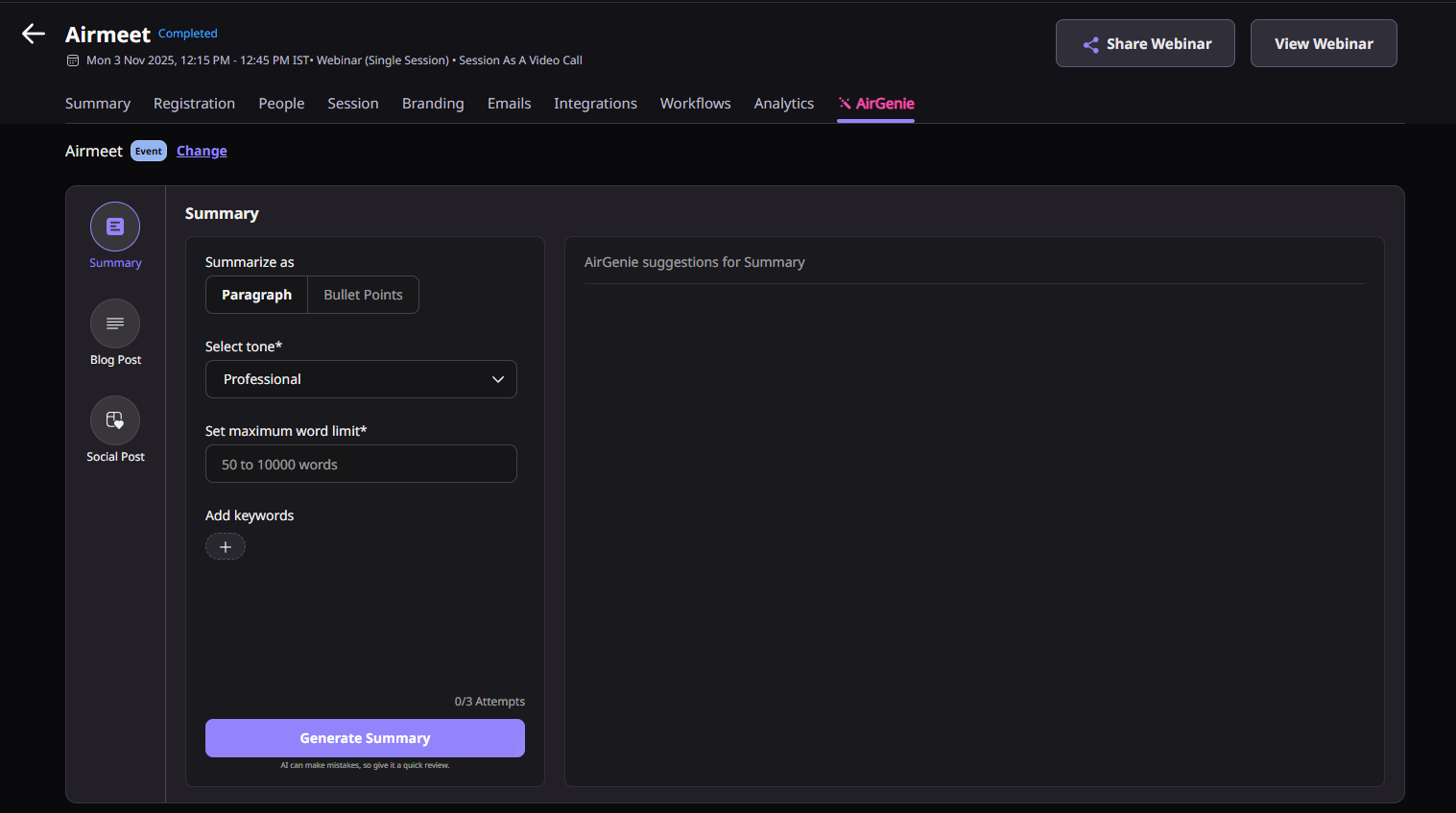
Actual Product Screenshots
Step-by-Step Process
AirGenie's AI Summary helps organizers quickly transform event discussions into concise, actionable summaries that can be used for reporting, follow-up and content repurposing.
Step 1. Open AirGenie AI Summary
Navigate to your completed Airmeet event and access the AI Summary feature from AirGenie. Choose whether you want to summarize the entire event or a specific session.
Step 2. Select the Content Source
Choose the event or session you want AirGenie to analyze. This allows you to generate either a high-level event recap or a focused summary of an individual presentation or discussion.
Step 3. Customize the Summary
Configure the output by selecting your preferred format, tone, maximum word count, and relevant keywords. These options help tailor the summary for different audiences, including attendees, sales teams, executives, or internal stakeholders.
Step 4. Generate the AI Summary
Click Generate and allow AirGenie to process the selected event content. The AI analyzes the event discussion and produces a structured summary highlighting the key topics, major takeaways, and important discussion points.
Step 5. Review and Edit the Output
Review the generated summary for accuracy, clarity, and brand consistency. It is recommended to review and edit AI-generated content before sharing it externally to ensure it reflects your organization’s messaging and communication standards.
Step 6. Share and Repurpose the Summary
Use the finalized summary across attendee follow-up emails, sales handoffs, internal reports, executive updates, blog drafts, newsletters, CRM notes, and other post-event marketing initiatives to extend the value of your webinar.
Why choose Airmeet for AI Summary?
AirGenie's AI Summary helps webinar teams move from live event discussions to meaningful follow-up in minutes. By generating structured summaries directly from event content, marketers can save time, improve collaboration, and maximize the impact of every webinar.
Built for Webinar Recaps Generate summaries directly from your Airmeet event or individual sessions without manually reviewing recordings or writing recaps from scratch.
Faster Post-Event Follow-up Quickly create recap content that marketing, sales, and customer success teams can use while attendee engagement is still fresh.
Flexible Content Controls Customize summaries using tone, format, keywords, and word limits to create outputs suited for different audiences and communication channels.
Repurpose Content Across Channels Transform webinar discussions into follow-up emails, sales enablement material, executive reports, blog articles, newsletters, and other marketing assets with minimal effort.
Human Review Remains Essential AirGenie accelerates content creation while keeping organizers in control. Every AI-generated summary can be reviewed, refined, and approved before publication to ensure accuracy and brand consistency.
Designed for Revenue-Focused Teams Whether you are running demand generation webinars, product launches, customer education sessions, or executive briefings, AI Summary helps your team convert valuable event discussions into actionable business content.
Help Center
Relevant reads
Explore guides and tutorials to help you create, customize, and host exceptional events on Airmeet.
It is an AirGenie capability for generating a concise summary from an Airmeet event or session so teams can use the recap in follow-up, reporting, and content workflows.
Teams can incorporate or utilize summaries in attendee follow-up emails, sales notes, event reports, internal Slack or CRM updates, and post-event content briefs.
AirGenie Features
Other Features to Explore
Discover more powerful features that help you create engaging, branded, and seamless event experiences with Airmeet.
“I was really excited to see how alive Airmeet seemed. The first time I raised my virtual hand to ask a question, I was brought up on stage, my camera flipped on, and I was able to talk with the presenters, that was the sold-moment in my head! That is what I wanted. We weren't going to be speaking at our audience. We wanted a two-way engagement. With the analytics in the background, that was my “Aha moment!”
Victoria YounesExecutive Events Manager
Incredible Companies Use Airmeet
Most loved Virtual Events Platform
“I was really excited to see how alive Airmeet seemed. The first time I raised my virtual hand to ask a question, I was brought up on stage, my camera flipped on, and I was able to talk with the presenters, that was the sold-moment in my head! That is what I wanted. We weren't going to be speaking at our audience. We wanted a two-way engagement. With the analytics in the background, that was my “Aha moment!”
Victoria YounesExecutive Events Manager
Incredible Companies Use Airmeet
Most loved Virtual Events Platform
“I was really excited to see how alive Airmeet seemed. The first time I raised my virtual hand to ask a question, I was brought up on stage, my camera flipped on, and I was able to talk with the presenters, that was the sold-moment in my head! That is what I wanted. We weren't going to be speaking at our audience. We wanted a two-way engagement. With the analytics in the background, that was my “Aha moment!”
Victoria YounesExecutive Events Manager
Incredible Companies Use Airmeet
Most loved Virtual Events Platform
“I was really excited to see how alive Airmeet seemed. The first time I raised my virtual hand to ask a question, I was brought up on stage, my camera flipped on, and I was able to talk with the presenters, that was the sold-moment in my head! That is what I wanted. We weren't going to be speaking at our audience. We wanted a two-way engagement. With the analytics in the background, that was my “Aha moment!”