Deliver timely information or direct participants toward the right area of your event. When a schedule changes or a live audience is spread across sessions, lounges, booths, and breakouts, a clear Airmeet announcement helps organizers keep everyone informed and moving with confidence.
Live changes become attendee confusion without a shared signal
Running a live event means coordinating people who may be watching a session, networking in the lounge, visiting a booth, or working inside a breakout. A sudden delay, room change, or program update can quickly fragment the experience.
For revenue-focused webinars, that confusion has a business cost: qualified attendees miss demos, sponsor moments lose traffic, and a well-planned CTA reaches fewer people.
The Solution
Keep every attendee on the same page
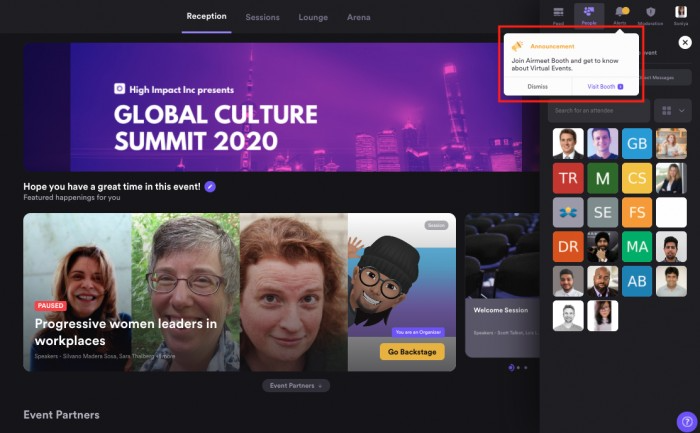
Airmeet's text announcements give organizers a fast way to communicate important updates during a live event. Whether you're announcing a session change, directing attendees to a breakout room, opening networking, or sharing the next agenda item, a short written message helps participants understand exactly what to do next. They can quickly scan session names, timing, and destinations without interrupting the live program.
For moments that require immediate action, announcements can also be paired with a Dynamic CTA.
Use Cases
Benefits across revenue-focused virtual event use cases
Demand-generation webinars
Direct attendees to a live demo, resource room, or high-intent session before the conversion moment passes.
Product launches
Share a timing change or route the audience to the right reveal, demo, or expert Q&A.
Customer education
Point customers toward a workshop, help desk, or breakout that answers their next adoption question.
Multi-track summits
Reduce wrong-room friction by telling participants which session, lounge, or booth to visit next.
Actual Product Screenshots
Step-by-step process
How to send a Text Announcement:
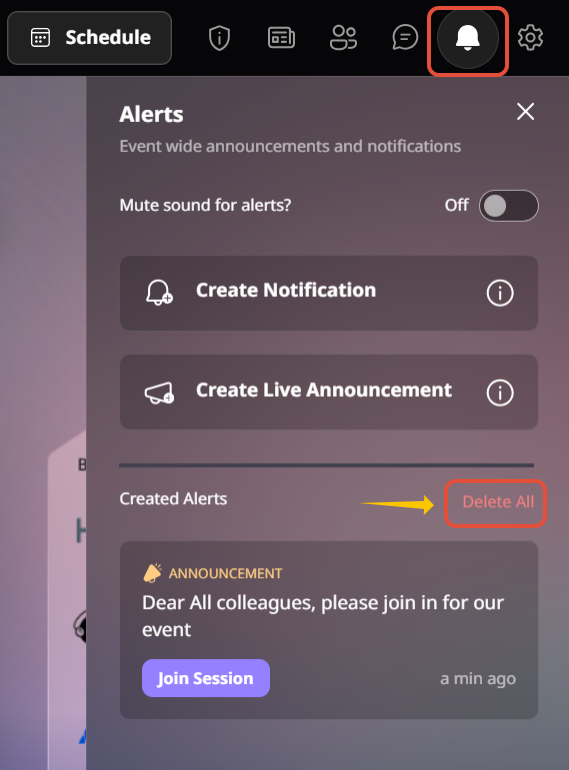
Step 1. Open the event controls
While your event is live, open the organizer controls from the Event Dashboard or live event interface.
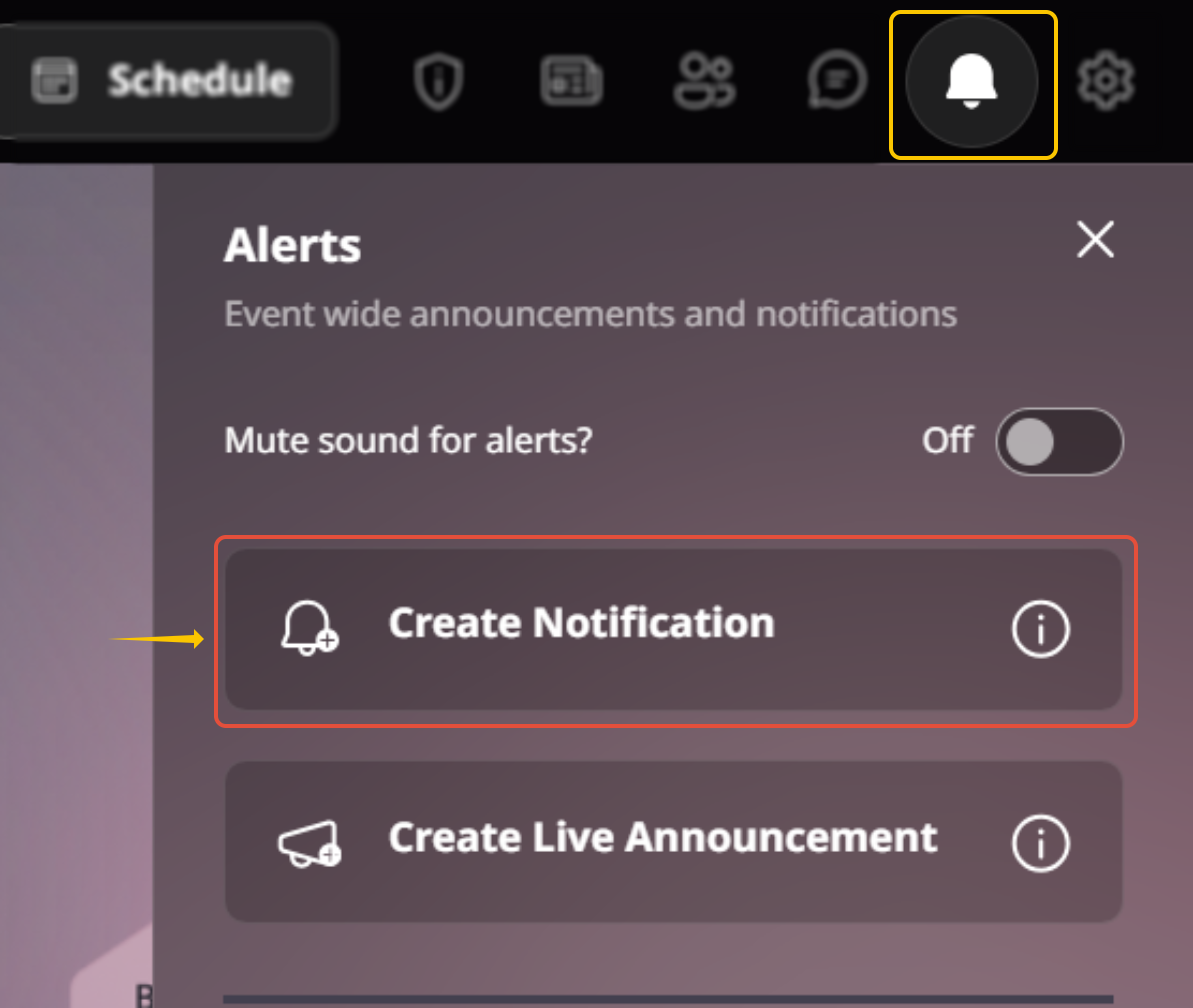
Step 2. Select Text Announcement
Choose the option to send a text-based notification or alert to participants.
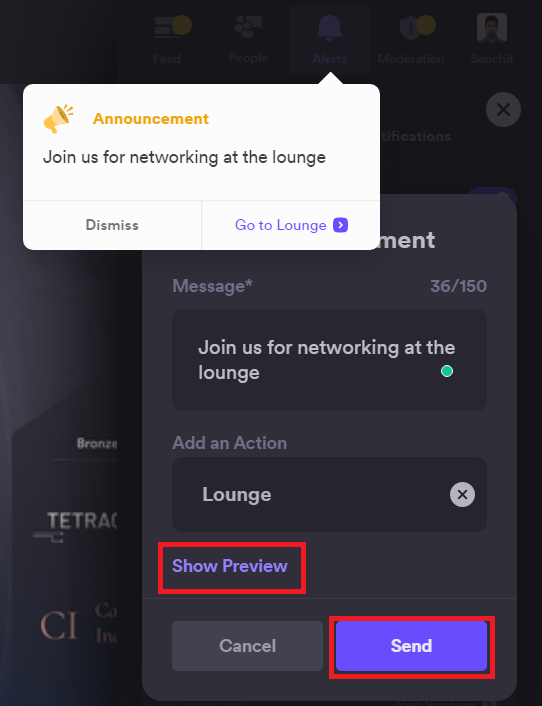
Step 3. Write a clear message
Keep the announcement short and actionable. Explain what has changed, who it affects, and what attendees should do next.
Step 4. Send the announcement
Review the message, then publish it. Participants receive the announcement immediately, helping them stay informed without interrupting the live experience.
Why Airmeet
Why choose Airmeet for Text Announcement?
Airmeet brings every major engagement tool into one live-stage experience. Instead of switching between disconnected moderation tools, hosts can invite attendees, surface audience contributions, launch engagement prompts, and guide conversations from a single workflow.
The strongest teams treat announcements as part of event orchestration, not emergency copy. Prepare short templates, assign an owner, and connect important messages to the relevant session, booth, lounge, or conversion step.
help Center
Relevant Help Articles
Explore guides and tutorials to help you create, customize, and host exceptional events on Airmeet.
Send text-based notifications or alerts to participants
Text announcement is a live event communication feature that organizers can use to send written notifications or alerts to participants during an Airmeet event.
Text announcements help organizers quickly communicate important updates during a live event. Whether it’s a schedule change, room update, networking reminder, or a prompt to visit another session or booth, attendees receive clear written instructions without disrupting the event experience.
Send a text announcement whenever attendees need timely guidance—for example, when a session is about to begin, the agenda changes, networking opens, a breakout starts, or participants should move to another part of the event.
Yes. Timely announcements help attendees reach important sessions, demos, sponsor booths, and other key moments before they begin, improving participation throughout the event.
No. An announcement communicates an update or direction; a dynamic CTA is designed to prompt a specific click or conversion action. They can be used together.
Text announcements are ideal for sharing quick written updates, directions, and schedule changes. Audio or video announcements are better suited for moments where a spoken message adds clarity, urgency, or a more personal touch.
Prepare a few ready-to-use announcement templates before the event begins. Messages for schedule updates, session reminders, networking, technical issues, and closing announcements can be sent much faster when they’re already drafted.
Airmeet features
Other Features to Explore
Discover more powerful features that help you create engaging, branded, and seamless event experiences with Airmeet.
“I was really excited to see how alive Airmeet seemed. The first time I raised my virtual hand to ask a question, I was brought up on stage, my camera flipped on, and I was able to talk with the presenters, that was the sold-moment in my head! That is what I wanted. We weren't going to be speaking at our audience. We wanted a two-way engagement. With the analytics in the background, that was my “Aha moment!”
Victoria YounesExecutive Events Manager
Incredible Companies Use Airmeet
Most loved Virtual Events Platform
“I was really excited to see how alive Airmeet seemed. The first time I raised my virtual hand to ask a question, I was brought up on stage, my camera flipped on, and I was able to talk with the presenters, that was the sold-moment in my head! That is what I wanted. We weren't going to be speaking at our audience. We wanted a two-way engagement. With the analytics in the background, that was my “Aha moment!”
Victoria YounesExecutive Events Manager
Incredible Companies Use Airmeet
Most loved Virtual Events Platform
“I was really excited to see how alive Airmeet seemed. The first time I raised my virtual hand to ask a question, I was brought up on stage, my camera flipped on, and I was able to talk with the presenters, that was the sold-moment in my head! That is what I wanted. We weren't going to be speaking at our audience. We wanted a two-way engagement. With the analytics in the background, that was my “Aha moment!”
Victoria YounesExecutive Events Manager
Incredible Companies Use Airmeet
Most loved Virtual Events Platform
“I was really excited to see how alive Airmeet seemed. The first time I raised my virtual hand to ask a question, I was brought up on stage, my camera flipped on, and I was able to talk with the presenters, that was the sold-moment in my head! That is what I wanted. We weren't going to be speaking at our audience. We wanted a two-way engagement. With the analytics in the background, that was my “Aha moment!”