Turn registered interest into live participation with timely event emails, attendee-controlled session bookmarks, and calendar invites that keep high-value webinar moments visible.
A webinar registration is intent, not attendance. Busy calendars, parallel sessions, timezone uncertainty, and the gap between sign-up and showtime can pull high-value prospects away before the conversation begins.
For revenue teams, every avoidable no-show is a missed chance to capture engagement, qualify interest, and create a relevant follow-up.
The Solution
Turn registration into live attendance
Airmeet gives every registered participant two simple ways to return at the right time. A default reminder email is automatically sent one hour before the event begins. For individual sessions, attendees can bookmark sessions inside the event or add them directly to their preferred calendar from the agenda. This helps them keep important sessions visible and avoid missing key moments.
Fifteen minutes before a bookmarked session starts, the "Remind Me" button changes to "Join Session." Once the session goes live, attendees can also receive an in-platform notification, making it quick to enter the session.
Right reminder. Right session. Right audience.
Help attendees show up for the sessions that matter
Give each attendee a lightweight way to save the sessions that matter to their role and buying journey.
Product launches
Protect the moment when buyers see the story, demo, and next step live.
Customer education
Help customers return for onboarding, enablement, and product training.
Partner events
Keep distributed partner audiences aligned to shared sessions and announcements.
Multi-track summits
Let attendees create a personal route through competing agenda choices.
See the reminder experience in context
Step-by-step process
How Session Reminders work:
Step 1. Register for the event
Once attendees register, Airmeet automatically includes them in the default event reminder workflow for supported event types.
Step 2. Save important sessions
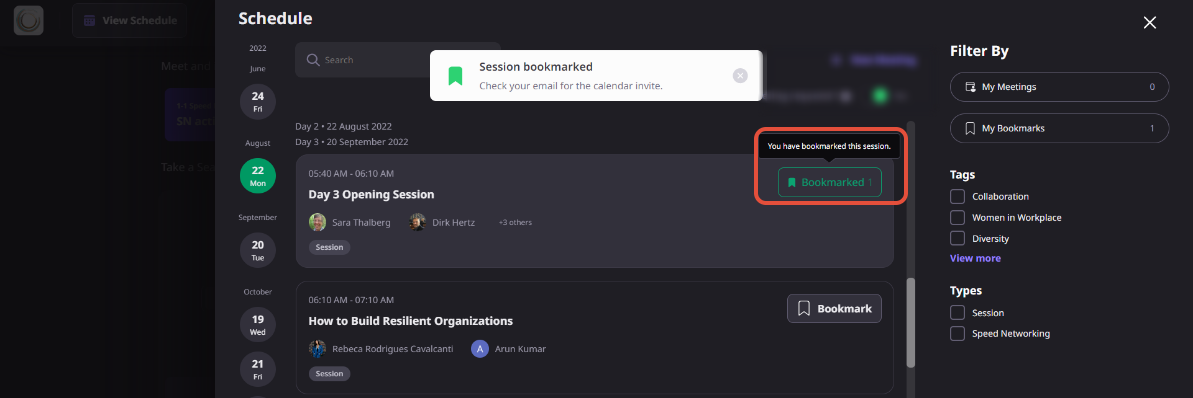
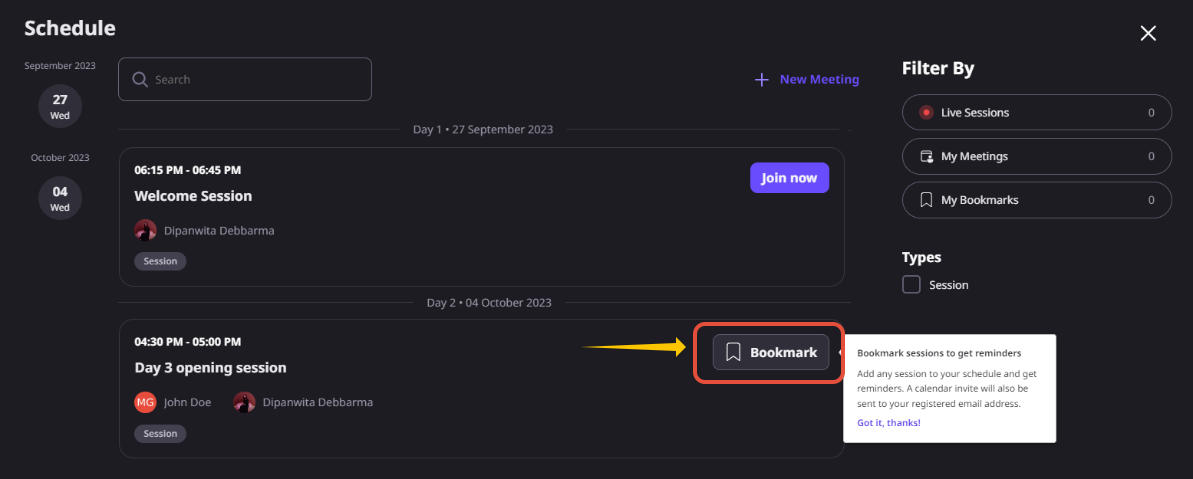
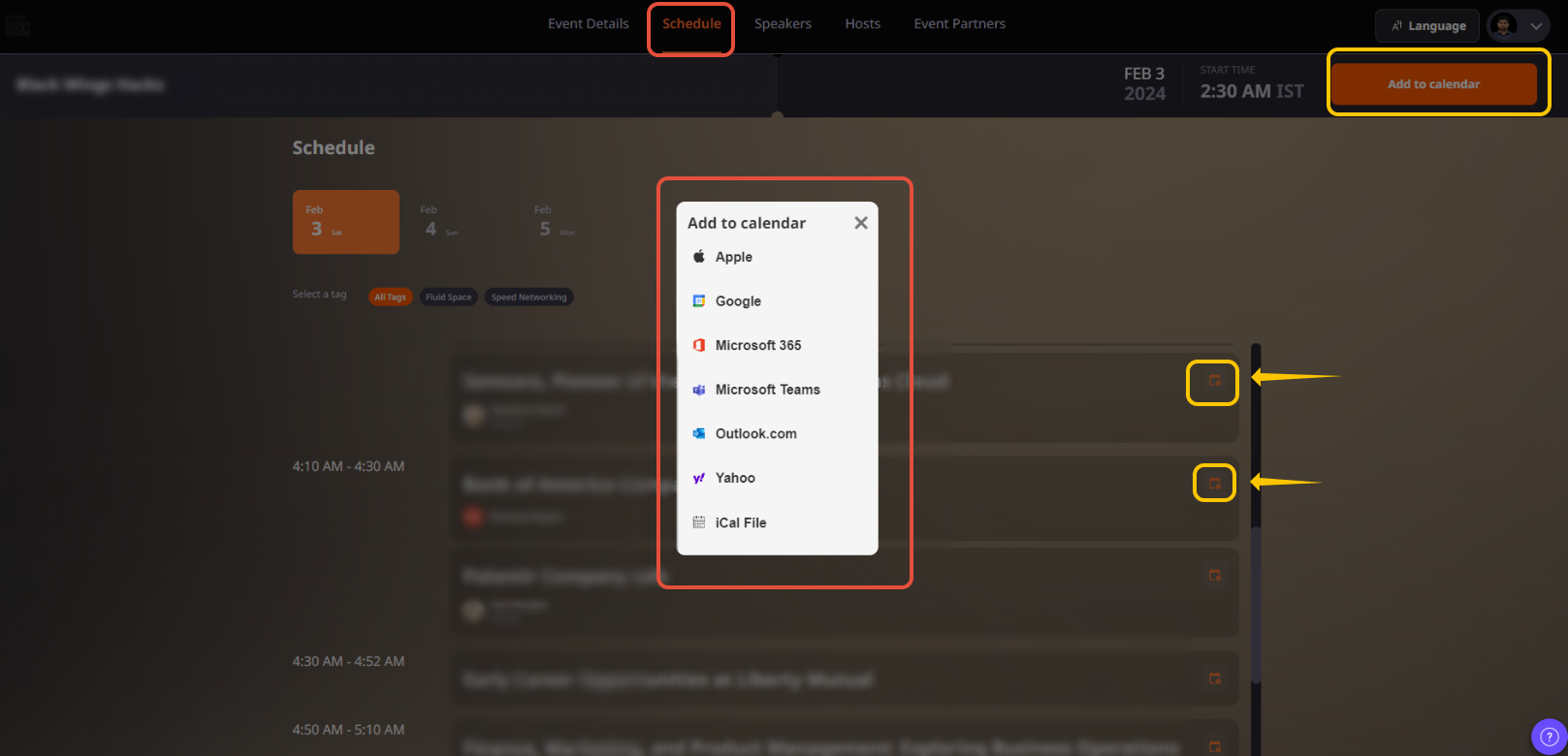
From the event agenda, attendees can either click Add to Calendar on a session before entering the event or use Schedule > Remind Me after joining the event to bookmark sessions they don’t want to miss.
Step 3. Receive timely reminders
Airmeet sends the default event reminder email one hour before the event starts. For bookmarked sessions, attendees receive a calendar invite at their registered email address.
Step 4. Join when it’s time
Fifteen minutes before a bookmarked session begins, the Remind Me button changes to Join Session. Once the session goes live, attendees may also receive an in-platform notification, making it easy to enter directly.
Why Airmeet
Why Choose Airmeet for Session Reminders
Built into the attendee journey, from event agenda to live session.
Combines a broad default event reminder with personal session-level intent.
Lets attendees move a chosen session into the calendar they already use.
Keeps attendees focused on joining the right sessions while giving organizers more opportunities for meaningful engagement.
help Center
Relevant Help Articles
Explore guides and tutorials to help you create, customize, and host exceptional events on Airmeet.
How to bookmark sessions and add them on your calendar?
Session Reminders combine Airmeet’s default event reminder email with attendee-controlled session bookmarks and calendar invites, helping registrants protect time for the sessions they care about.
Yes. After registering, an attendee can use the Add to Calendar icon beside a session on the event landing page agenda and choose a supported calendar.
For sessions that haven’t started yet, attendees can click Schedule and choose the Remind Me option. Airmeet then sends a calendar invite to their registered email address, making it easy to remember and join the session on time.
Session reminders are available for attendees with a registered email address. If an event allows registration without email verification, the Remind Me option isn’t available. It also doesn’t appear for speakers or event organizers.
Yes. Organizers can customize default email templates and create branded event communications. The available options may vary depending on the event setup and subscription plan.
Timely reminders help more registered attendees join live sessions. Higher attendance creates more opportunities for engagement, meaningful conversations, and stronger follow-up for marketing and sales teams.
Airmeet features
Other Features to Explore
Discover more powerful features that help you create engaging, branded, and seamless event experiences with Airmeet.
“I was really excited to see how alive Airmeet seemed. The first time I raised my virtual hand to ask a question, I was brought up on stage, my camera flipped on, and I was able to talk with the presenters, that was the sold-moment in my head! That is what I wanted. We weren't going to be speaking at our audience. We wanted a two-way engagement. With the analytics in the background, that was my “Aha moment!”
Victoria YounesExecutive Events Manager
Incredible Companies Use Airmeet
Most loved Virtual Events Platform
“I was really excited to see how alive Airmeet seemed. The first time I raised my virtual hand to ask a question, I was brought up on stage, my camera flipped on, and I was able to talk with the presenters, that was the sold-moment in my head! That is what I wanted. We weren't going to be speaking at our audience. We wanted a two-way engagement. With the analytics in the background, that was my “Aha moment!”
Victoria YounesExecutive Events Manager
Incredible Companies Use Airmeet
Most loved Virtual Events Platform
“I was really excited to see how alive Airmeet seemed. The first time I raised my virtual hand to ask a question, I was brought up on stage, my camera flipped on, and I was able to talk with the presenters, that was the sold-moment in my head! That is what I wanted. We weren't going to be speaking at our audience. We wanted a two-way engagement. With the analytics in the background, that was my “Aha moment!”
Victoria YounesExecutive Events Manager
Incredible Companies Use Airmeet
Most loved Virtual Events Platform
“I was really excited to see how alive Airmeet seemed. The first time I raised my virtual hand to ask a question, I was brought up on stage, my camera flipped on, and I was able to talk with the presenters, that was the sold-moment in my head! That is what I wanted. We weren't going to be speaking at our audience. We wanted a two-way engagement. With the analytics in the background, that was my “Aha moment!”