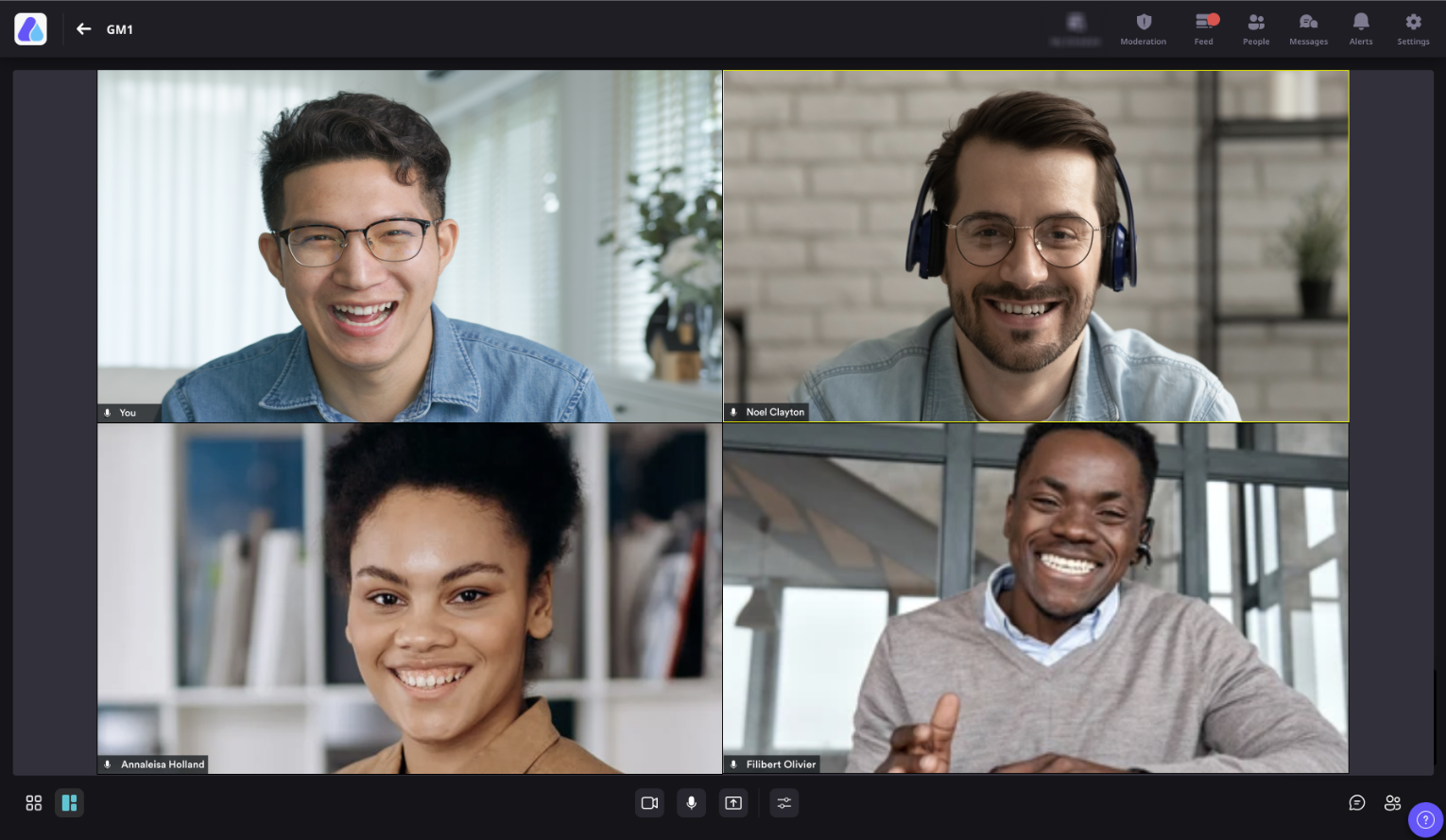
Turn a passive audience into an active room. Run unmoderated roundtables and large group discussions where up to 1,000 participants can join – and attendees contribute simply by unmuting.
Your best webinar insight should not wait in a hand-raise queue
Revenue-focused webinars drive better results when prospects, customers, and experts can respond to one another in the moment. Traditional stage mechanics can slow that exchange and hide the very signals your go-to-market team needs.
Stage bottlenecks suppress intent When every contribution needs a hand raise and promotion to stage, the strongest buyer questions can arrive late - or never surface at all.
Broadcast formats hide the room A one-way presentation shows who attended, but not always who has context, objections, expertise, or urgency.
Large discussions lose momentum Switching between presentation, meeting, and networking tools creates friction just when the audience is ready to talk.
The Solution
Open the room - without giving up live-session control
Session as a Video Call combines the immediacy of a group meeting with the structure of an Airmeet event, so an engaged audience can become an engaged conversation.
Open the conversation Attendees can contribute by unmuting themselves, without waiting to be invited to the stage or raising a hand.
Bring the buying group together Run an unmoderated roundtable or large group meeting with up to 1,000 connected participants in one session.
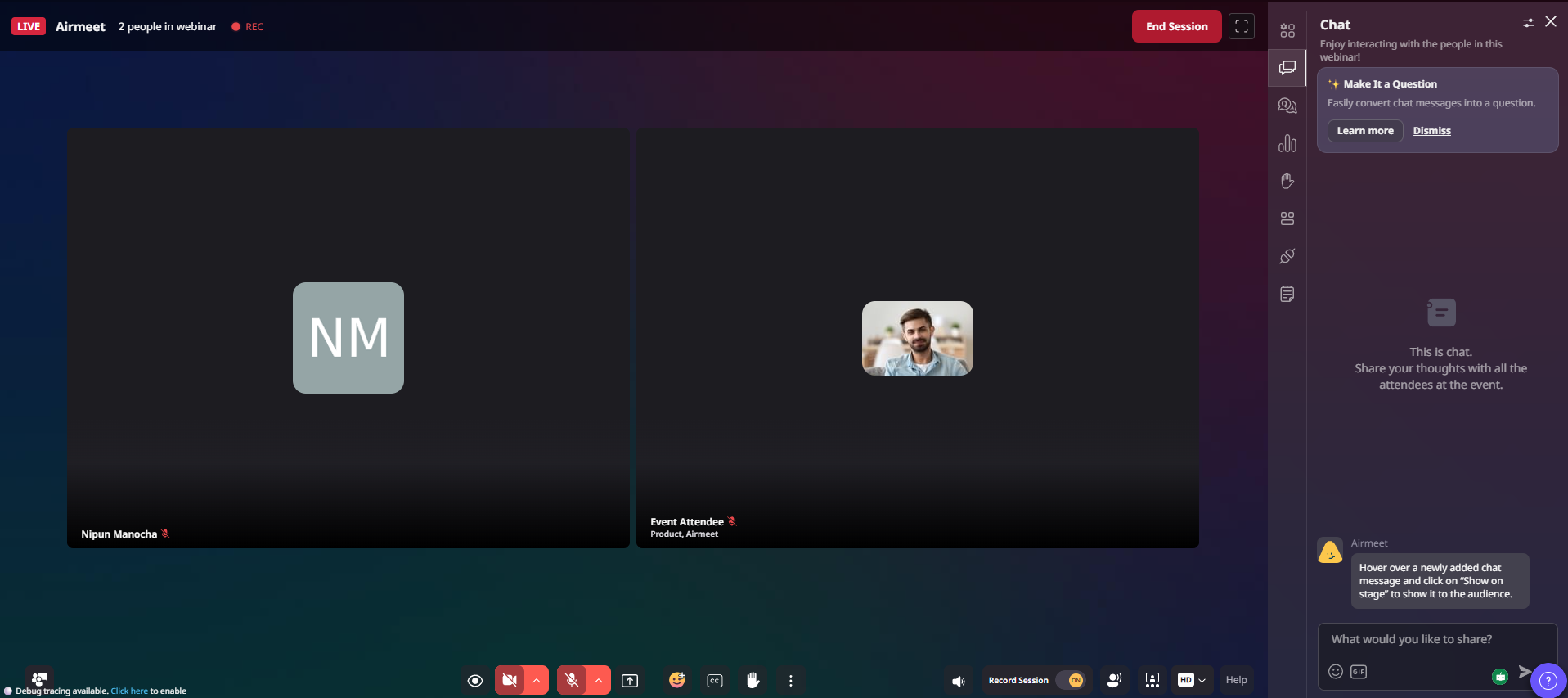
Keep hosts in control Hosts and co-hosts can pin video, mute microphones, turn off cameras, change layouts, manage recording, and end the session.
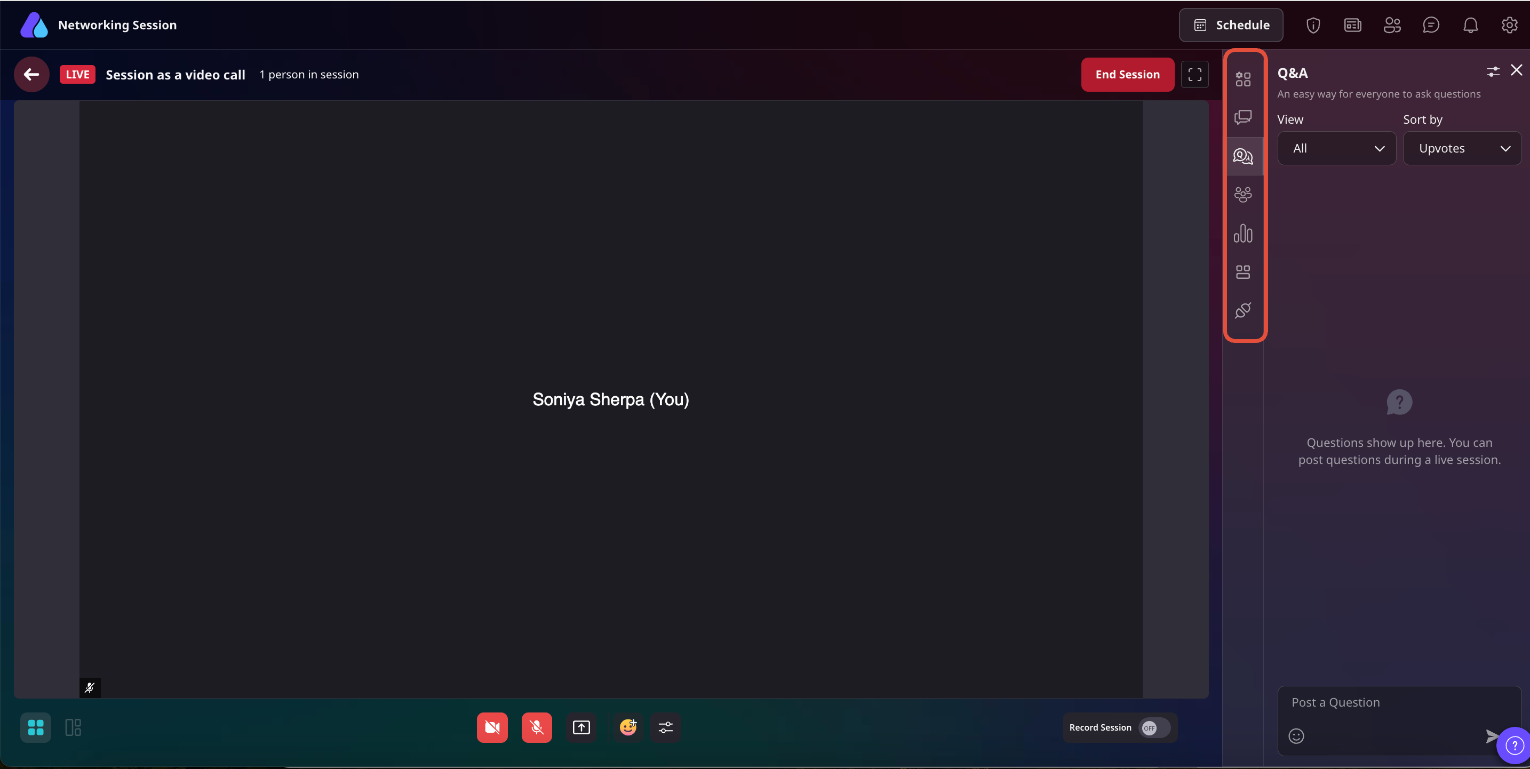
Layer in interaction Use chat, Q&A, advanced polls, breakout rooms, people-in-session controls, and iframes from the session's right-hand panel.
USE CASES
Build the conversation around the buyer moment
Choose the format when participation itself is the value - feedback, co-creation, peer proof, or direct expert access.
Customer advisory boards
Give customers and prospects room to compare priorities, reveal objections, and shape the roadmap conversation.
Interactive workshops
Move from presentation to practice quickly, so attendees can test ideas and learn from one another.
Peer community discussions
Let practitioners exchange real examples at scale without turning every contribution into a stage-management task.
Post-webinar expert clinics
Keep high-intent attendees engaged after the keynote with direct access to experts and peers.
Actual Product Screenshots
Step-by-step process
Step 1. Create a new session
From the Event Dashboard, navigate to Sessions and click Create Session. Enter the session details, including the title, description, speakers or hosts, and schedule.
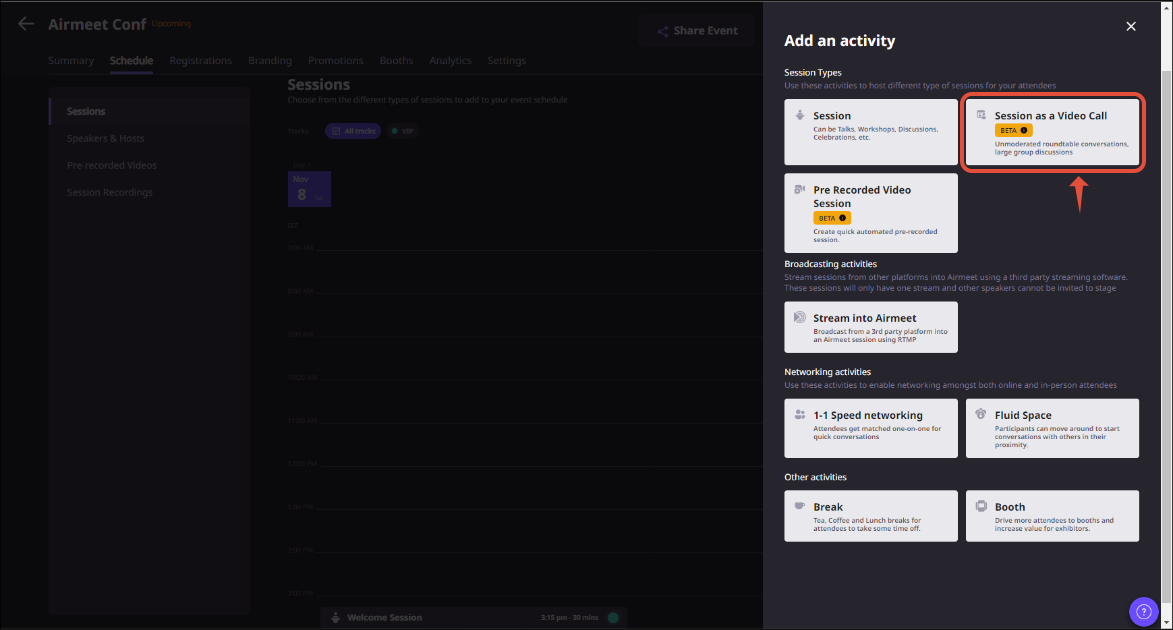
Step 2. Select “Session as a Video Call”
Under the session format, choose “Session as a Video Call” instead of the standard stage session. This enables a collaborative discussion format where attendees can participate by unmuting themselves.
Step 3. Configure session settings
Review and configure the session settings before publishing. You can define-
Session timing.
Hosts and co-hosts.
Recording preferences.
Breakout Room availability.
Audience interaction settings.
Step 4. Publish the session
Save your configuration and publish the session as part of your event agenda. Once published, attendees will see it in the event schedule.
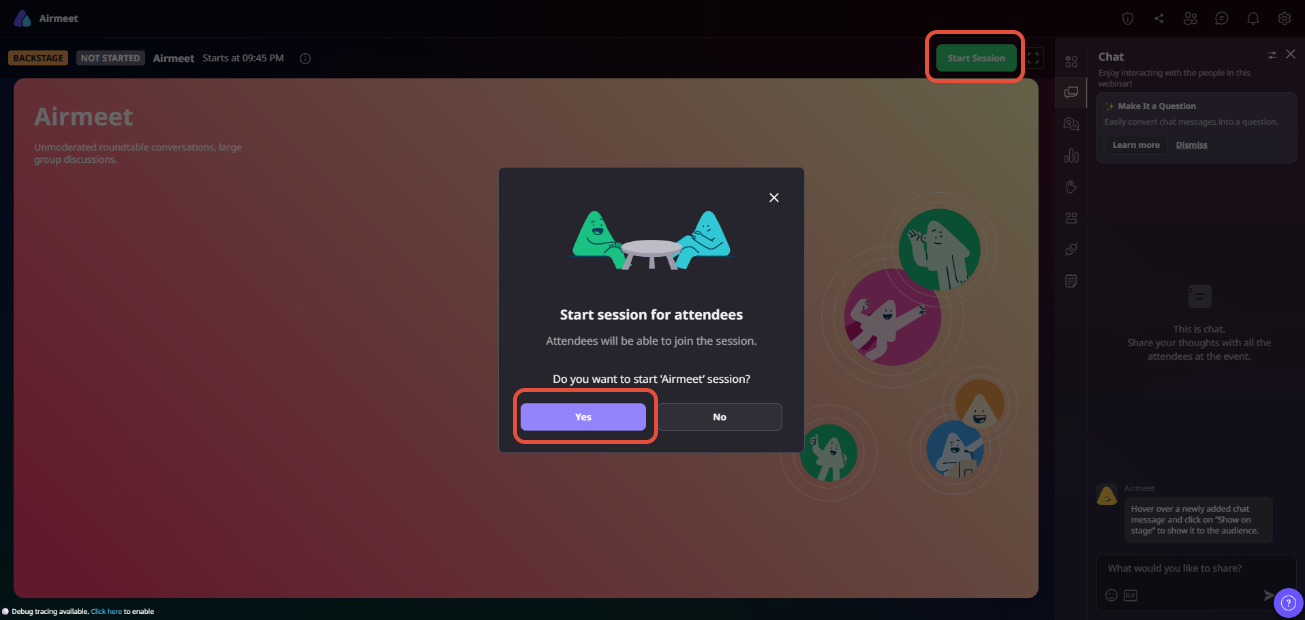
Step 5. Start the session
At the scheduled time, the assigned Host or Co-host starts the session from the Event Dashboard or event interface. Only mapped hosts and co-hosts can start or end a Session as a Video Call.
Step 6. Manage the live discussion
During the session, hosts can manage the conversation using built-in controls, including-
– Pin participant videos. – Mute participant microphones. – Turn participant cameras on or off. – Switch between layouts. – Start or stop recording. – Launch Breakout Rooms. – Use Chat, Q&A, Polls, and People panel.
This allows organizers to maintain an engaging discussion while keeping the session organized.
Step 7. End the session
When the discussion concludes, the host or co-host ends the session. If recording was enabled, the recording is processed and becomes available from the Event Dashboard after the session ends.
WHY CHOOSE AIRMEET
Large-room energy, event-grade guardrails
Move from scheduled content to high-value conversation without sending your audience into a disconnected meeting tool.
Scale without forcing a broadcast Support a large connected audience while preserving the immediacy of a group meeting.
Integrated into the event experience Session as a Video Call works within the same Airmeet event environment, allowing attendees to move seamlessly between sessions, networking, engagement activities, and post-event follow-up.
Guardrails for live operators Hosts and co-hosts retain practical controls over participant audio/video, layout, recording, and session end state.
Richer engagement insights Open discussions, poll responses, breakout participation, and attendee interactions provide valuable context that helps marketing and sales teams identify follow-up opportunities after the event.
Make the discussion part of the revenue journey Use open participation to surface questions, objections, peer evidence, and next-step intent—then give sales and marketing richer context for relevant follow-up.
help Center
Relevant Help Articles
Explore guides and tutorials to help you create, customize, and host exceptional events on Airmeet.
How to set up 'Session as a Video Call' and start the session
It is Airmeet’s open group-meeting session format for unmoderated roundtables and large discussions. Participants can join the conversation by unmuting rather than requesting access to a stage.
Session as a Video Call supports up to 1,000 participants, making it ideal for large workshops, customer discussions, advisory boards, and interactive webinars.
No. In this format, attendees can contribute by unmuting themselves, which makes the experience better suited to open discussion than a tightly moderated stage session.
They can pin video, mute participant microphones, turn off participant cameras, hide self-view, change the layout, send reactions, manage recording, and end the session.
Yes. Recording is enabled by default, and hosts or co-hosts can manage recording during the session. After the session ends, the recording becomes available in the Event Dashboard.
Session as a Video Call supports engagement tools such as Chat, Q&A, Advanced Polls, Breakout Rooms, People in Session, and embedded iframes, allowing organizers to create highly interactive discussions alongside live conversations.
Use Session as a Video Call when audience participation is the primary goal. It works especially well for customer advisory boards, interactive workshops, user groups, peer discussions, expert clinics, and collaborative roundtables where attendees actively contribute to the conversation.
Standard webinar sessions are designed for presenter-led broadcasts with moderated audience participation. Session as a Video Call creates a more collaborative meeting environment where attendees can speak freely by unmuting themselves, making it ideal for open discussions and group collaboration.
Yes. Hosts and co-hosts can mute participant microphones, turn participant cameras on or off, pin videos, change layouts, manage recording, and oversee the discussion to keep the session organized and engaging.
Airmeet features
Other Features to Explore
Discover more powerful features that help you create engaging, branded, and seamless event experiences with Airmeet.
“I was really excited to see how alive Airmeet seemed. The first time I raised my virtual hand to ask a question, I was brought up on stage, my camera flipped on, and I was able to talk with the presenters, that was the sold-moment in my head! That is what I wanted. We weren't going to be speaking at our audience. We wanted a two-way engagement. With the analytics in the background, that was my “Aha moment!”
Victoria YounesExecutive Events Manager
Incredible Companies Use Airmeet
Most loved Virtual Events Platform
“I was really excited to see how alive Airmeet seemed. The first time I raised my virtual hand to ask a question, I was brought up on stage, my camera flipped on, and I was able to talk with the presenters, that was the sold-moment in my head! That is what I wanted. We weren't going to be speaking at our audience. We wanted a two-way engagement. With the analytics in the background, that was my “Aha moment!”
Victoria YounesExecutive Events Manager
Incredible Companies Use Airmeet
Most loved Virtual Events Platform
“I was really excited to see how alive Airmeet seemed. The first time I raised my virtual hand to ask a question, I was brought up on stage, my camera flipped on, and I was able to talk with the presenters, that was the sold-moment in my head! That is what I wanted. We weren't going to be speaking at our audience. We wanted a two-way engagement. With the analytics in the background, that was my “Aha moment!”
Victoria YounesExecutive Events Manager
Incredible Companies Use Airmeet
Most loved Virtual Events Platform
“I was really excited to see how alive Airmeet seemed. The first time I raised my virtual hand to ask a question, I was brought up on stage, my camera flipped on, and I was able to talk with the presenters, that was the sold-moment in my head! That is what I wanted. We weren't going to be speaking at our audience. We wanted a two-way engagement. With the analytics in the background, that was my “Aha moment!”