Turn every webinar asset into an easy-to-find, measurable part of the event journey.
The all-new document hub is a one-stop solution for event resources. Upload files and links, control who can access them, connect assets to relevant sessions, and let attendees discover, view, and download content without leaving the event.
Your Best Event Content Should Not Be The Hardest Thing To Find
High-value slides, guides, checklists, and offers are often scattered across chat messages, email follow-ups, cloud folders, and speaker links.
Attendees lose momentum when they must leave the webinar, search another channel, or remember where a resource was shared.
Organizers struggle to keep the right content visible to the right audience—and to understand which assets actually earned attention.
The Solution
Keep Valuable Content Within Easy Reach
Upload documents and links to one central library, organize them by session, and control who can access each resource.
Create one content journey from session to follow-up. Keep resources available across the event cycle—from pre-event entry to live session and post-event replay.
Attendees can discover, view, and download materials without leaving the event, while organizers gain useful engagement insights for post-event follow-up.
Use resource views and downloads as practical content-intent signals for event reporting and follow-up.
Use Cases
Useful In Every Revenue-Focused Webinar Motion
Demand-generation webinars
Keep the benchmark report, buyer guide, or checklist beside the conversation that creates demand.
Product demos
Map setup guides, comparison sheets, and technical documentation to the session where product interest peaks.
Customer education
Give learners one reliable place for workbooks, slides, templates, recordings, and next-step materials.
Partner and sponsor events
Organize co-branded kits and session-specific assets without sending attendees into a maze of external tabs.
Actual Product Screenshots
Step-By-Step Process: How To Set Up The Resource Hub
Step 1. Open the Resource Hub
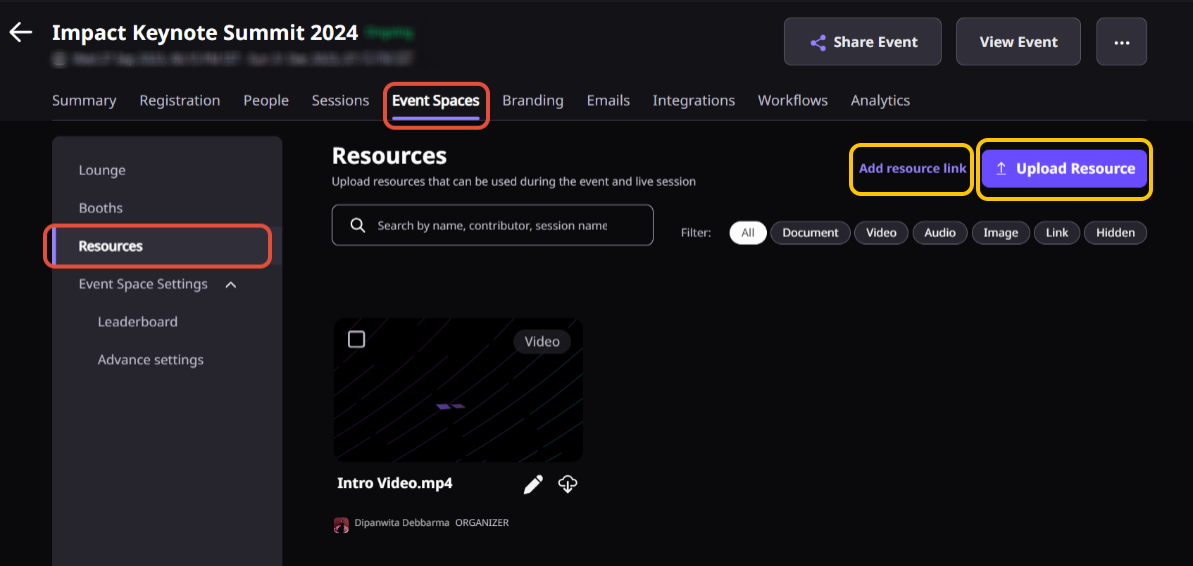
From the Event Dashboard, navigate to Resource Hub and start creating your event’s resource library.
Step 2. Add resources
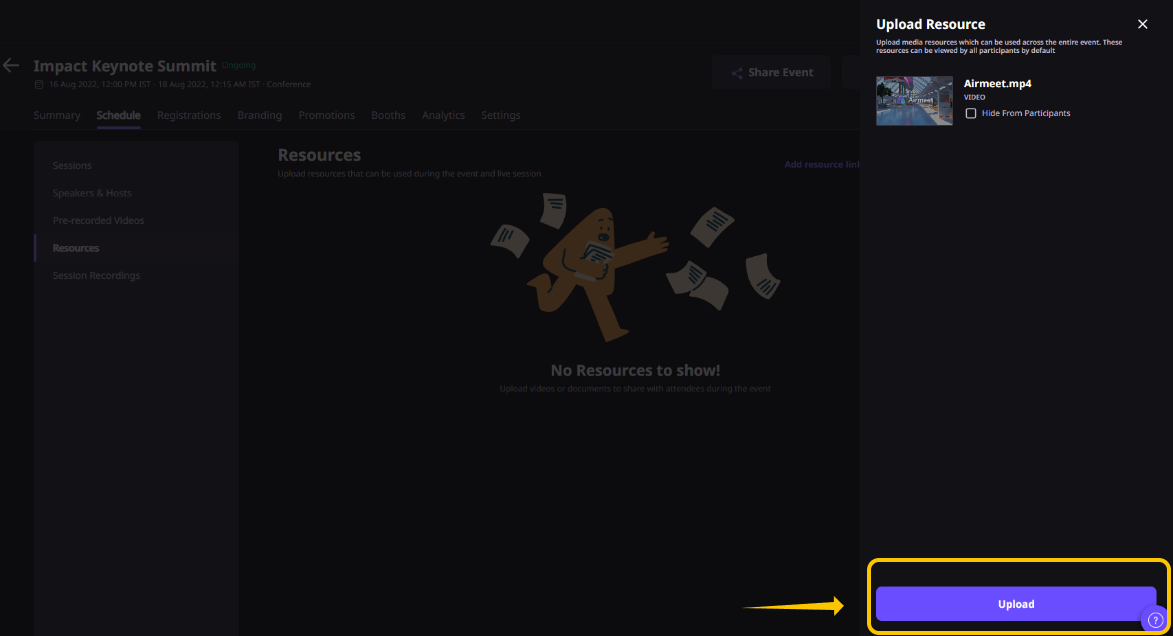
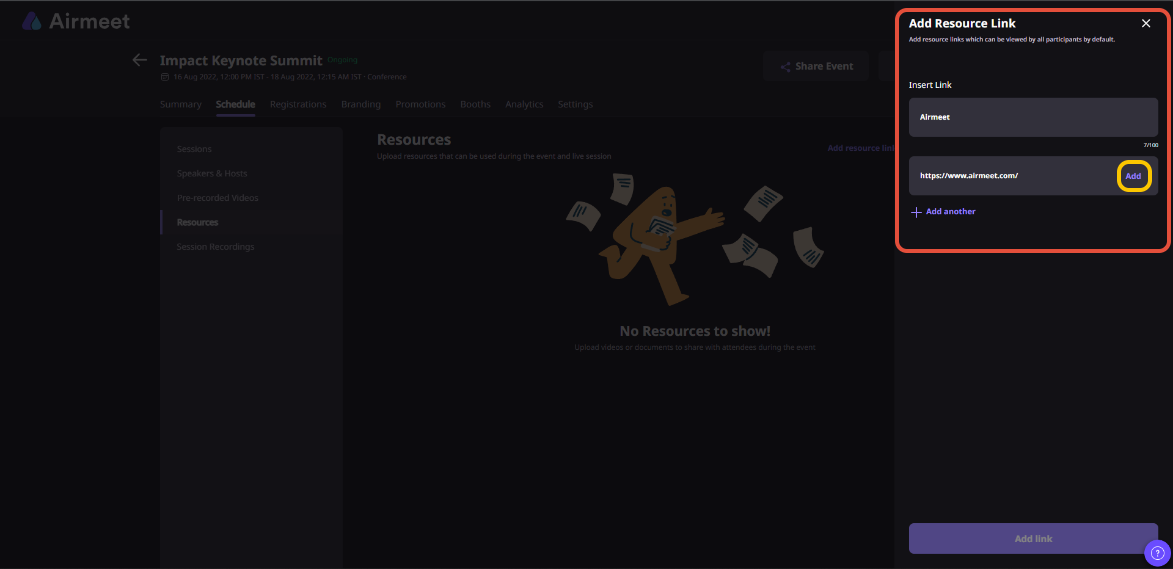
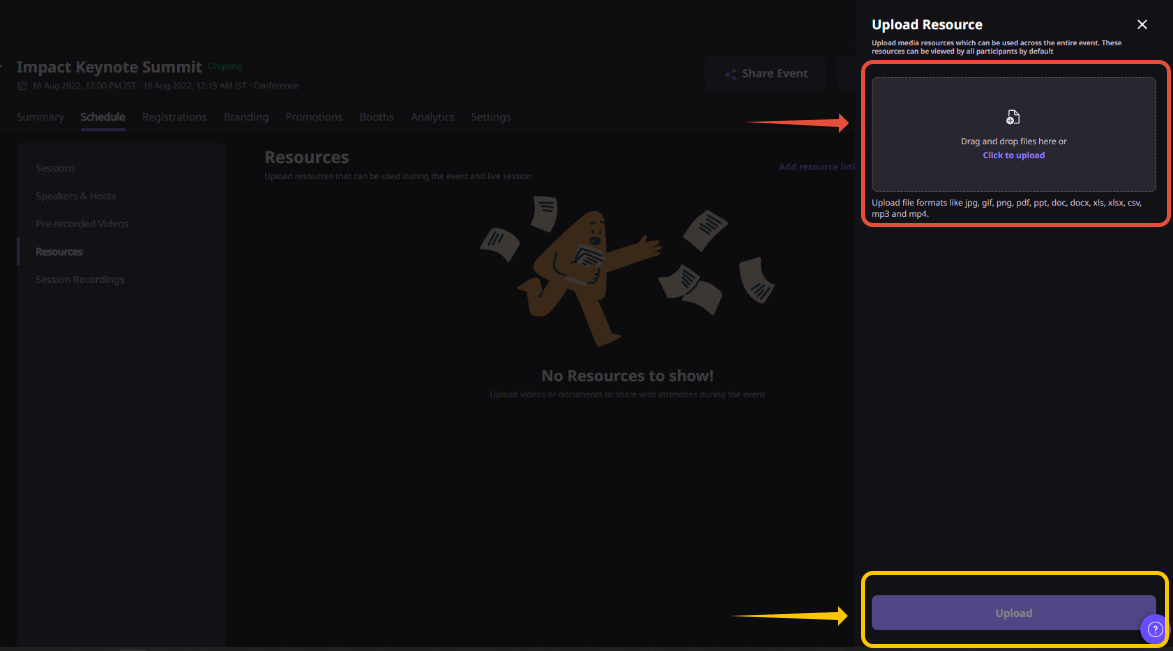
Upload documents or media files, or add external links that attendees can access during the event.
Step 3. Organize and control access
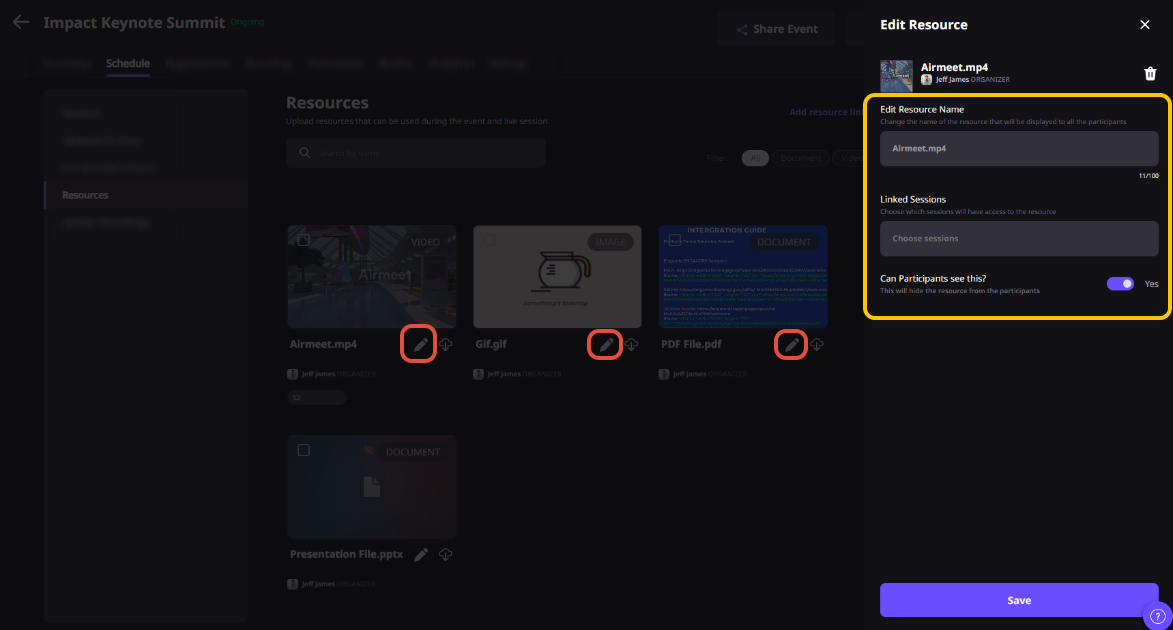
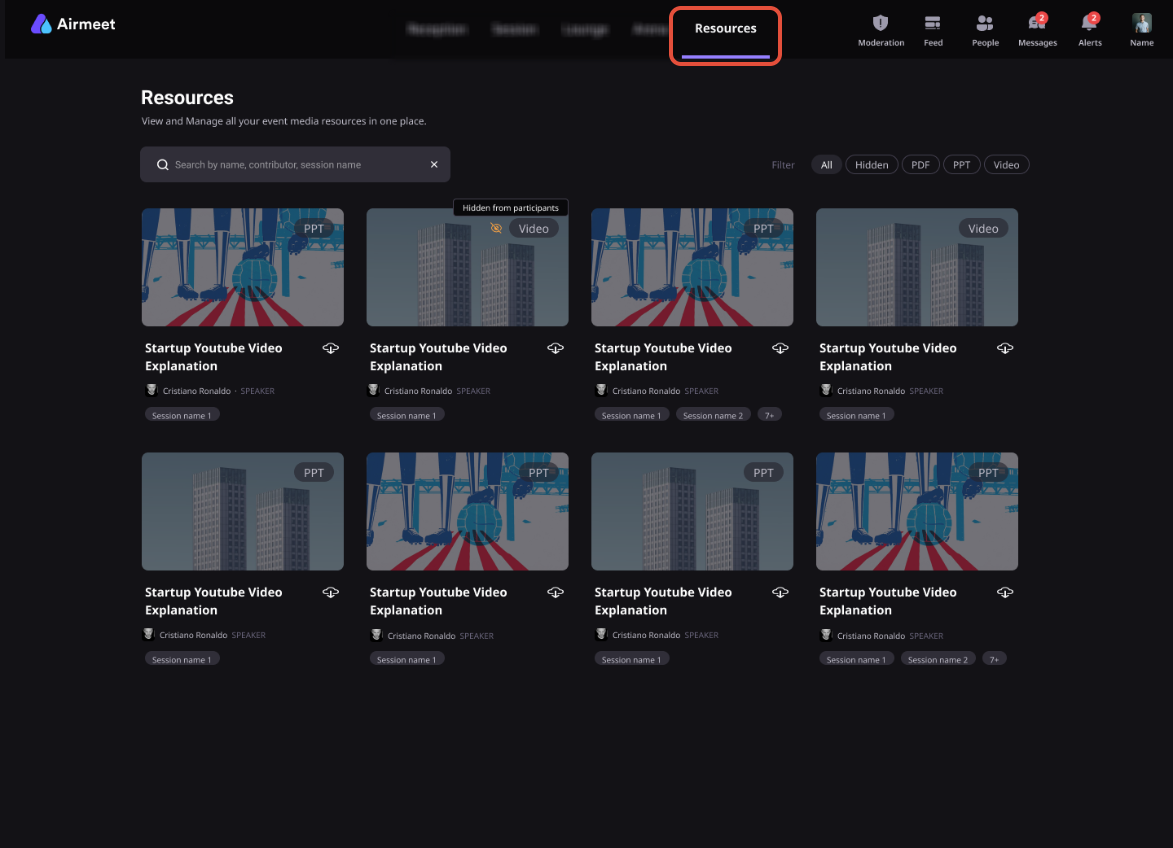
Rename resources, choose whether they’re visible or hidden, map them to relevant sessions, and, where supported, control access for specific attendee segments.
Step 4. Publish and monitor engagement
Once your resources are live, attendees can discover, view, and download them throughout the event. Organizers can review resource activity to understand which assets attracted the most interest.
Why Airmeet
Why Choose Airmeet For Resource Hub
One connected event experience Content discovery happens inside the event instead of becoming a disconnected post-webinar task.
Control without content chaos Manage names, downloads, visibility, session mapping, and segment access from a shared resource workflow.
Relevance at the moment of intent Place each asset near the session and audience most likely to value it.
Signals marketers can activate Resource activity adds context to engagement reporting, helping teams see which content deserves follow-up or reuse.
help Center
Relevant Help Articles
Explore guides and tutorials to help you create, customize, and host exceptional events on Airmeet.
Resource hub is Airmeet’s in-event document and link library. It gives organizers one place to upload, organize, control, and showcase event resources while attendees discover, view, and download them without leaving the event.
Organizers can upload a wide range of files—including presentations, PDFs, documents, spreadsheets, images, audio, and video—or add external links to useful resources. Supported formats may vary by plan and should be confirmed before large uploads.
Yes. You can upload multiple resources for an event. Airmeet currently supports up to 500 resources per event, with individual file sizes of up to 2 GB, subject to current platform limits.
Yes. Organizers can choose which resources attendees can see by hiding individual items or controlling visibility for specific audience segments where supported.
Yes. Resources can be associated with one or more sessions, making it easier for attendees to find the right documents exactly when they are most relevant.
Yes. The Resource Hub remains available during the Event Replay, allowing attendees to revisit and download useful materials even after the live event has ended.
Yes. Airmeet tracks resource engagement, including views and downloads. These insights help organizers understand which content attracted the most attention and can support more informed follow-up after the event.
Treat a resource view or download as one engagement signal—not a buying decision on its own. Combine resource activity with attendance, watch time, poll responses, questions, CTA clicks, and other engagement data to create more relevant follow-up.
Airmeet features
Other Features to Explore
Discover more powerful features that help you create engaging, branded, and seamless event experiences with Airmeet.
“I was really excited to see how alive Airmeet seemed. The first time I raised my virtual hand to ask a question, I was brought up on stage, my camera flipped on, and I was able to talk with the presenters, that was the sold-moment in my head! That is what I wanted. We weren't going to be speaking at our audience. We wanted a two-way engagement. With the analytics in the background, that was my “Aha moment!”
Victoria YounesExecutive Events Manager
Incredible Companies Use Airmeet
Most loved Virtual Events Platform
“I was really excited to see how alive Airmeet seemed. The first time I raised my virtual hand to ask a question, I was brought up on stage, my camera flipped on, and I was able to talk with the presenters, that was the sold-moment in my head! That is what I wanted. We weren't going to be speaking at our audience. We wanted a two-way engagement. With the analytics in the background, that was my “Aha moment!”
Victoria YounesExecutive Events Manager
Incredible Companies Use Airmeet
Most loved Virtual Events Platform
“I was really excited to see how alive Airmeet seemed. The first time I raised my virtual hand to ask a question, I was brought up on stage, my camera flipped on, and I was able to talk with the presenters, that was the sold-moment in my head! That is what I wanted. We weren't going to be speaking at our audience. We wanted a two-way engagement. With the analytics in the background, that was my “Aha moment!”
Victoria YounesExecutive Events Manager
Incredible Companies Use Airmeet
Most loved Virtual Events Platform
“I was really excited to see how alive Airmeet seemed. The first time I raised my virtual hand to ask a question, I was brought up on stage, my camera flipped on, and I was able to talk with the presenters, that was the sold-moment in my head! That is what I wanted. We weren't going to be speaking at our audience. We wanted a two-way engagement. With the analytics in the background, that was my “Aha moment!”