Run a calmer, more polished webinar with a private space for speakers and hosts to prepare, coordinate, and solve issues – before and throughout the live session.
Your audience should see the show - not the scramble
Live webinars move fast. A missing cue, last-minute change, or technical issue can derail the speaker experience and distract attendees from the message. Event teams need a private, session-specific place to prepare, coordinate, and communicate without exposing production work to attendees.
Speaker uncertainty Presenters need a clear place to confirm the run of show, handoffs, and who speaks next.
Fragmented coordination Side channels and scattered messages slow decisions when timing is tight.
Visible troubleshooting Audio, video, or presentation issues feel larger when the audience has to watch the team solve them live.
Awkward transitions Without a controlled waiting space, speaker changes can create silence, overlap, or unnecessary exposure.
The Solution
One private coordination layer from rehearsal to live delivery
Airmeet connects preparation, presenter communication, and stage management within the session through one private workspace. Mapped hosts enter backstage, align with speakers, keep a private text channel open during the event, and guide presenters onto the live stage at the right moments—without interrupting the attendee experience.
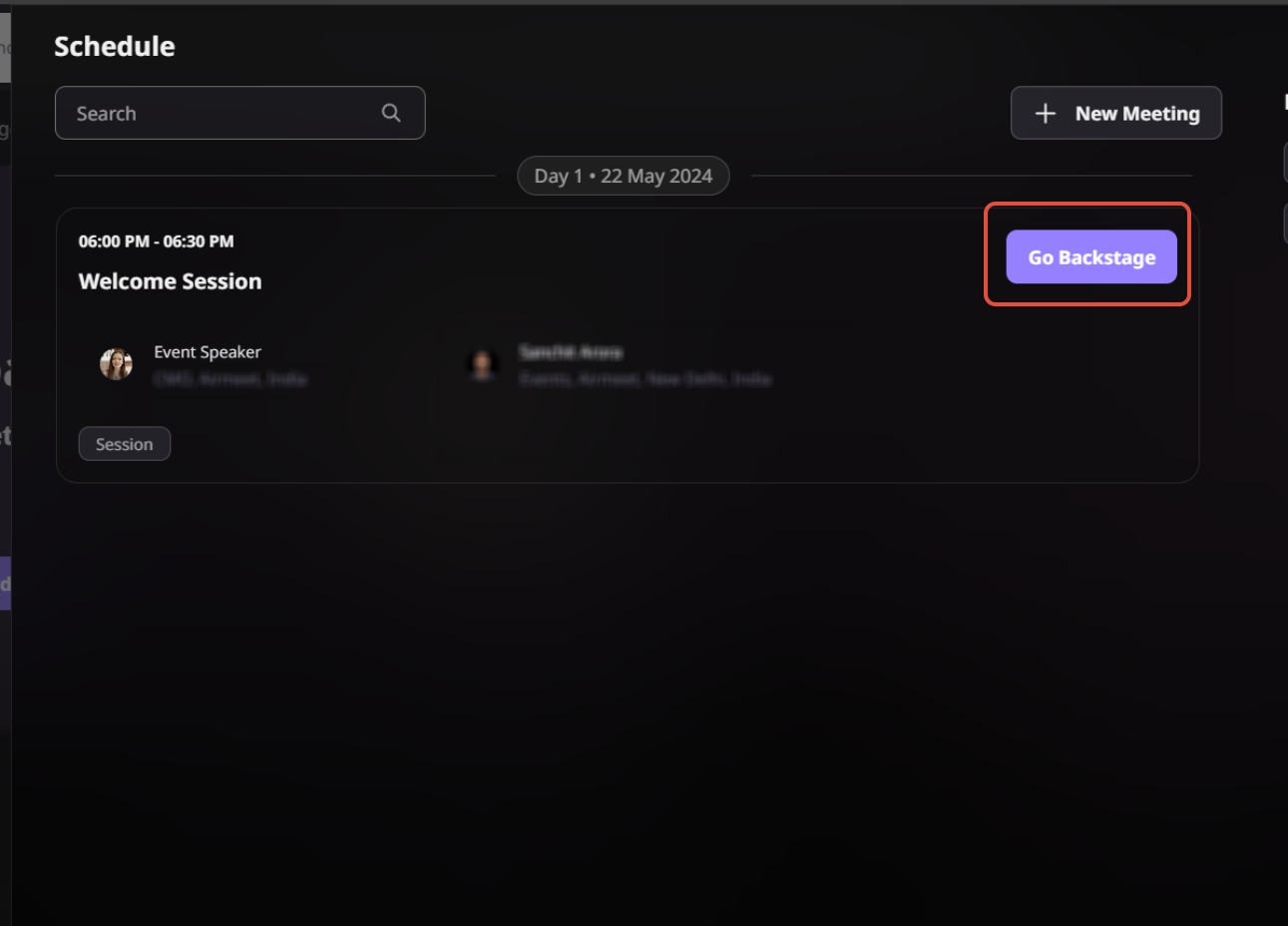
Enter the mapped session From the event schedule, the host selects Go Backstage for the relevant session.
Coordinate throughout the session Speaker Chat stays accessible so the presenting team can resolve issues and share cues privately.
Prepare together in private Hosts, co-hosts, and speakers can check audio, video, presentation content, timing, and responsibilities.
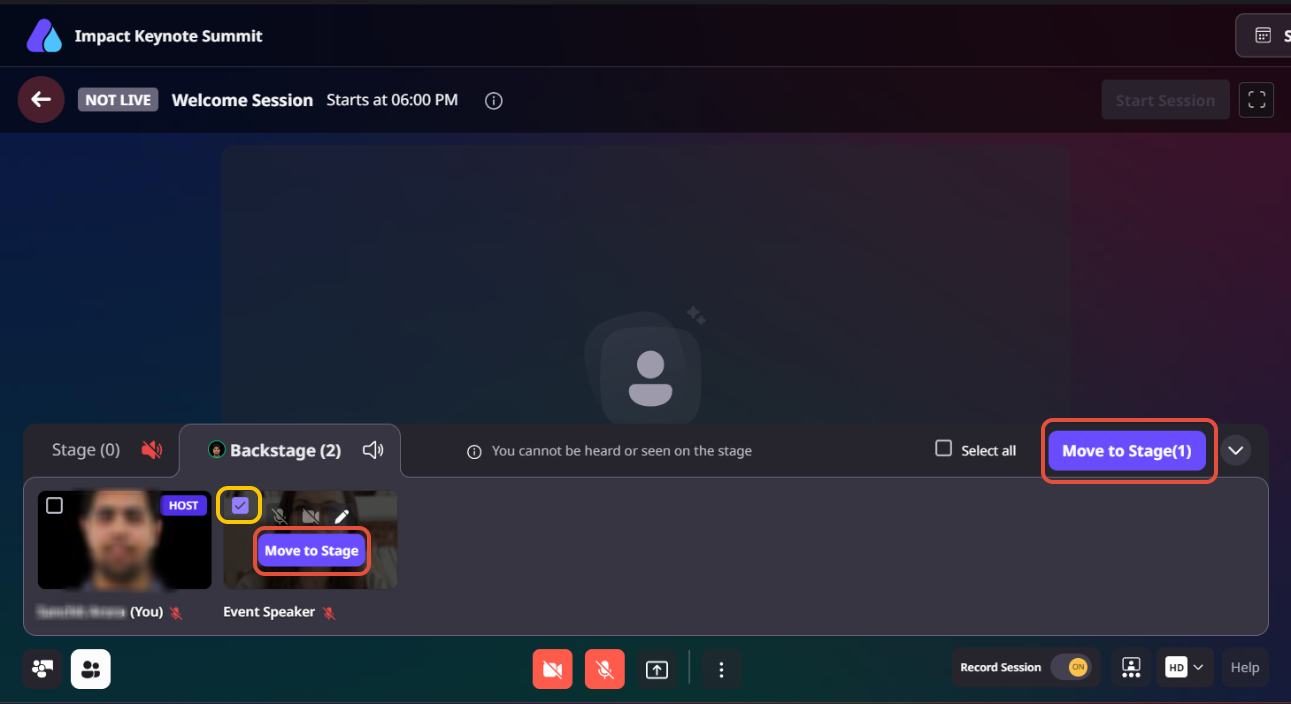
Control the live show flow Hosts and co-hosts can move speakers between backstage and stage as each segment begins or ends.
BUILT FOR REAL WEBINAR FORMATS
Private coordination wherever the conversation needs to convert
Different formats create different production risks. The same private backstage foundation helps each team protect the audience experience.
Product webinars
Cue demo handoffs, solve screen-share issues, and keep the narrative moving toward the next conversion moment.
Executive panels
Brief leaders privately, coordinate question order, and manage stage visibility without distracting attendees.
Customer roundtables
Help moderators align speakers, handle sensitive timing changes, and keep the discussion focused.
Virtual summits
Give each session team a consistent preparation and communication layer across a complex agenda.
See the real backstage and Speaker Chat experience
Step-by-step process - How Private Backstage & Speaker Chat works
Step 1. Enter backstage
Hosts, co-hosts, and speakers join the private backstage area before the session begins to prepare for the live event.
Step 2. Test everything before going live
Use the backstage space to check microphones, cameras, screen sharing, presentations, and speaker readiness before attendees join.
Step 3. Coordinate privately
Use Speaker Chat throughout the session to share cues, discuss timing, and resolve issues without exposing conversations to attendees.
Step 4. Bring speakers on stage
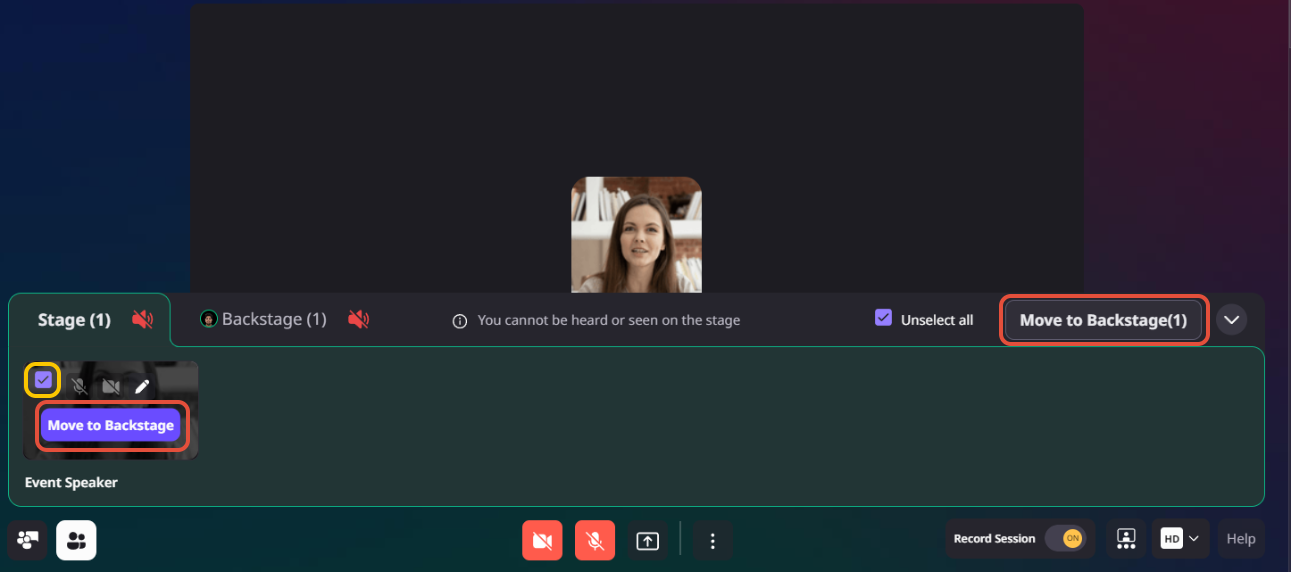
When it’s time for a presentation or discussion, hosts can invite speakers from backstage to the live stage.
Step 5. Move speakers off stage when needed
After a speaker finishes, hosts can return them to backstage while the next presenter joins the stage, keeping transitions smooth.
Step 6. Continue coordinating until the session ends
If the session is paused or plans change, the team can regroup backstage before resuming the live event.
Why Airmeet
Turn backstage readiness into a stronger audience experience
Private Backstage & Speaker Chat is not a disconnected green room. It works with mapped session roles, speaker controls, stage visibility, invitations, screen sharing, and pause/resume flows to support the full live-session operation.
Prepare with confidence Test content and video; align speakers before the audience arrives.
Coordinate privately Keep hosts and presenters connected through private Speaker Chat.
Protect show flow Move speakers at the right moment and recover quickly when plans change.
help Center
Relevant Help Articles
Explore guides and tutorials to help you create, customize, and host exceptional events on Airmeet.
Airmeet Persistence Backstage: ManageSpeakers On Stage and Backstage
It is a private session space where mapped speakers, hosts, and co-hosts can meet, prepare, and coordinate away from the attendee experience. It gives the team room to check audio, video, and presentation content before going live.
Yes. Speaker Chat remains available throughout the session, so presenters can coordinate while on stage or backstage without interrupting the audience’s experience.
It helps the event team protect presentation quality, keep speakers confident, reduce visible disruption, and deliver a more credible experience for prospects and customers. Those operational gains can support stronger engagement and follow-up, without guaranteeing a specific revenue result.
Airmeet features
Other Features to Explore
Discover more powerful features that help you create engaging, branded, and seamless event experiences with Airmeet.
“I was really excited to see how alive Airmeet seemed. The first time I raised my virtual hand to ask a question, I was brought up on stage, my camera flipped on, and I was able to talk with the presenters, that was the sold-moment in my head! That is what I wanted. We weren't going to be speaking at our audience. We wanted a two-way engagement. With the analytics in the background, that was my “Aha moment!”
Victoria YounesExecutive Events Manager
Incredible Companies Use Airmeet
Most loved Virtual Events Platform
“I was really excited to see how alive Airmeet seemed. The first time I raised my virtual hand to ask a question, I was brought up on stage, my camera flipped on, and I was able to talk with the presenters, that was the sold-moment in my head! That is what I wanted. We weren't going to be speaking at our audience. We wanted a two-way engagement. With the analytics in the background, that was my “Aha moment!”
Victoria YounesExecutive Events Manager
Incredible Companies Use Airmeet
Most loved Virtual Events Platform
“I was really excited to see how alive Airmeet seemed. The first time I raised my virtual hand to ask a question, I was brought up on stage, my camera flipped on, and I was able to talk with the presenters, that was the sold-moment in my head! That is what I wanted. We weren't going to be speaking at our audience. We wanted a two-way engagement. With the analytics in the background, that was my “Aha moment!”
Victoria YounesExecutive Events Manager
Incredible Companies Use Airmeet
Most loved Virtual Events Platform
“I was really excited to see how alive Airmeet seemed. The first time I raised my virtual hand to ask a question, I was brought up on stage, my camera flipped on, and I was able to talk with the presenters, that was the sold-moment in my head! That is what I wanted. We weren't going to be speaking at our audience. We wanted a two-way engagement. With the analytics in the background, that was my “Aha moment!”