But speaker calendars, rehearsals, and production risks make every additional live session expensive.
Subject-matter experts cannot repeat the same presentation indefinitely.
Technical glitches can derail a high-intent buyer moment.
Messaging drifts when every delivery is improvised.
One live time slot leaves global prospects behind.
The Solution
Record Once. Schedule Confidently. Engage At Scale.
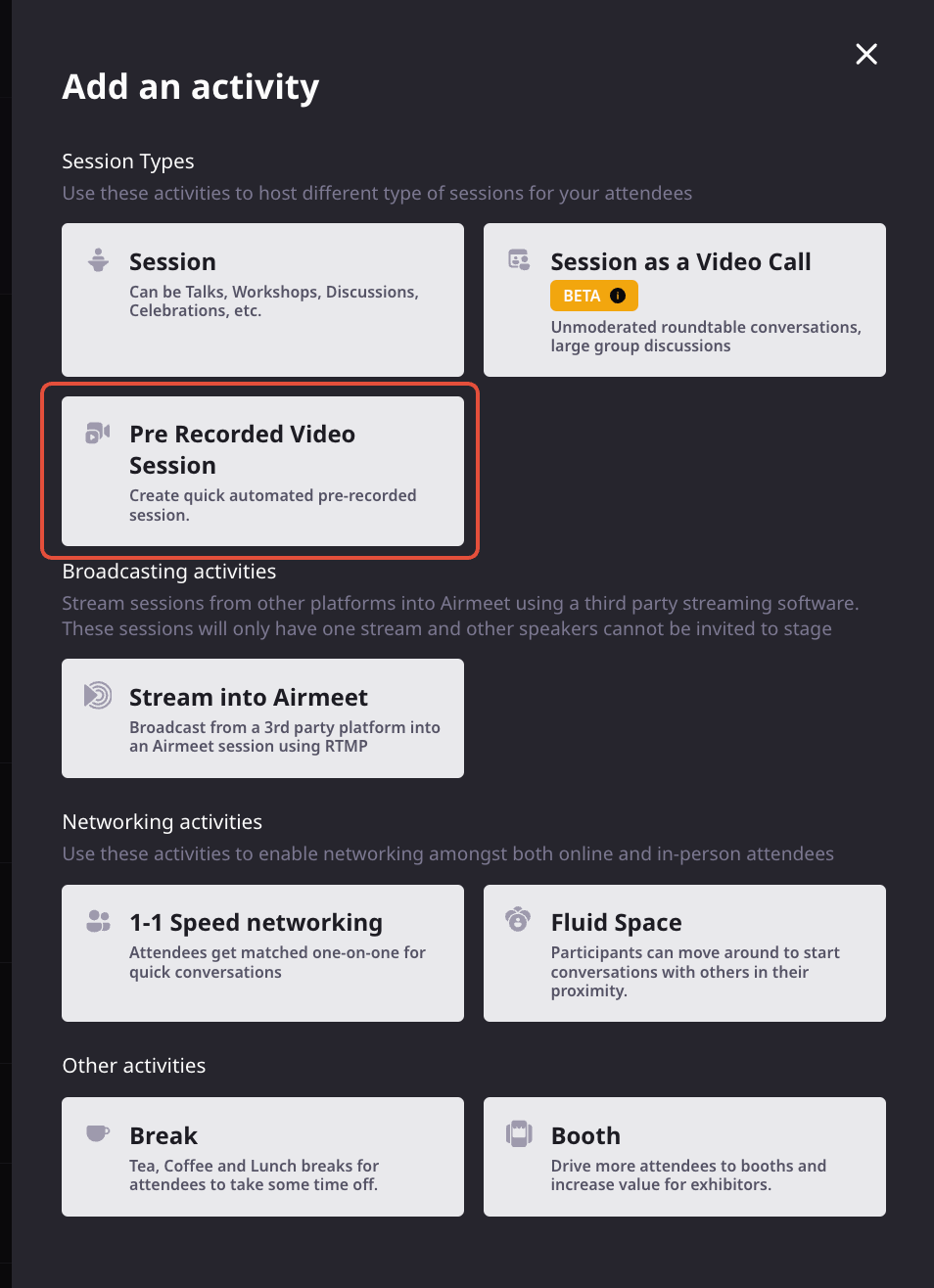
In the event dashboard, add a pre-recorded video session, set its date and start time, upload or select the MP4, preview it, and publish. Airmeet auto-plays the content at the scheduled time and ends the session when the video finishes.
On Time Automatic scheduled playback
Controlled Previewed, consistent content
Interactive Chat, Q&A, polls, and activities
Airmeet currently supports one MP4 file per automated session (up to 5 GB). Uploaded videos are optimized for streaming at up to 720p.
Use Cases
1 Workflow, 4 Revenue Plays
Product Demos
Deliver the same crisp story to every buying group.
Demand Generation
Run proven thought leadership across campaign windows and regions.
Customer Education
Scale onboarding and feature adoption without repeating the presentation.
Partner Programs
Give distributed audiences a consistent, co-branded experience.
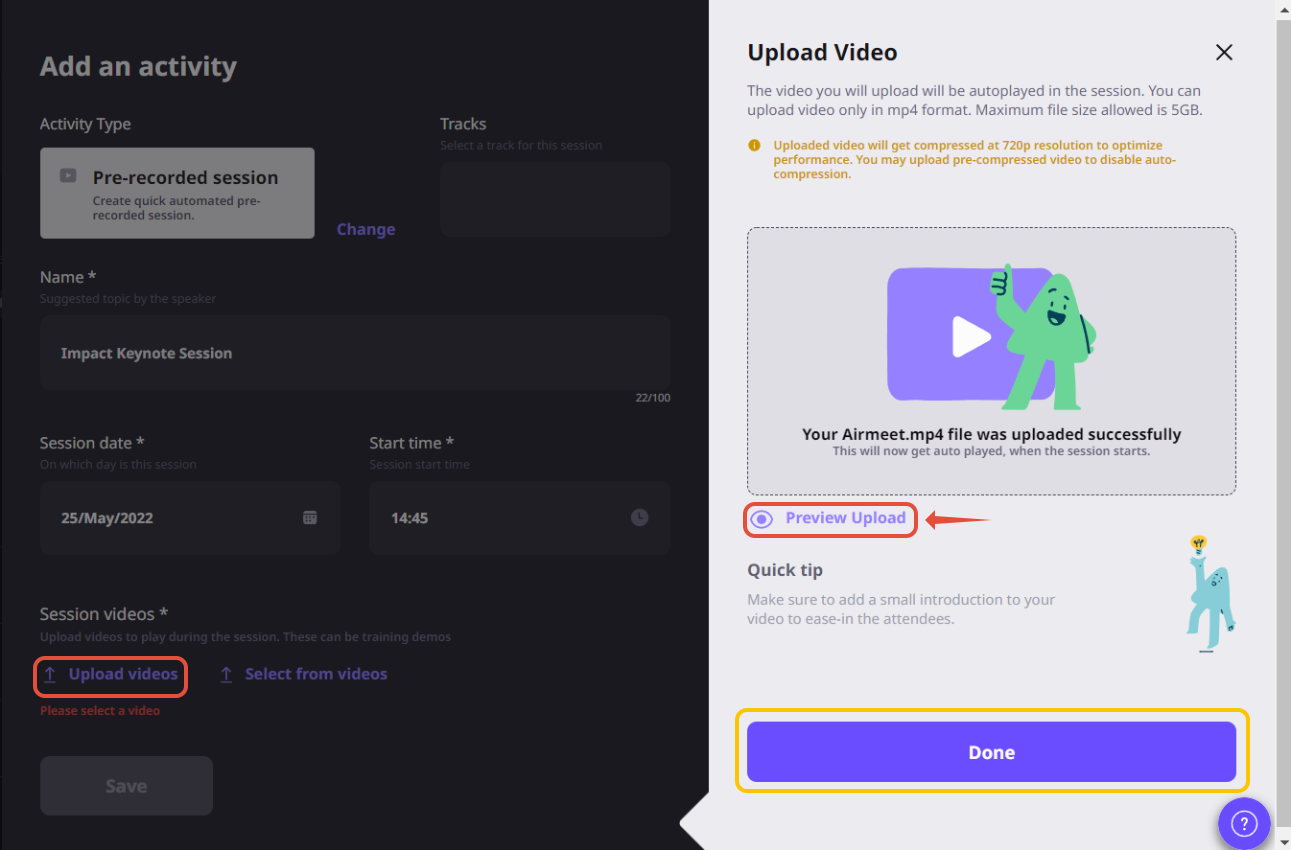
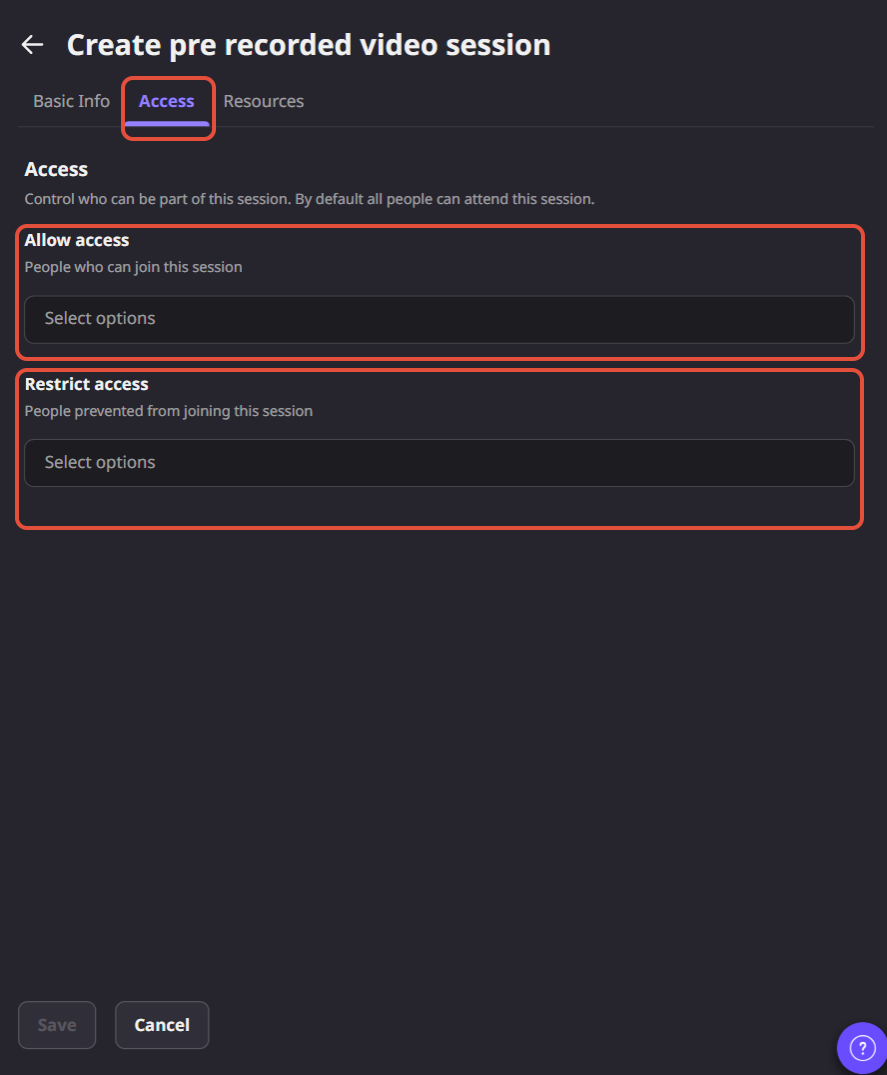
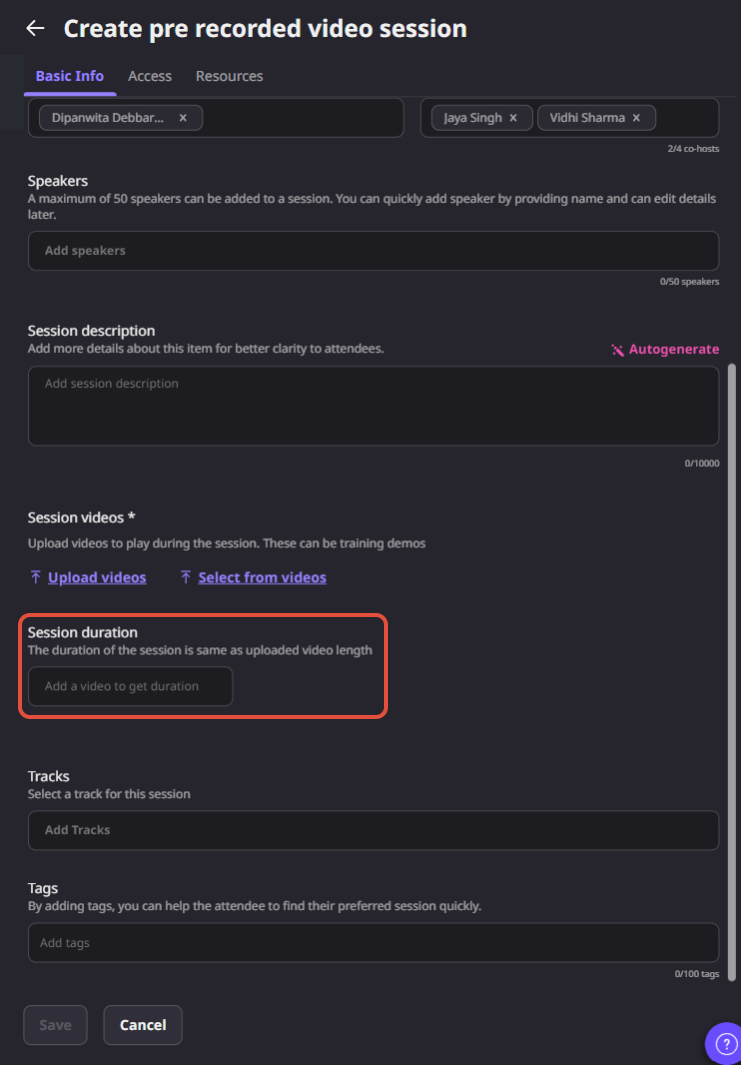
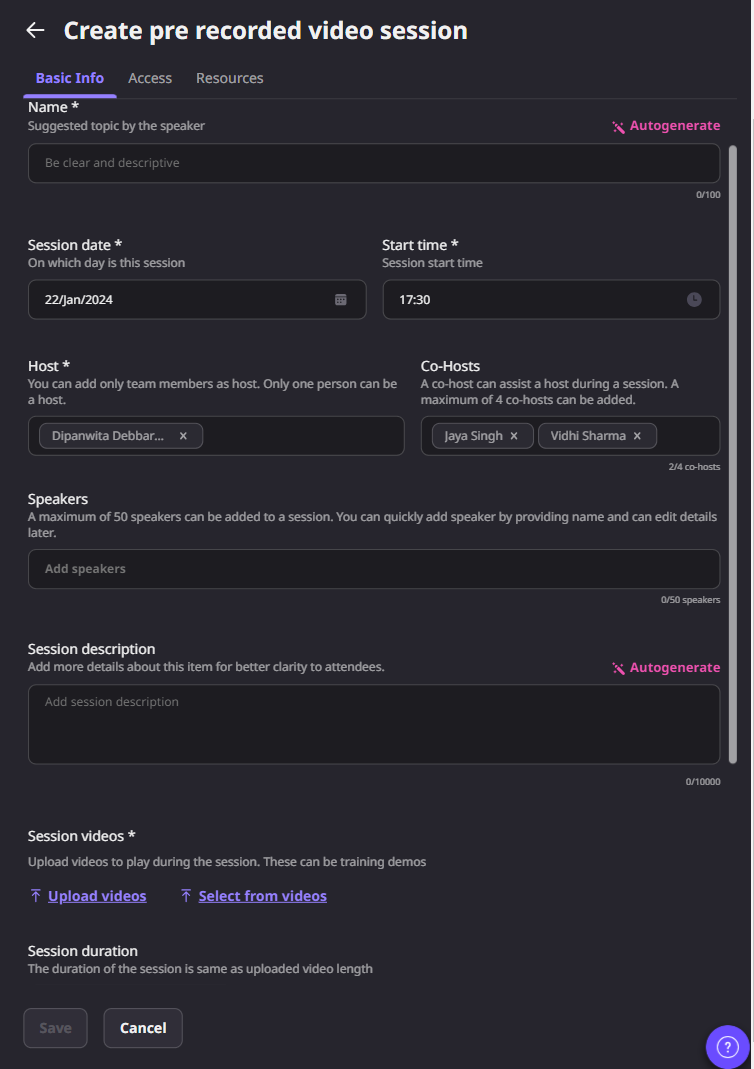
Product Screenshots
Setup: How To Create An Automated Session
Step 1. Open the event dashboard and navigate to Sessions.
Step 2. Click Add Schedule Item and choose Pre-Recorded Video Session.
Step 3. Enter the session details, including the title, schedule, track, tags, speakers, resources, and other settings.
Step 4. Upload an MP4 video or choose one from your existing Video Library.
Step 5. Preview the video to confirm playback before saving.
Step 6. Save the session. At the scheduled time, Airmeet automatically starts playback. The session ends automatically when the video finishes.
Why Airmeet
Automation That Still Behaves Like An Event
A basic video link delivers content. Airmeet wraps scheduled playback in a branded webinar environment where buyers can participate, and marketers can connect engagement to their follow-up motion.
Protect the message ship an edited, repeatable presentation.
Keep participation visible retain familiar interaction surfaces around the session.
Build a repeatable engine use the format for demos, education, and evergreen demand programs.
help Center
Relevant Help Articles
Explore guides and tutorials to help you create, customize, and host exceptional events on Airmeet.
How to automate live sessions with pre-recorded video on Airmeet
An automated session lets you schedule a pre-recorded webinar that plays automatically at the time you choose. Once the session starts, attendees watch the recorded presentation without a host needing to manually launch it.
Go to your event dashboard, open Sessions, add a Pre-Recorded Video Session, fill in the session details, upload or select your video, preview it, and save. Airmeet takes care of starting the session at the scheduled time.
Each automated session supports one pre-recorded video. If you want to schedule multiple videos, simply create separate automated sessions for each one.
The session starts automatically at its scheduled time and ends when the video finishes playing, so the session length matches the duration of your recording.
No. Automated sessions can run without assigning a host, co-host, or speaker. That said, many teams add a co-host to moderate chat, answer questions, or support attendees while the recording plays.
Yes. Even though the presentation is pre-recorded, attendees can still participate through features like chat, Q&A, polls, and other interactive tools during the session.
“I was really excited to see how alive Airmeet seemed. The first time I raised my virtual hand to ask a question, I was brought up on stage, my camera flipped on, and I was able to talk with the presenters, that was the sold-moment in my head! That is what I wanted. We weren't going to be speaking at our audience. We wanted a two-way engagement. With the analytics in the background, that was my “Aha moment!”
Victoria YounesExecutive Events Manager
Incredible Companies Use Airmeet
Most loved Virtual Events Platform
“I was really excited to see how alive Airmeet seemed. The first time I raised my virtual hand to ask a question, I was brought up on stage, my camera flipped on, and I was able to talk with the presenters, that was the sold-moment in my head! That is what I wanted. We weren't going to be speaking at our audience. We wanted a two-way engagement. With the analytics in the background, that was my “Aha moment!”
Victoria YounesExecutive Events Manager
Incredible Companies Use Airmeet
Most loved Virtual Events Platform
“I was really excited to see how alive Airmeet seemed. The first time I raised my virtual hand to ask a question, I was brought up on stage, my camera flipped on, and I was able to talk with the presenters, that was the sold-moment in my head! That is what I wanted. We weren't going to be speaking at our audience. We wanted a two-way engagement. With the analytics in the background, that was my “Aha moment!”
Victoria YounesExecutive Events Manager
Incredible Companies Use Airmeet
Most loved Virtual Events Platform
“I was really excited to see how alive Airmeet seemed. The first time I raised my virtual hand to ask a question, I was brought up on stage, my camera flipped on, and I was able to talk with the presenters, that was the sold-moment in my head! That is what I wanted. We weren't going to be speaking at our audience. We wanted a two-way engagement. With the analytics in the background, that was my “Aha moment!”