Airmeet features

Automated calendar invites

Turn session interest into protected time. Registered attendees can add the exact Airmeet sessions they want to attend to their preferred calendar – directly from the event agenda – so the path from registration to live participation has less friction.

Automated calendar invites
A registration is interest. It is not yet attendance.

The Problem

A registration is interest. It is not yet attendance.

B2B audiences register with good intent, then return to a crowded work calendar. Multi-session agendas add another decision: which sessions deserve protected time? Without an easy way to reserve the exact session, marketers risk no-shows, late arrivals, and lower live engagement - even when the content is highly relevant.

The Solution

Move the chosen session into the attendee's real schedule

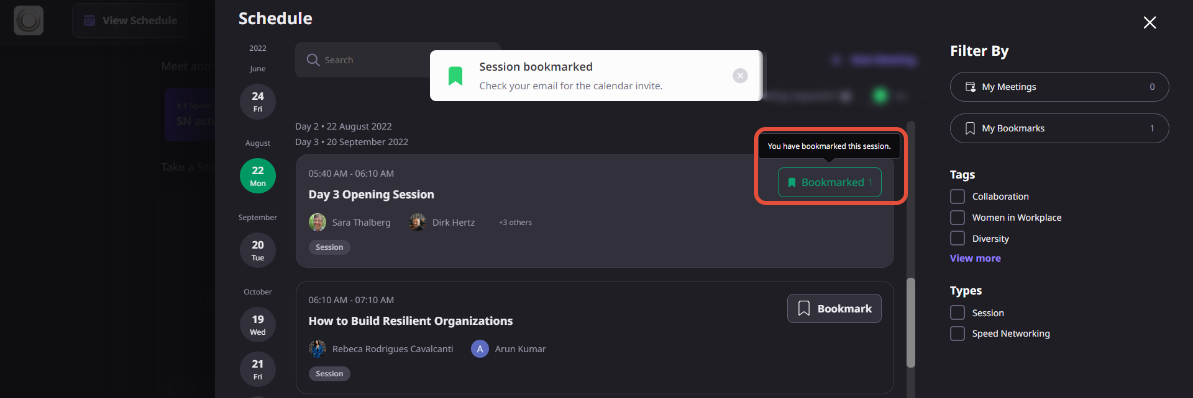
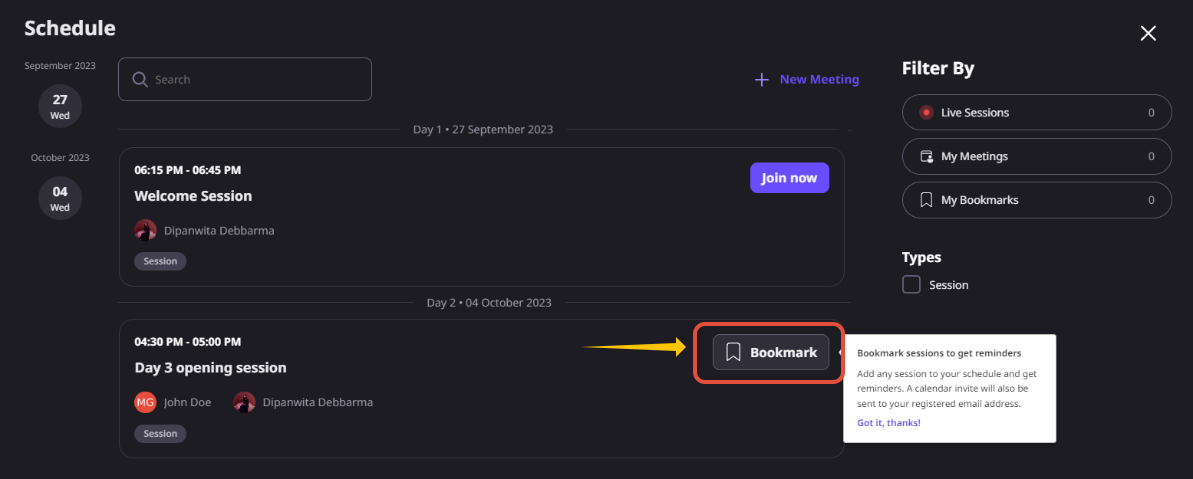
Reserve time for the sessions that matter. After registering, attendees can browse the event agenda and add individual sessions to their preferred calendar with just a few clicks. For sessions bookmarked inside the event, Airmeet can also send a calendar invite to the attendee's registered email address. Together, these options help reduce missed sessions and make it easier to return at the right time.
Move the chosen session into the attendee's real schedule

BENEFITS BY VIRTUAL EVENT USE CASE

Give every high-value session a place on the calendar

Demand-generation webinars

Reserve the exact product demo, panel, or buyer-education session that matters to each registrant.

Multi-track virtual summits

Help attendees turn a dense agenda into a personal plan and reduce conflicts across parallel sessions.

Give every high-value session a place on the calendar

Customer education series

Place onboarding, training, and office-hour sessions directly into customer calendars.

Partner and ecosystem events

Make co-marketing sessions easier to remember across busy partner schedules and time zones.

Actual Product Screenshots

Connect discovery, attendance, engagement, and follow-up

Why Airmeet

Connect discovery, attendance, engagement, and follow-up

Calendar invites sit inside a broader Airmeet attendee journey: a branded landing page earns registration, the agenda helps attendees choose, the calendar protects time, the live experience creates engagement signals, and post-event teams follow up with better context. For revenue-focused webinar programs, the advantage is continuity – fewer handoffs between intent and participation.

Airmeet also supports event-level calendar adds, in-event session bookmarks and reminders, agenda tracks, and scheduled attendee meetings, giving marketers multiple ways to help audiences plan and participate.

help Center

Relevant Help Articles

Explore guides and tutorials to help you create, customize, and host exceptional events on Airmeet.
How to bookmark sessions and add them on your calendar?
How to Register for an Event at Airmeet as an Attendee?
Step By Step Guide for Attendees - Virtual Event Format
How to enter Airmeet Events based on different event entries?

FAQs

Frequently Asked Questions

Automated calendar invites let registered attendees add individual Airmeet sessions to their preferred calendar directly from the event agenda. This makes it easier to reserve time and remember important sessions.

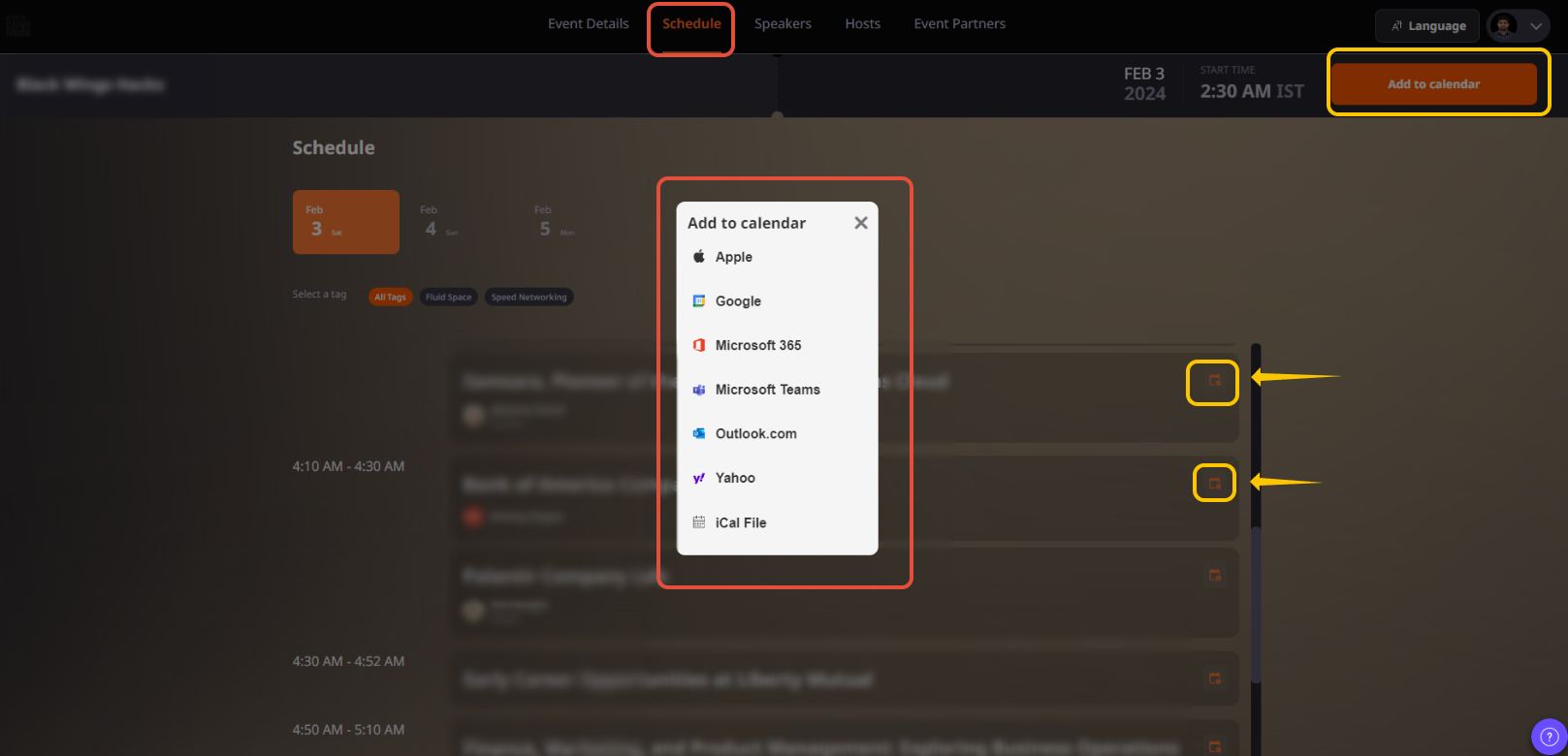
After registering, the attendee scrolls to the event agenda on the landing page and selects the Add to Calendar icon beside the session they want to attend. 

Yes. After clicking Add to Calendar, attendees can choose their preferred calendar application before saving the session.

It reserves the duration of the selected session. There’s an event-level Add to calendar option in the attendee registration flow. 

Yes. The calendar entry reserves the scheduled time for that session, helping attendees avoid scheduling conflicts and return at the right time.

Yes. Registration comes before using the agenda’s Add to Calendar action. 

Yes. Attendees can repeat the process for any sessions they plan to attend, creating a personalized event schedule that matches their interests.

They serve different purposes.

Add to Calendar is available from the event agenda before joining the event and adds the selected session to the attendee’s personal calendar.

Bookmarking (Remind Me) happens inside the event and sends a calendar invite to the attendee’s registered email address for that session.

About 15 minutes before the session starts, the Remind Me button changes to Join Session. Once the session goes live, attendees may also receive an in-platform notification. 

Airmeet features

Other Features to Explore

Discover more powerful features that help you create engaging, branded, and seamless event experiences with Airmeet.
Event Tracks
Scheduled Meetings

Incredible Companies Use Airmeet

Most loved Virtual Events Platform

Incredible Companies Use Airmeet

Most loved Virtual Events Platform

Incredible Companies Use Airmeet

Most loved Virtual Events Platform

Incredible Companies Use Airmeet

Most loved Virtual Events Platform

Incredible Companies Use Airmeet

Most loved Virtual Events Platform