Airmeet features

Airmeet for Podcasters

Record studio-quality podcasts, turn every episode into share-worthy clips, and help your brand show up in the high-intent conversations that shape buying decisions. 

Airmeet brings production, repurposing, and discovery into one connected growth system for modern podcasters. 

Great Conversations Lose Value Inside Fragmented Workflows
Podcast teams often stitch together a recording tool, editing software, a clip generator, a streaming service, and separate analytics. Every handoff costs time. Publishing slows, the best moments stay buried, quality varies by guest, and even a strong episode can disappear before the right audience discovers it.

The Problem

Great Conversations Lose Value Inside Fragmented Workflows

The Solution

One Connected System Turns Every Episode Into Arowth Asset

One Connected System Turns Every Episode Into Arowth Asset
AirStudio gives hosts a stable, powerful desktop studio for recording and live streaming. AirShots uses AI to identify engaging moments and create short, shareable clips. AirPulse helps the brand behind the show monitor and improve its visibility in AI search and social conversations. Together, they help podcast teams move from one polished conversation to sustained reach, discoverability, and measurable brand momentum.

From One Conversation To An Always-On Content Engine

Record the flagship episode in AirStudio. Use AirShots to extract moments for social distribution. Use AirPulse to see which buyer questions and conversations your brand is missing, then turn those insights into stronger episode themes, supporting pages, and follow-up content. Feed what the audience responds to back into the next recording.

Use Cases

Built For The Formats That Move B2B Audiences

Use the same connected workflow for executive thought leadership, customer proof, expert interview series, webinar-to-podcast programs, and live shows. Each format can begin as a premium recording and continue as a coordinated portfolio of clips, social touchpoints, searchable ideas, and follow-up assets.

Thought leadership

Give executives a repeatable studio for point-of-view content that builds category authority over time.

Webinar to podcast

Extend high-value sessions into an always-on editorial series that keeps generating audience and pipeline beyond the live date.

Built For The Formats That Move B2B Audiences

Customer stories

Capture credible conversations and reuse the strongest proof moments across demand generation and sales enablement.

Live podcast shows

Stream polished conversations and build audience participation around them using Airmeet's live engagement features.
Actual Product Screenshots

Step-By-Step Process

Step 1. Set Up Your Recording Session

Path: Event Dashboard > Sessions tab > Session Settings > Streaming Resolution

  • Create your event in Airmeet and configure the session settings before recording begins. 
  • Enable 1080p streaming and recording quality from the Sessions tab under Session Settings. 
  • Apply your stage backdrop, overlays, and branding from the Branding tab so every recording carries the show’s visual identity from the first frame.

Step 2. Record Or Stream Your Episode

  • Use AirStudio to record your conversation with remote guests. 
  • Guests can join directly from their browser using a guest link without installing additional software. 
  • Once recording is complete, mark the session as ended so the recording is generated and available for download.

Step 3. Access And Download Your Recording

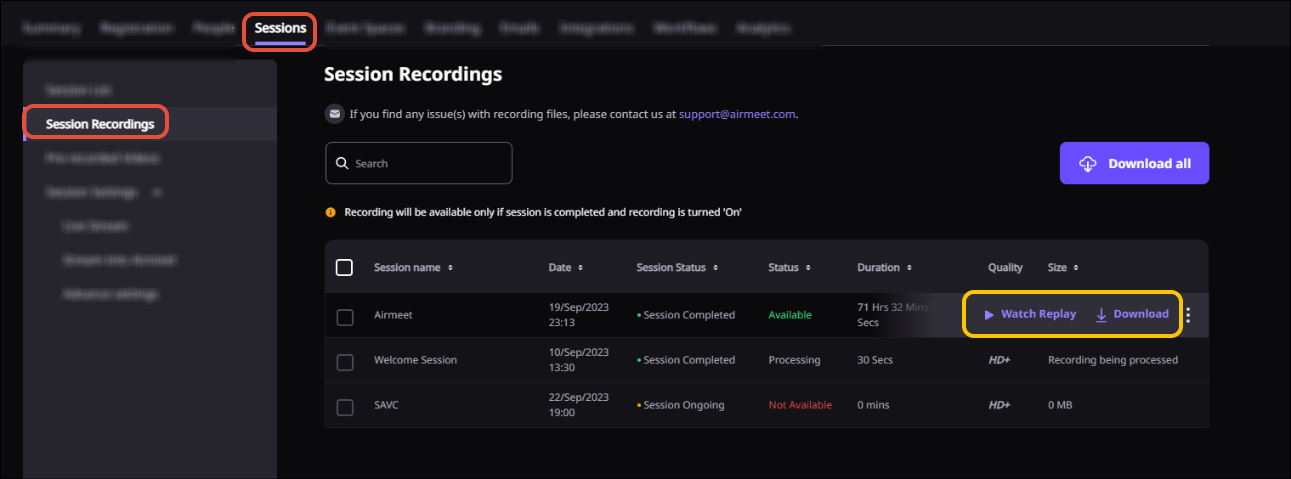
Path: Event Dashboard > Sessions tab > Session Recordings tab

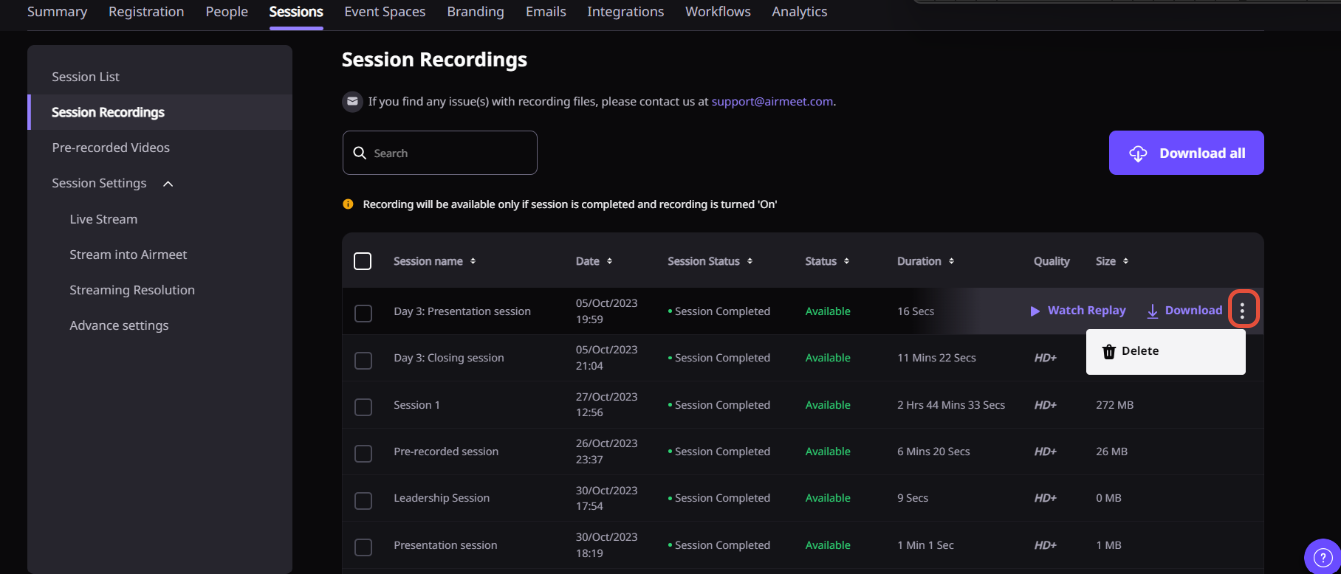
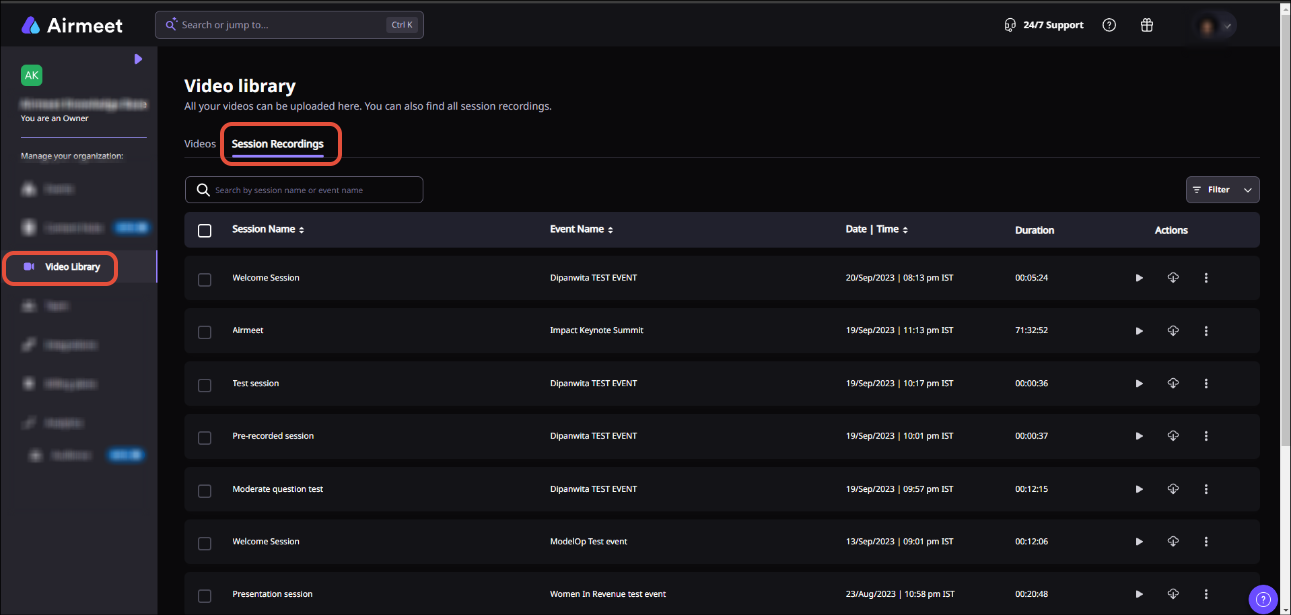
  • Go to the Sessions tab and open the Session Recordings section. 
  • Preview, download, or share the recording from here. 
  • For individual speaker recordings, access the individual speaker recording feature from the same section where separate per-speaker tracks are available.

Step 4. Download The Session Transcript

Path: Event Dashboard > Sessions tab > Sessions list > Download Transcript

  • Once the session is complete, hover over the session details and click Download Transcript. 
  • Use the transcript to build show notes, supporting articles, clip captions, and searchable episode pages. 

Note that transcripts are available for live sessions only, not for stream-into-Airmeet or pre-recorded session types.

Step 5. Create Clips From The Recording

Path: Event Dashboard > Sessions tab > Recordings and Transcript > Scissors icon

  • Open the session recordings area and click the Scissors icon to access the video editor. 
  • Trim the recording, adjust the layout ratio for different platforms, apply style settings, and save the clip. 
  • Clips will be available under the Sessions tab once processing is complete.

Step 6. Connect AirShots For AI-Assisted Clip Creation

Connect your recording to AirShots to let AI identify the most engaging moments and produce short clips automatically. This reduces editing time and increases the number of usable assets from each episode.

Step 7. Use AirPulse To Find Content Gaps And Improve Discoverability

Connect AirPulse to monitor where your brand appears or is missing in AI search answers, Reddit discussions, and social conversations. Use the gap data to plan the next episode topic, brief the speaker, and create supporting pages that help buyers find the show when they ask relevant questions.  

A few things to keep in mind:

  • 1080p recording must be enabled per event from the dashboard. Default quality is 720p
  • Session transcripts are only available for live sessions, not pre-recorded or RTMP stream-into-Airmeet sessions
  • Backstage conversations are not recorded even when recording is enabled for the session
  • Recording is only generated after the session is marked as ended, not paused
  • AirShots and AirPulse are separate products. Confirm plan compatibility and connection steps for your specific configuration

Most podcast stacks optimize one step. Airmeet connects the steps that determine business value: production quality, content velocity, audience reach, and ongoing discovery. Podcasters can spend less time moving files between tools and more time building a recognizable show, a useful content library, and an audience that compounds.

Why Airmeet

Why Podcasters Choose The Airmeet Product Family

help Center

Relevant Help Articles

Explore guides and tutorials to help you create, customize, and host exceptional events on Airmeet.
Access Airmeet session recordings
Enable 1080p session and recording quality
Edit and create clips from recorded videos
View and download session transcripts
Set up webinar streaming and recording

FAQs

Frequently Asked Questions

Airmeet has expanded beyond virtual events. AirStudio supports recording and streaming, AirShots supports AI-assisted clip creation, and AirPulse supports discoverability in AI search and social. Airmeet’s recording, transcript, branding, streaming, and audience-engagement capabilities provide a practical foundation for podcast-led marketing.

AirStudio is a desktop streaming and recording studio designed to be stable, powerful, and easy to use. It supports videos, overlays, logos, banners, screen sharing, virtual backgrounds, remote guests, and multistreaming.

Yes. Hosts can send a guest link, and guests can join from their browser without signing up or installing additional software.

AirStudio supports multistreaming. Available destinations and limits depend on the selected AirStudio plan and should be confirmed before purchase.

AirShots uses AI to identify engaging moments in long recordings and transform them into short, share-worthy clips, reducing repetitive editing work and increasing the output from each episode.

AirPulse monitors visibility across AI answers, search, Reddit, social threads, site health, and competitor activity. It helps teams identify content gaps, approve fixes and drafts, and measure whether brand visibility improves.

Yes. Airmeet supports 720p by default and 1080p recording and streaming for eligible plans or configurations. Enable 1080p from the session settings dashboard before recording begins. AirStudio separately supports recording and streaming up to 4K depending on the plan selected.

Yes. Airmeet recordings, transcripts, individual-speaker recordings, and clip workflows can support a webinar-to-podcast process. Configure the final edit and publishing route to match the show’s format and distribution channels.

Not automatically. AirStudio supports multistreaming, AirShots creates clips, and AirPulse supports approved publishing workflows. Verify the exact integrations and channel limits for your selected setup before launch.

B2B podcasters, content marketers, executive-communications teams, customer marketers, webinar teams, agencies, and lean media teams that want one conversation to produce more reach, proof, and pipeline-supporting content.

Airmeet features

Other Features to Explore

Discover more powerful features that help you create engaging, branded, and seamless event experiences with Airmeet.
Managing Session Recordings Quick Guide
Stage Backdrop for Sessions
AirGenie AI Blog Post
Event Branding Quick Guide
Pre-recorded video sessions

Incredible Companies Use Airmeet

Most loved Virtual Events Platform

Incredible Companies Use Airmeet

Most loved Virtual Events Platform

Incredible Companies Use Airmeet

Most loved Virtual Events Platform

Incredible Companies Use Airmeet

Most loved Virtual Events Platform

Incredible Companies Use Airmeet

Most loved Virtual Events Platform