Help every participant arrive with enough context to be discoverable, approachable, and ready for relevant conversations. Attendees can add an introduction, interests, and website or social links so networking begins with shared ground instead of a cold start.
A participant list tells people who joined. It does not tell them who is worth meeting. Sparse profiles force attendees to guess at role, interests, and intent, so promising conversations often never begin.
Cold-start networking: Without an introduction or interests, the first message has no useful opening.
Weak peer discovery: Marketers, buyers, customers, and partners struggle to identify people with shared priorities.
Lower networking confidence: Attendees hesitate to approach strangers when there is little professional context.
Less relevant follow-up: Connections made without context are harder to convert into useful meetings or post-event conversations.
The Solution
Give every connection a relevant starting point
Attendee profiles turn a name in a list into a useful event identity. Participants can complete their profile with a concise introduction, up to five interests, and website or social links, then use that context to connect with other people in the event.
Add context Use an introduction to explain role, expertise, or what the attendee hopes to learn.
Signal intent Choose interests that make common ground easier to spot.
Extend the connection Add website and social links so a valuable event interaction can continue afterward.
Move from discovery to conversation Use profile context to support direct messages, social-lounge conversations, and scheduled meetings where those experiences are enabled.
Use Cases
One profile, more value across every event use case
Demand-generation webinars
Help prospects share their interests so peer conversations and sales follow-up begin with relevant context.
Industry summits
Give buyers, experts, and partners enough context to identify valuable networking opportunities.
Customer education events
Make it easier for customers to find peers with similar industries, challenges, and use cases.
Partner and ecosystem events
Highlight complementary interests before co-selling and partnership conversations begin.
Actual Product Screenshots
Step-by-step process
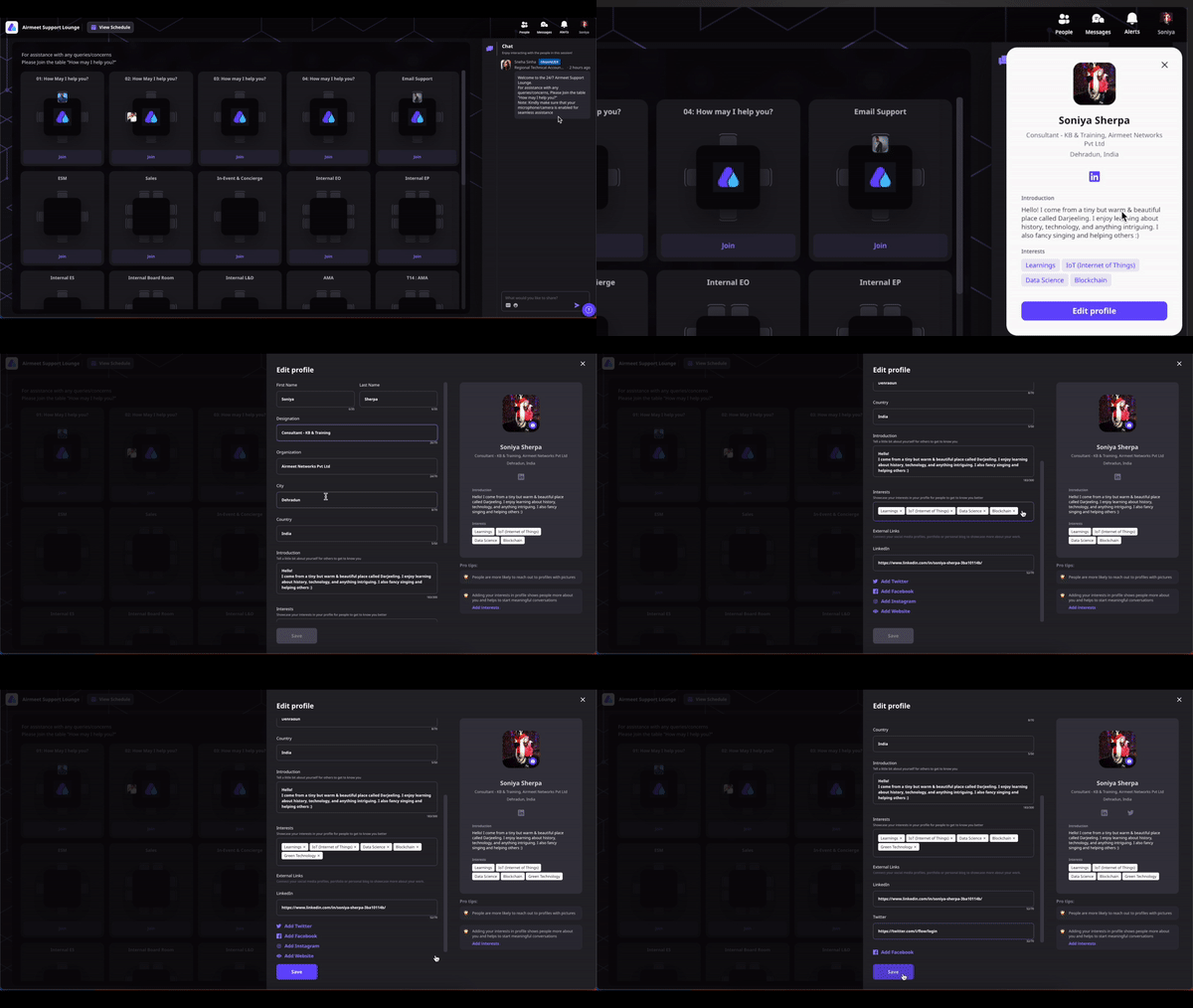
Step 1. Open your profile
After joining the event, click your profile avatar in the top-right corner and select My Profile.
Step 2. Edit your profile
Click Edit Profile to update your attendee information.
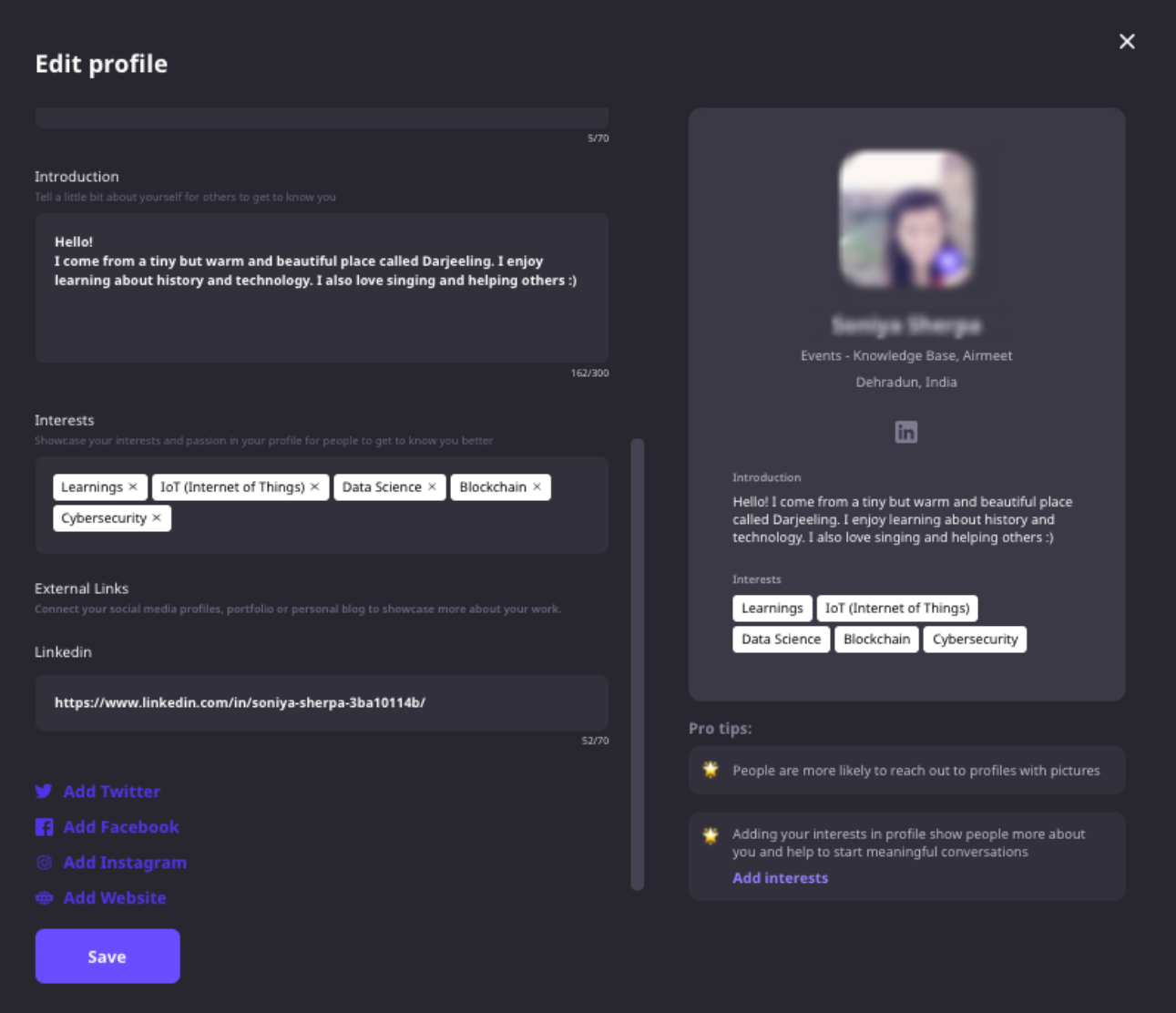
Step 3. Add a short introduction
Write a brief introduction describing who you are, what you do, or what you hope to gain from the event.
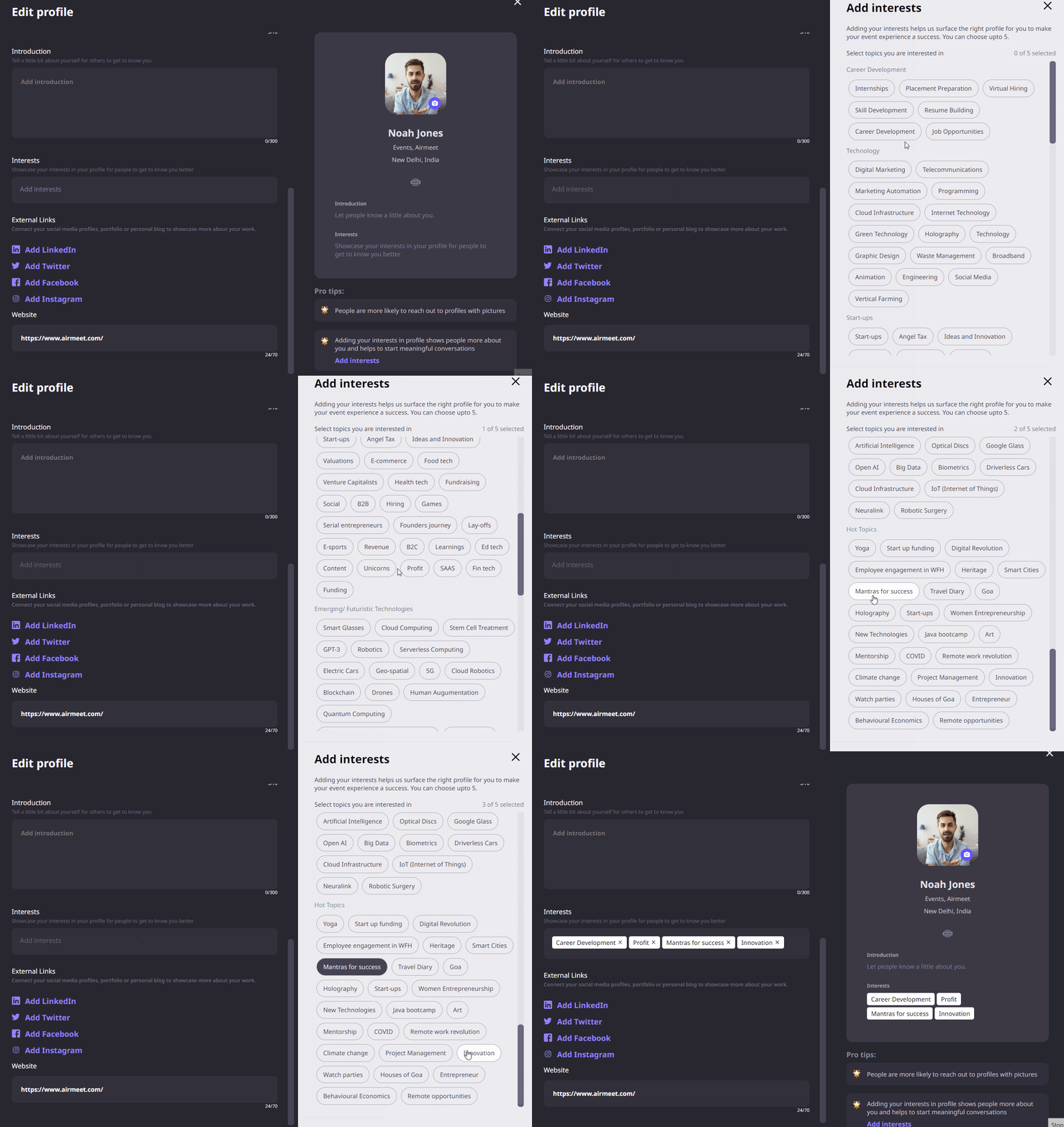
Step 4. Select your interests
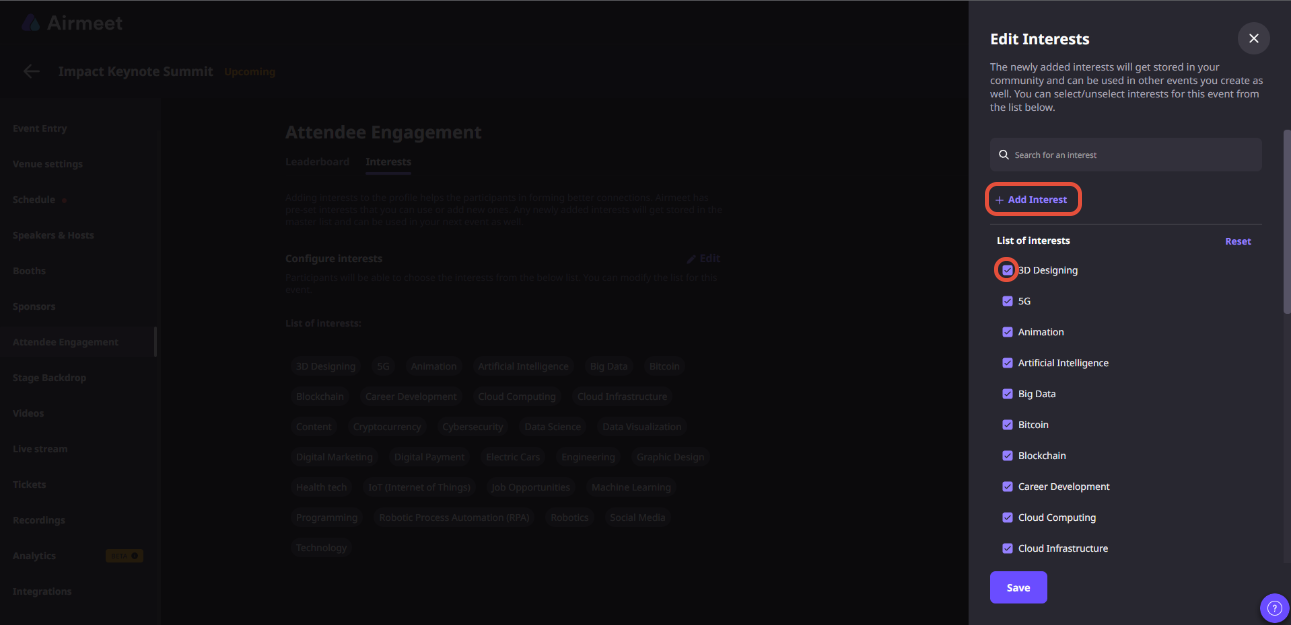
Choose up to five interests to help other attendees discover shared topics and start relevant conversations. If the organizer has created custom interests, you can select those as well.
Step 5. Add your website and social links
Include your website or professional social profiles so attendees can continue the conversation after the event.
Step 6. Upload a profile photo (if required)
Some events may prompt you to complete your profile by adding a profile picture or other required information before participating in networking activities.
Step 7. Save your changes
Click Save to update your profile. Your information will be visible wherever attendee profiles are supported during the event.
Why Airmeet
Why choose Airmeet for attendee profiles
The value of a profile is not the form itself. It is what happens next. Airmeet places attendee identity inside an event experience built around people discovery, messaging, meetings, and social interaction.
Built into the networking experience Attendee profiles appear across participant discovery, Social Lounge, messaging, and meeting experiences, helping conversations start with useful context.
Customizable interests Organizers can create preset or custom interests before the event, making attendee profiles more relevant to the audience and event goals.
Profile-completion controls Organizers can prompt attendees to complete important profile details and, where required, make selected attributes mandatory before networking.
Designed for meaningful connections Rich attendee profiles make it easier to start direct messages, schedule meetings, and discover people with shared interests throughout the event.
help Center
Relevant Help Articles
Explore guides and tutorials to help you create, customize, and host exceptional events on Airmeet.
How to edit or update your profile on an Airmeet event
It is the information participants share about themselves inside an event, including an introduction, interests, and website or social links. That context helps other attendees decide whom to connect with.
Attendees can add an introduction, interests, website, and social media links such as Twitter, Facebook, and Instagram. Available fields can vary with the event setup.
Attendees can add a short introduction of up to 300 characters and select up to five interests to help others understand who they are and what they’re interested in.
A complete profile gives other attendees useful conversation starters, makes networking feel more natural, and increases the chances of building meaningful connections during and after the event.
Yes. Organizers can choose from Airmeet’s preset interests or create custom interests that match the event theme. Custom interests are also saved for future use within the community.
Attendee profiles are visible across participant discovery, Social Lounge, and other networking experiences where supported. They also provide context for direct messaging and meeting requests.
No. Attendee profiles are designed for networking during the event. They complement your registration information and CRM data by giving other participants a more personal, event-specific introduction.
Airmeet features
Other Features to Explore
Discover more powerful features that help you create engaging, branded, and seamless event experiences with Airmeet.
“I was really excited to see how alive Airmeet seemed. The first time I raised my virtual hand to ask a question, I was brought up on stage, my camera flipped on, and I was able to talk with the presenters, that was the sold-moment in my head! That is what I wanted. We weren't going to be speaking at our audience. We wanted a two-way engagement. With the analytics in the background, that was my “Aha moment!”
Victoria YounesExecutive Events Manager
Incredible Companies Use Airmeet
Most loved Virtual Events Platform
“I was really excited to see how alive Airmeet seemed. The first time I raised my virtual hand to ask a question, I was brought up on stage, my camera flipped on, and I was able to talk with the presenters, that was the sold-moment in my head! That is what I wanted. We weren't going to be speaking at our audience. We wanted a two-way engagement. With the analytics in the background, that was my “Aha moment!”
Victoria YounesExecutive Events Manager
Incredible Companies Use Airmeet
Most loved Virtual Events Platform
“I was really excited to see how alive Airmeet seemed. The first time I raised my virtual hand to ask a question, I was brought up on stage, my camera flipped on, and I was able to talk with the presenters, that was the sold-moment in my head! That is what I wanted. We weren't going to be speaking at our audience. We wanted a two-way engagement. With the analytics in the background, that was my “Aha moment!”
Victoria YounesExecutive Events Manager
Incredible Companies Use Airmeet
Most loved Virtual Events Platform
“I was really excited to see how alive Airmeet seemed. The first time I raised my virtual hand to ask a question, I was brought up on stage, my camera flipped on, and I was able to talk with the presenters, that was the sold-moment in my head! That is what I wanted. We weren't going to be speaking at our audience. We wanted a two-way engagement. With the analytics in the background, that was my “Aha moment!”