



This is what happens when an organization picks a webinar tool and tries to stretch it into a hybrid event. The two formats look similar on a features page. In practice, they are entirely different challenges.
According to Markletic’s hybrid event research, 86% of B2B organizations see positive ROI from hybrid events within seven months of the event date. That number only holds when the platform is actually built to handle both audiences well, not when it treats virtual participants as an afterthought.
This guide walks through every feature category that matters for enterprise hybrid events, what to look for inside each one, and how to tell the difference between platforms built for hybrid and those that just say they are.
Why Hybrid Event Platforms Are Not the Same as Webinar Tools
A standard webinar tool is built for one audience: remote. And this is how the agenda is usually planned:
- The presenter broadcasts.
- The audience watches.
- Interaction stays in a chat box and a Q&A panel.
That’s it.
However, hybrid events involve two distinct audiences in completely different environments at the same time. In-person attendees are walking a venue, moving between sessions, and expecting fast check-in. At the same time, virtual attendees are joining from a browser, expecting broadcast-quality streaming, and hoping they can still network with someone in the room even though they are hundreds of miles away.
The platform has to serve both groups simultaneously without either one feeling like they are not a priority. That is a fundamentally different challenge, and it is why the feature checklist for a hybrid event webinar platform looks nothing like a standard webinar buyer’s guide.
Core Features Every Enterprise Hybrid Event Platform Needs
Live Streaming That Actually Holds Up
Everything else in a hybrid event depends on the stream working. Virtual attendees who cannot see or hear clearly are going to leave, and they are not coming back.
What enterprise teams should evaluate here goes well beyond basic streaming. The right platform covers these essentials:
- Adaptive bitrate delivery so the stream adjusts to different connection speeds without forcing drop-offs
- Low latency broadcasting so virtual attendees stay in sync with the in-person audience during live polls and Q&A
- Multi-camera support for sessions with multiple speakers or physical stage elements
- Global CDN coverage for US and international virtual audiences
Run a streaming test at your actual expected attendee volumes before shortlisting any platform. Because a system that holds up to 200 people may fall apart at 2,000.
Interactive Engagement for Both Audiences
The most common hybrid event mistake is running engagement tools for one audience only. If polls show up on a physical screen but virtual participants cannot vote in them, the experience is already broken.
Strong enterprise hybrid event software gives both groups equal access to every engagement tool in real time. Here is what that looks like in practice:
- Live polls where both audiences see results updating at the same moment
- A shared Q&A queue so room questions and virtual questions appear together
- Session chat visible to every attendee regardless of how they are joining
- Reactions and emoji tools that work across both environments
A surprising number of platforms handle virtual and in-person engagement in separate layers, which creates fragmentation even when the technology is technically functional.
Multi-Session and Agenda Management
Enterprise events rarely run a single track. Customer conferences, sales kickoffs, partner summits, and user conferences typically involve multiple concurrent sessions across different rooms or virtual breakout spaces.
The platform needs to handle this without making navigation painful for either audience. Attendees on both sides should be able to do the following:
- Build a personalized agenda and filter sessions by topic or track
- Get automatic reminders before sessions they have saved
- Switch between sessions cleanly without losing context
In-person attendees usually do this through a mobile app. Virtual attendees do it through the platform interface. Both need to show identical session information in real time.
Registration and Ticketing Built for Hybrid
Hybrid events have more registration variables than standard webinars. You are collecting location preference, applying the right ticket type, potentially managing different pricing for in-person versus virtual access, and feeding all of that into systems that need to know who is physically arriving so you can prepare badges and check-in accordingly.
Look for platforms that handle these without manual workarounds:
- Separate registration streams for in-person and virtual participants
- Flexible ticket options including VIP, speaker and sponsor access.
- Automated confirmation and reminder workflows
- Native CRM and marketing automation integration, so data flows without manual export.
On-Demand Content Library
A hybrid event does not end when the venue empties. Attendees want to revisit sessions, watch ones they missed, and share recordings with colleagues who could not attend.
The on-demand layer should cover the following without requiring extra setup:
- Track or speaker-sorted searchable session videos
- Gated access for lead generation post-event
- Replay analytics showing which of the sessions are still being viewed after the live date
Branding and customization
Custom branding is a crucial element for all event formats, including in-person, hybrid, and virtual events. While organizers usually invest heavily in onsite branding, digital branding for the virtual attendees is often overlooked.
Choose a hybrid event platform that supports extensive event branding and customization features. The goal is to create a consistent and immersive brand for in-person as well as virtual audiences.
The platform should offer
- Customizable virtual booths and networking spaces.
- In-event branding with custom backdrops, logos, banners, landing pages and layouts & themes.
- Custom email templates and branded event URLs.
Enterprise security
Enterprise security controls like access permissions, SSO support & data encryption are essential for protecting attendee data, event content as well as other sensitive information.
Look for a platform that
- Strictly follows the industry security & privacy standards.
- Complies with regulations such as GDPR, where applicable.
- Regularly updates its security measures to address the emerging threats.
Advanced Features That Separate Enterprise-Grade Platforms
AI Networking and Matchmaking
Networking is one of the main reasons people attend events and one of the hardest things to replicate for virtual attendees in a hybrid format. In-person attendees can approach someone between sessions. Virtual attendees cannot.
AI matchmaking closes that gap. Here is what it should do for both audiences:
- Analyze attendee profiles, session selections, and stated interests to surface relevant connections
- Make it easy to schedule a meeting or join a shared virtual space directly from the recommendation
- Work across both in-person and virtual audiences within the same environment
For enterprise events where connecting customers with prospects or partners with sales teams is a business goal, this feature directly influences commercial outcomes.
Sponsor and Exhibitor Management
Hybrid formats expand what you can offer sponsors beyond a table at the back of a room. Virtual booths reach attendees who would never have stopped by an in-person exhibit.
For example,
- Sponsored sessions broadcast to both audiences simultaneously.
- Lead capture tools collect qualified contact information from virtual visitors in real time.
The sponsor dashboard should give clear visibility into the following:
- Booth traffic and time spent by virtual visitors
- Resource downloads and video views
- Meeting requests and CTA conversions
Sponsors who can see their ROI clearly are the ones who come back for the next event.
Advanced Analytics and Reporting
Attendance headcount does not tell leadership whether a hybrid event delivered business value. The analytics layer of the virtual and in-person event platform needs to go much deeper. Here is what enterprise reporting should cover:
- Session-level attendance and drop-off rates for both audiences
- Individual engagement metrics including poll votes and Q&A submissions
- Networking activity showing meetings scheduled and completed
- Sponsor performance tied to specific booth and content behaviors
- On-demand content consumption tracked after the live event ends
Dashboards that compile this into executive summaries save significant time at the end of every event cycle.
CRM and Marketing Automation Integrations
Hybrid events generate more behavioral data than almost any other marketing activity. None of it has commercial value sitting inside the event platform. It needs to flow into Salesforce, HubSpot, Marketo, or Eloqua so engagement signals translate into lead scores, nurture sequences, sales alerts, and pipeline attribution.
Do not just verify that a platform claims integration. Ask the following before committing:
- Which tools does the platform natively support and which ones require third-party tools
- Exactly which data fields transfer into your specific CRM
- Whether the sync is real-time or scheduled batch
Accessibility and Language Support
Accessibility features like screen reader compatibility and language support help organizations to create more inclusive hybrid events and to improve the experience for global audiences.
Ensure that the platform supports live closed captions, real-time translations, and multilingual subtitles for both virtual and in-person audiences, either natively or through the third-party integrations.
Platform Comparison: Hybrid Event Features for Enterprise Teams
The table below reflects typical capabilities across leading platforms. Validate specifics with each vendor for your event requirements.
Platform | Hybrid Audience Support | AI Networking | Sponsor and Exhibitor Tools | Analytics Depth | CRM Integration | Mobile App |
Strong. Both audiences connected through speed networking, social lounges, live polls & more | Yes. AI matchmaking and attendee recommendations for both audiences | Yes. Virtual booths, lead capture, and sponsor analytics dashboard included | Advanced, session engagement, networking activity, and ROI reporting | Yes. Salesforce, HubSpot, Marketo, Eloqua with real-time sync | Available in beta; supports in-person check-in, session navigation, and cross-audience networking via chat, polls, and Q&A | |
Good for familiar environments, virtual and in-person support available | Soften claim, AI Companion assists networking but dedicated matchmaking is limited | Upgrade from Limited to Good, virtual booths and sponsor analytics confirmed | Upgrade from Moderate to Good, confirmed broader analytics coverage | Yes, integrations available, behavioral data sync varies | Yes, standard app available | |
Good, strong virtual delivery with growing hybrid capabilities | Limited, networking not a primary platform focus | Good, sponsor content and lead capture available | Excellent, deep behavioral analytics and digital body language tracking | Add Eloqua and Microsoft Dynamics to the list | Correct from Limited to Yes, mobile app confirmed for iOS and Android | |
Excellent, built specifically for complex in-person and hybrid programs | Good, AI recommendations available across the platform | Excellent, full exhibitor and sponsor management including onsite tools | Strong, comprehensive reporting tied to registration and engagement data | Excellent, enterprise-grade integrations across major CRM platforms | Yes, robust mobile app for in-person navigation and engagement | |
Good, B2B focused with strong virtual delivery and growing hybrid support | Soften from Strong to Good, primarily virtual-focused matchmaking | Good, sponsor session options and lead capture available | Advanced, pipeline-level reporting and engagement attribution | Yes, Salesforce, HubSpot, and Marketo integrations | Limited, web-first experience | |
Excellent, strong corporate hybrid support including large conference formats | Good, networking and meeting scheduling available | Good, sponsor tools with lead retrieval and analytics | Strong, comprehensive analytics including sponsor performance | Add clarification that integration depth varies | Yes, full-featured mobile app for hybrid attendees |
Questions to Ask Before You Commit to a Platform
Feature lists only take you so far. These are the conversations worth having with vendors before anything gets signed.
1. Can it handle your actual scale?
Do not evaluate at demo sizes. Get specific answers about maximum concurrent attendees, parallel sessions supported simultaneously, and what happens to streaming reliability at your real audience peak.
2. How does virtual and in-person networking actually connect?
Ask for a live demo of
- A virtual attendee scheduling a meeting with someone in the room.
- Hybrid engagement features that the platform offers.
- Interactive tools like polls, live chat, Q&A, gamification, etc.
Check
- How can in-person attendees interact with sponsors/exhibitors at the virtual booths?
- How can virtual attendees interact with sponsors/exhibitors present on-site?
This is where most hybrid platforms reveal their real limitations.
3. What data fields flow into your CRM, and how fast?
Ask whether engagement from both in-person and virtual attendees syncs through the same integration or requires separate configurations.
4. What does a sample sponsor report look like?
Request one from a comparable event. This tells you more about sponsor ROI capabilities than any product tour will.
How Airmeet Supports Enterprise Hybrid Events
Choosing a hybrid event webinar platform comes down to which one genuinely serves both audiences rather than prioritizing one while tolerating the other. Airmeet is built to run both virtual and in-person audiences through the same engagement infrastructure, which matters far more than it sounds when your event day actually arrives.
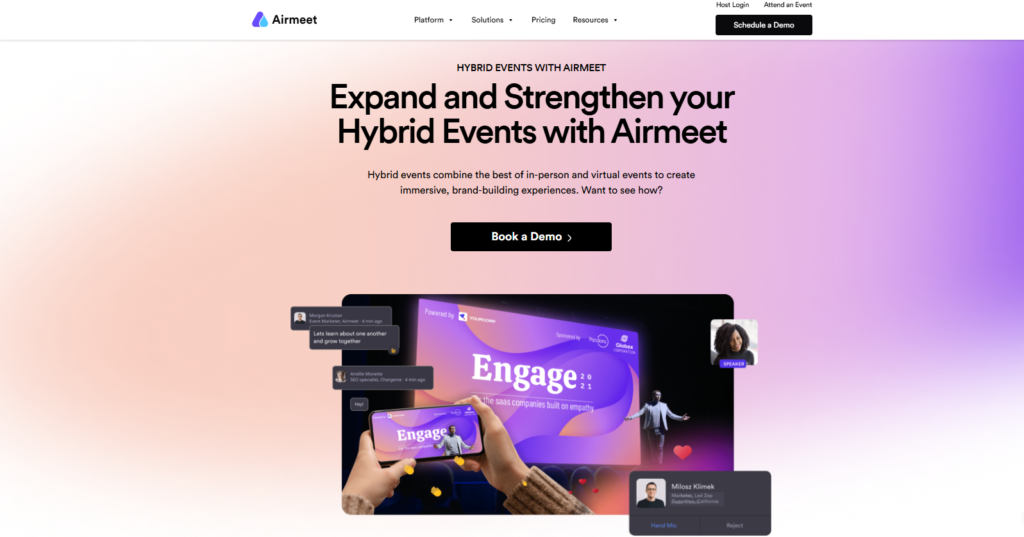
For enterprise teams comparing top hybrid event platforms across use cases, Airmeet is designed to support multi-format events, including interactive conferences, partner summits, customer marketing programs, and demand generation events. Live streaming, AI-powered tools, rule-based networking, sponsor management, analytics, and CRM integration all sit within a single environment rather than requiring separate tools to be integrated together.
Teams that also need production support can access AirCare managed services, which provides dedicated event managers and live event-day oversight so execution quality does not depend entirely on internal headcount.
Airmeet’s hybrid event platform covers the features enterprise hybrid programs actually need, from separate ticketing flows for in-person and virtual attendees to multi-track session management, on-site check-in, and a unified stage that brings remote and physical speakers together seamlessly.
Virtual attendees stay engaged through live polls, Q&A, chat, and speed networking, rather than watching passively. While sponsor content reaches both audiences simultaneously.
Moreover, Airmeet’s integration with platforms like Salesforce, HubSpot, Marketo, and Eloqua offers behavioral data from both audience types flowing into existing systems rather than sitting isolated after the event closes.
Final Thoughts
Hybrid events are not harder than in-person or virtual. They are different, and the platforms that handle them well and are designed to drive the real value from such events make the real difference.
For enterprise teams, the decision comes down to whether the platform genuinely serves both audiences, whether engagement tools work symmetrically, whether analytics produce data leadership can actually use, and whether integrations connect to real workflows rather than just claiming compatibility.
Evaluate on those terms and the right platform becomes easier to identify than any comparison chart alone can show you.
FAQs
Ask the vendor to demonstrate this specific scenario live during your evaluation. Here is what to verify:
- Whether a virtual attendee’s Q&A question appears in the same queue as in-person questions, without a moderator manually moving it over
- Whether virtual and in-person networking happens natively within the platform or requires a separate tool to connect both the sides
Most evaluations focus heavily on streaming quality and registration. Here is what gets missed until after go-live:
- Sponsor reporting depth, specifically whether virtual booth sponsors receive the kind of ROI data that makes them want to come back
- Post-event on-demand analytics showing content consumption after the live date, which matters when ROI is measured beyond attendance
It makes sense when the platform handles both natively without compromising in either direction. Running separate tools creates data silos because attendee engagement ends up in different systems, making pipeline attribution and program-level reporting significantly harder to produce. A unified platform also cuts the overhead of managing multiple vendor contracts, support relationships, and integration configurations at the same time.