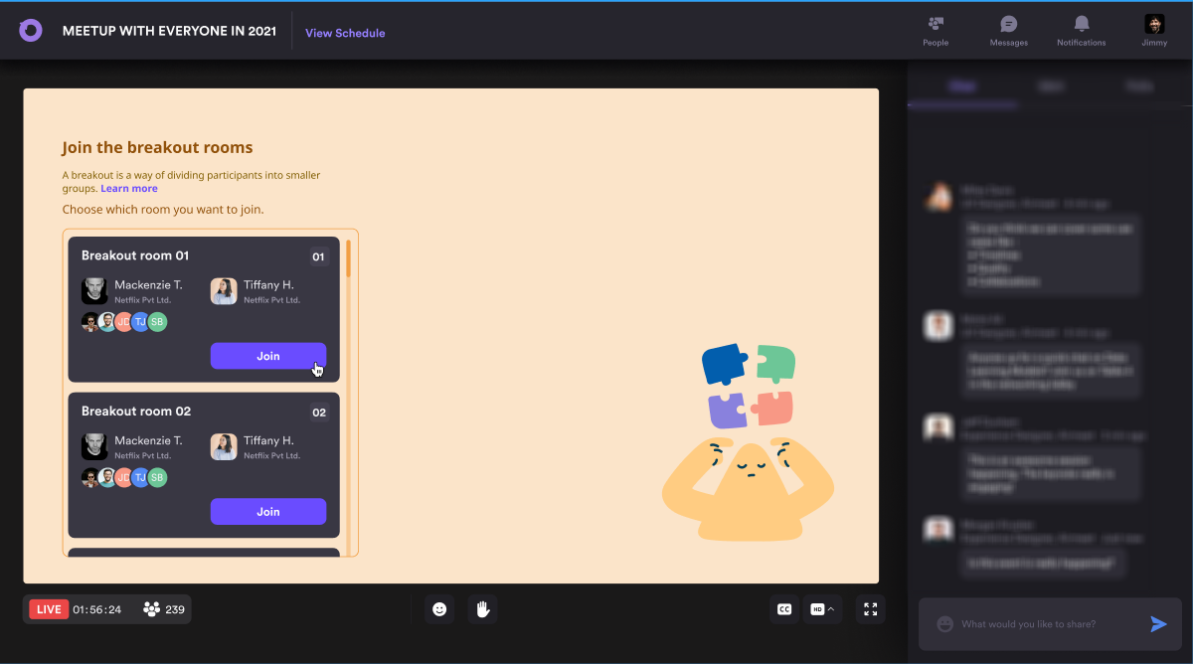
Turn passive viewing into active conversation. Split attendees into focused groups during a live session; give them space to network and explore ideas; then bring everyone back together—without breaking the flow of your webinar.
High-intent webinar audiences arrive with different questions, experiences, and goals. When everyone can only watch the same stage, peer learning disappears, quieter attendees stay invisible, and valuable context never makes it into the room. That makes even strong content feel one-way and gives demand-generation teams fewer moments of genuine participation to build trust around.
Passive attendance Attendees can consume content without contributing, making attention harder to sustain.
Missing peer context Participants rarely hear how others are solving the same challenge.
One-size-fits-all discussion A single conversation cannot serve every role, region, account tier, or learning level.
Lost momentum Moving people to a separate meeting link interrupts the session and risks drop-off.
The Solution
Orchestrate meaningful small-group moments inside the live session
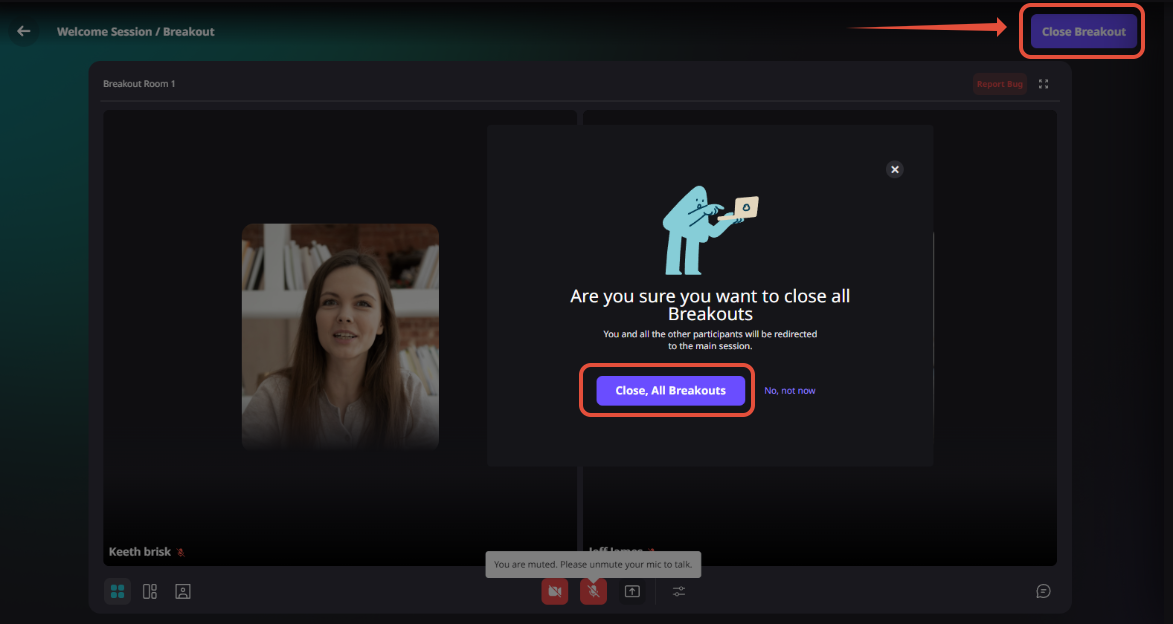
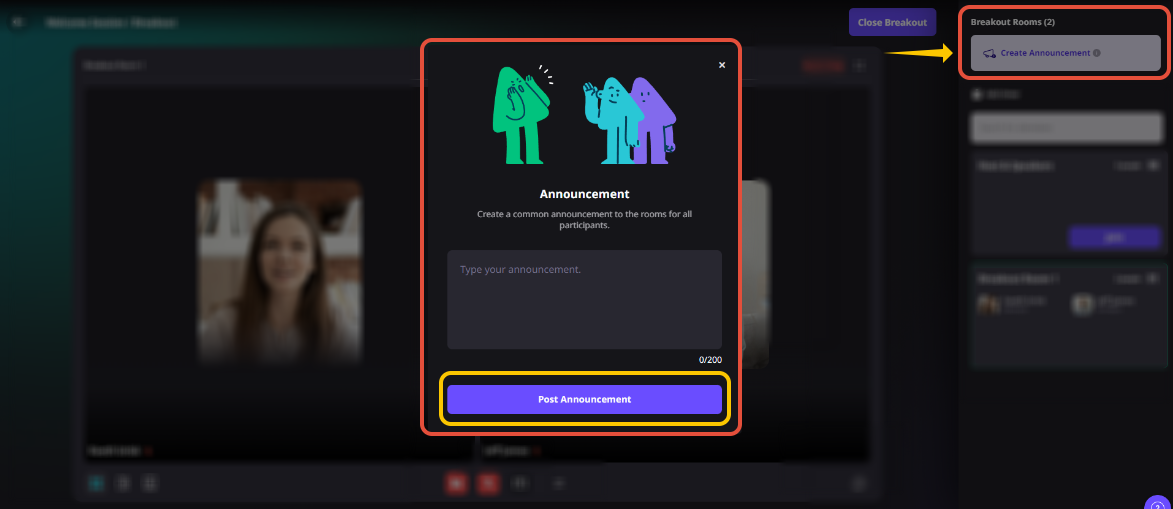
Hosts and co-hosts can open breakout rooms from the live-session controls, assign attendees randomly or by uploaded CSV, and optionally let participants choose a discoverable room. While discussions are active, facilitators can move between rooms, send an announcement, apply a shared timer, and close the breakout to reunite attendees with the main session.
Design the groups Use random assignment for serendipity or CSV mapping for intentional cohorts.
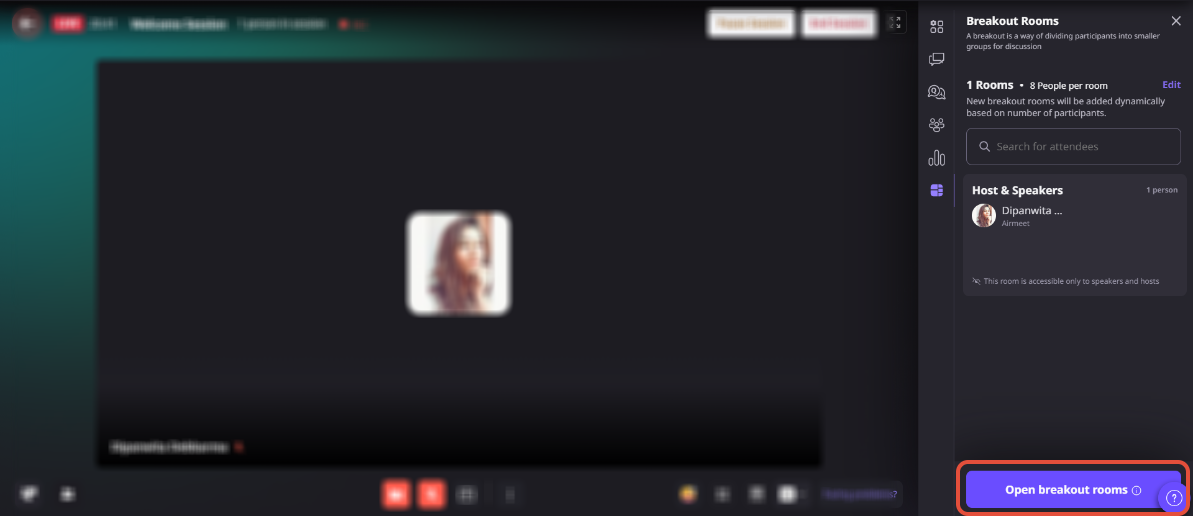
Open the rooms Move attendees from the live session into focused video discussions.
Facilitate in real time Visit rooms, time the activity, and broadcast a concise announcement to every group.
Reunite the audience Close the breakout and continue the main-stage narrative while energy is high.
USE CASES
Make every webinar format more useful
Breakout rooms create structured moments where attendees can apply the content, meet relevant peers, and contribute their perspective—while the host remains in control of the overall experience.
Demand-generation webinars
Turn a broad topic into peer discussion by challenge, industry, or buying-stage prompt.
Executive roundtables
Create smaller, more candid conversations before bringing key themes back to the main room.
Customer and partner education
Give participants space to practice a workflow, compare approaches, and learn together.
Sales enablement and virtual offsites
Run role-play, brainstorming, and peer-coaching exercises without leaving the session.
Actual Product Screenshots
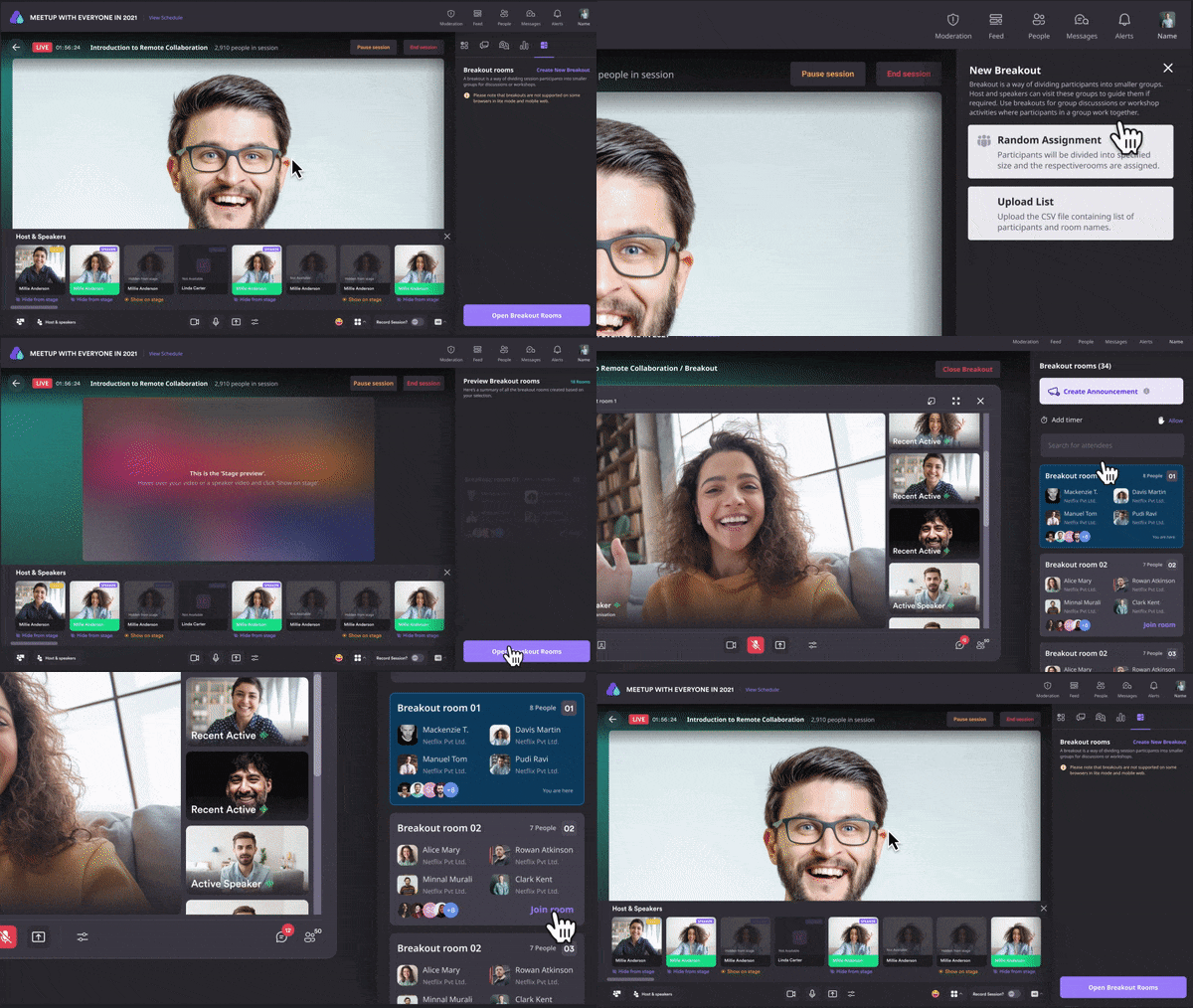
Step-by-step process
Step 1.
Click on “Enter Event” from your event dashboard and look for the session under the “Schedule” tab.
Step 2.
Click on “Go backstage” and “Start the session” to create the breakout room.
Step 3.
Now that the session has started, go to the “right panel” and click on the “Breakout room icon” to create the breakout rooms
Step 4.
Click on the “Create new breakout” option.
WHY CHOOSE AIRMEET
Flexible enough for the agenda. Controlled enough for the host.
Airmeet puts breakout facilitation inside the live-session experience. Hosts can create spontaneous energy or pre-plan groups, give participants more choice when appropriate, and keep the program moving with shared controls.
In-session continuity No separate meeting link or disconnected tool for the breakout moment.
Two assignment paths Choose random groups or map registered participants with a CSV.
Optional participant choice Make rooms discoverable when self-selection fits the experience.
Live host controls Move between rooms, set a timer, and post an announcement to all groups.
Built-in collaboration Participants can use audio, video, in-meeting chat, and one-at-a-time screen sharing.
Easy reconvening Close the breakout and guide attendees back to the main-session narrative.
help Center
Relevant Help Articles
Explore guides and tutorials to help you create, customize, and host exceptional events on Airmeet.
How to Set Up “Breakout Rooms” During an Airmeet Session
They are smaller video discussion rooms created from within an active Airmeet session. Attendees can be divided into focused groups and later returned to the main session, helping a webinar move between presentation and participation.
The session host and co-host can create, open, manage, and close breakout rooms once the session is live. Hosts, co-hosts, and speakers can join rooms and move between them.
Hosts can use random assignment based on a chosen room size or upload a CSV that maps registered participants to room numbers. The CSV path is useful when cohorts need to be planned by account, role, region, or another deliberate grouping.
A minimum of 2 and a standard maximum of 30 participants per room. An increase up to 50 may be available on request depending on the subscription plan.
Yes. A single timer can apply to all rooms and can be set for up to 120 minutes; the rooms end automatically when it expires. Hosts and co-hosts can also publish an announcement of up to 200 characters to all active rooms.
Participants can return to the main session at any time. If room discovery is enabled, they may also join another breakout room. Hosts can close all rooms when it is time to reconvene the full audience.
No. Discussions are not recorded, while the main session can still be recorded and made available from the dashboard. Plan any recap or report-back activity with that privacy and documentation boundary in mind.
Breakouts are unavailable in lite mode; breakout discussions do not support recording, closed captions, gallery view, or streaming out. (Please check the latest plan and device guidance before the event because availability can change.)
Airmeet features
Other Features to Explore
Discover more powerful features that help you create engaging, branded, and seamless event experiences with Airmeet.
“I was really excited to see how alive Airmeet seemed. The first time I raised my virtual hand to ask a question, I was brought up on stage, my camera flipped on, and I was able to talk with the presenters, that was the sold-moment in my head! That is what I wanted. We weren't going to be speaking at our audience. We wanted a two-way engagement. With the analytics in the background, that was my “Aha moment!”
Victoria YounesExecutive Events Manager
Incredible Companies Use Airmeet
Most loved Virtual Events Platform
“I was really excited to see how alive Airmeet seemed. The first time I raised my virtual hand to ask a question, I was brought up on stage, my camera flipped on, and I was able to talk with the presenters, that was the sold-moment in my head! That is what I wanted. We weren't going to be speaking at our audience. We wanted a two-way engagement. With the analytics in the background, that was my “Aha moment!”
Victoria YounesExecutive Events Manager
Incredible Companies Use Airmeet
Most loved Virtual Events Platform
“I was really excited to see how alive Airmeet seemed. The first time I raised my virtual hand to ask a question, I was brought up on stage, my camera flipped on, and I was able to talk with the presenters, that was the sold-moment in my head! That is what I wanted. We weren't going to be speaking at our audience. We wanted a two-way engagement. With the analytics in the background, that was my “Aha moment!”
Victoria YounesExecutive Events Manager
Incredible Companies Use Airmeet
Most loved Virtual Events Platform
“I was really excited to see how alive Airmeet seemed. The first time I raised my virtual hand to ask a question, I was brought up on stage, my camera flipped on, and I was able to talk with the presenters, that was the sold-moment in my head! That is what I wanted. We weren't going to be speaking at our audience. We wanted a two-way engagement. With the analytics in the background, that was my “Aha moment!”